Building the Agent Host Protocol for sessions that continue across devices
Discover how we built the open Agent Host Protocol to keep your agent sessions accessible across editors, apps, phones, and the cloud.
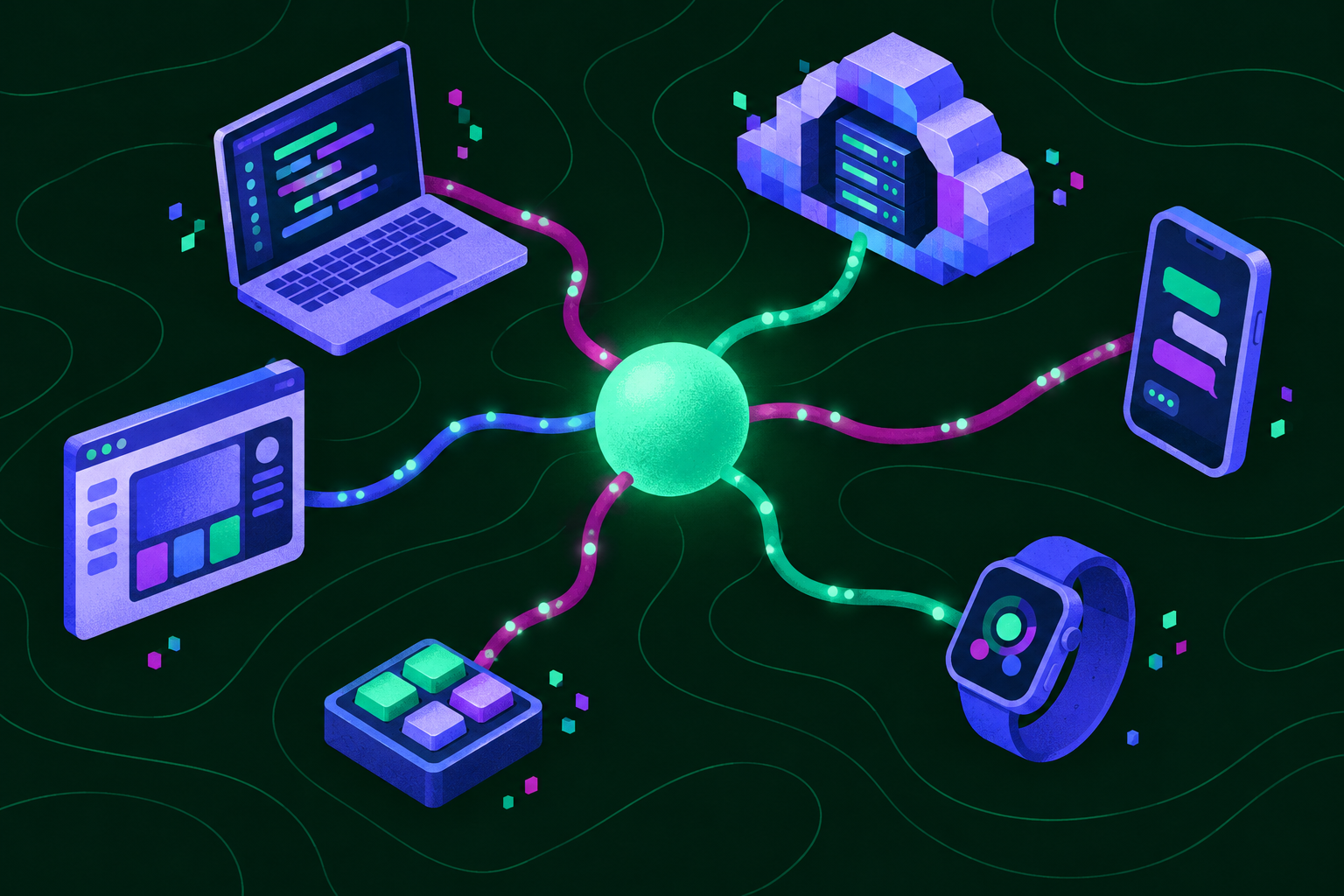
Models are now good enough to work for hours or even days on their own. You don’t have to watch over every thing they do, but you still need to be able to check in, no matter where you are. An agent can’t live only inside one application. The work should continue even If you close a window or switch devices.
In GitHub Copilot you can start an agent session in one place and pick it up in another. This session continuity runs on the Agent Host Protocol (AHP), an open standard built first in VS Code and adopted across GitHub. Here’s how it works, what we learned building it, and how you can use it to bring your agents into your own apps and workflows.
Why one integration per client stopped working
GitHub Copilot was first built in VS Code as an extension that bundled its own harness. This gave you access to your agents in VS Code, but it tied their lifetime to the editor. Extensions are attached to a single VS Code window. Close that window, and the agent is gone. Update VS Code, and every agent stops as the application restarts. Connect to a remote machine, and you get an entirely new extension host commit-locked against the version of the VS Code workbench you have.
At the same time, the Copilot app was being developed, alongside the existing GitHub mobile apps for iOS and Android. Each product was doing its own distinct integration with cloud-based agents to work towards delivering session continuity.
Each of these integrations solved the problem for one product, but developers also still want to be able to pull their agents into their own workflows–whether that’s an editor, a terminal, a phone, or a tool they built themselves–and they can’t do that if every client needs its own one-off integration. That’s why developers needed a protocol: a standard, independently versioned language across versions of VS Code, the GitHub Copilot app, mobile apps, and any other client that might host an agent. A shared protocol means every client sees the same agents, history, and state without bespoke integrations, and you aren’t tied to one app’s idea of what an agent session is.
Designing a protocol for agents on every client
The protocol needed to allow multiple clients to interact with the same set of agents seamlessly. Start a session in the cloud from your phone, for example, then continue it from your laptop. It should tolerate network interruptions, reconnections, and concurrent client mutations. And it needed to be full-featured enough for you to do real work from each of your clients.
At the same time, the protocol needed to stay out of agent behavior. Unlike the domains that produced the Language Server Protocol and Debug Adapter Protocol, the world of agents is evolving quickly. That’s why AHP avoids encoding how agents work, and instead focuses on how you want to interact with them.
You also need the protocol to be simple enough to implement on your own client or server. While the full feature set would necessarily be extensive, the core protocol needed to be minimal.
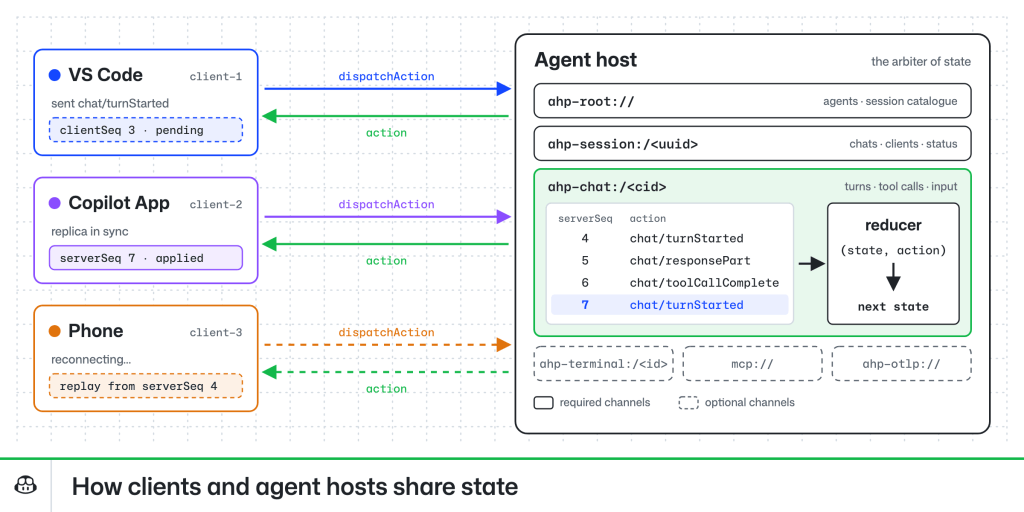
The result of these requirements is the Agent Host Protocol (AHP). It is oriented around URI-identified “channels”, which are the coarsest unit of functionality in the protocol. Every server must implement the root, session, and chat channels, but can also implement more channels that provide terminal support, MCP additions, or OTel reporting, for example.
Within each channel is a reducer-based state object, which drives most of the logic for clients. The server is the arbiter of the state, and each client sends a sequence of actions that either mutate the state or trigger side effects, like sending a chat message. This provides a few very nice properties. Reconnection and replay in poor network conditions are easy: a client sends all queued actions, presents the right ‘loading’ state, and waits for the server to reconcile and acknowledge the actions before confirming them. Clients and servers are straightforward to debug. And reducer-based state also plays nicely with popular UI frameworks like React.
Shipping five clients and two hosts
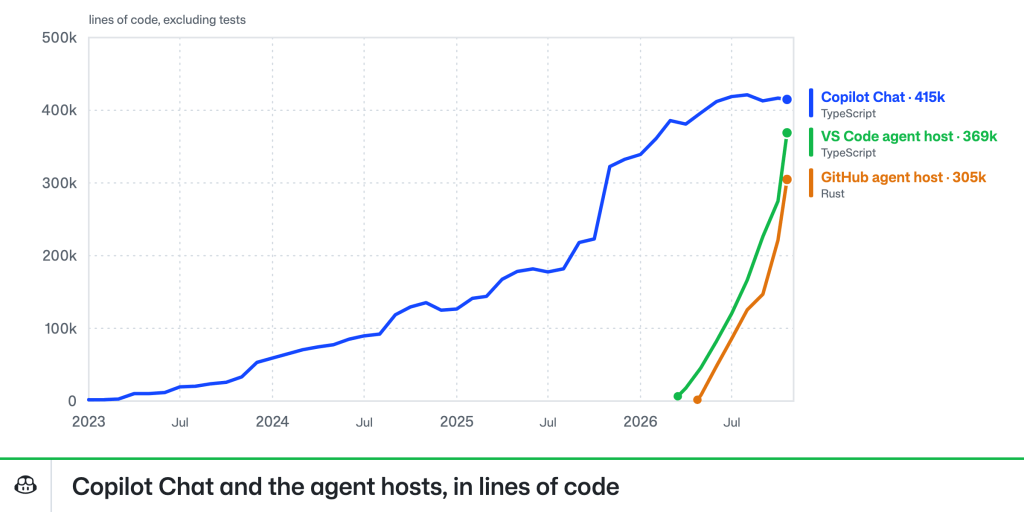
Adopting the Agent Host Protocol in VS Code required building a new harness and agentic stack underneath it. The Copilot Chat extension, which used to provide all of VS Code’s AI and agentic capabilities, had been growing for over three years, reaching over 400,000 lines of TypeScript, not counting tests. But, as a VS Code extension, it was structured around the lifecycle of a VS Code window and depended entirely on the VS Code extension API. Neither that lifetime nor those APIs would be available in a standalone agent host process.
As we started building the Agent Host Protocol in early 2026, the Copilot SDK was also being developed, and it made sense to leverage it as the foundation for the new agentic stack. This was a big transition. It’s easy to build a harness implementation that says hello and can edit files—we were using the agent host to develop the agent host after the first couple weeks—but it’s another thing to build one that covers the long tail of features developers had come to expect from Copilot Chat.
GitHub has had Copilot cloud agents for a couple of years, allowing developers to run tasks in the cloud from any device. While VS Code was quietly developing the Agent Host Protocol, GitHub was looking to expand that capability to coordinate sessions running on your own devices via the Copilot app, or in cloud sandboxes. This was exactly the N:M problem that AHP was built to solve, so adopting the same technology made perfect sense.
From the outset, the GitHub Agent Host had different requirements than VS Code’s implementation. VS Code runs the host locally and can drop its host on other compute over SSH, containers, WSL, or Dev Tunnels, and it is actually included as part of the VS Code Server bundle. The GitHub Agent Host needed to run in the cloud and across a much wider variety of infrastructure, environments, and security constraints.
Those differing requirements are why they’re separate implementations written in different languages: VS Code’s in TypeScript and GitHub’s in Rust. For now, having two agent hosts has been a good acid-test for the protocol itself. How well does it work when two entirely different teams and sets of agents implement the same protocol independently?
Pretty well, it turns out. Like MCP, the Agent Host Protocol provides escape hatches via custom methods and _metadata on objects that consumers can use for out-of-band signaling. After several months heads-down on our respective implementations, our first task as we worked toward unification was inventorying the ways each implementation had extended the protocol. Many of these extensions reasonably stay GitHub-specific, such as the GitHub Agent Host using metadata to link to project boards. In other cases, variance was a sign of a gap in the protocol; early versions, for example, could not accurately represent shell-type tool output that wasn’t backed by a PTY. And some were bad assumptions, like VS Code’s client assuming a particular structure for the session URIs it received from the agent host. A protocol with only one implementation isn’t truly portable; as we taught our clients and servers to talk to each other, AHP became portable in practice, not just in theory.
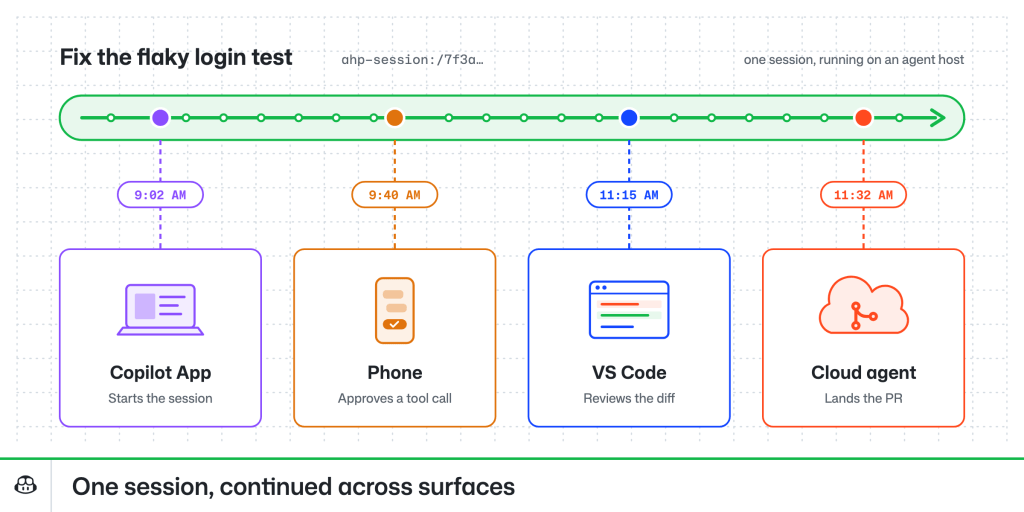
Today, the Agent Host Protocol provides that same continuity across all VS Code and GitHub surfaces. Agent sessions running locally in the GitHub Copilot app, in cloud sandboxes, and in VS Code all share the same underlying protocol. To see how it’s used, read about how you can work from anywhere with the new connected Copilot cloud experience.
Using the Agent Host Protocol
AHP was designed to be easy to use in clients and servers. Agent Host Protocol libraries are available in Rust, TypeScript, Kotlin, Swift, .NET, and Go, and agents are able to build clients and servers with little prompting. I have a macropad sitting on my desk that reflects my agent’s state in real time, and others have built everything from smart watch apps to Kanban-style task management tools against the protocol. Whether you want a companion app for your own agents, a way to bring agent sessions into your team’s tools, or AHP support in your own editor or agent, the protocol is open for you to build on.
You can connect to an agent host you implement in the Copilot app (enable Experimental > Direct Connections, then go to Environments > Add Agent Host Protocol Host) and in VS Code (via Add Remote Agent Host in the Agents window). You can spawn a standalone version of VS Code’s agent host by running code agent host in your terminal, or see the endpoints for the one in your editor by running code agent endpoints, and samples can help you and your agent get started.
The Agent Host Protocol is an open standard, and questions and suggestions are welcome on GitHub.
Happy coding!
Tags:


Related posts

Inside GitHub’s new Git storage architecture
GitHub’s new Git storage architecture is built so thousands of agents can push to a single repository at once. Here’s how it works.
The bridge to agent-scale Git infrastructure
We moved a copy of 99.99999% of GitHub’s repositories to Azure. Here’s how per-reference quorums will bring over the rest, and how object storage lets reads scale independently.

Staying Evergreen: How we automated secure access and repo hygiene in a shared org
Put native GitHub features to work to review outside collaborator access and archive stale repositories.