Work from anywhere with a new, connected Copilot cloud experience
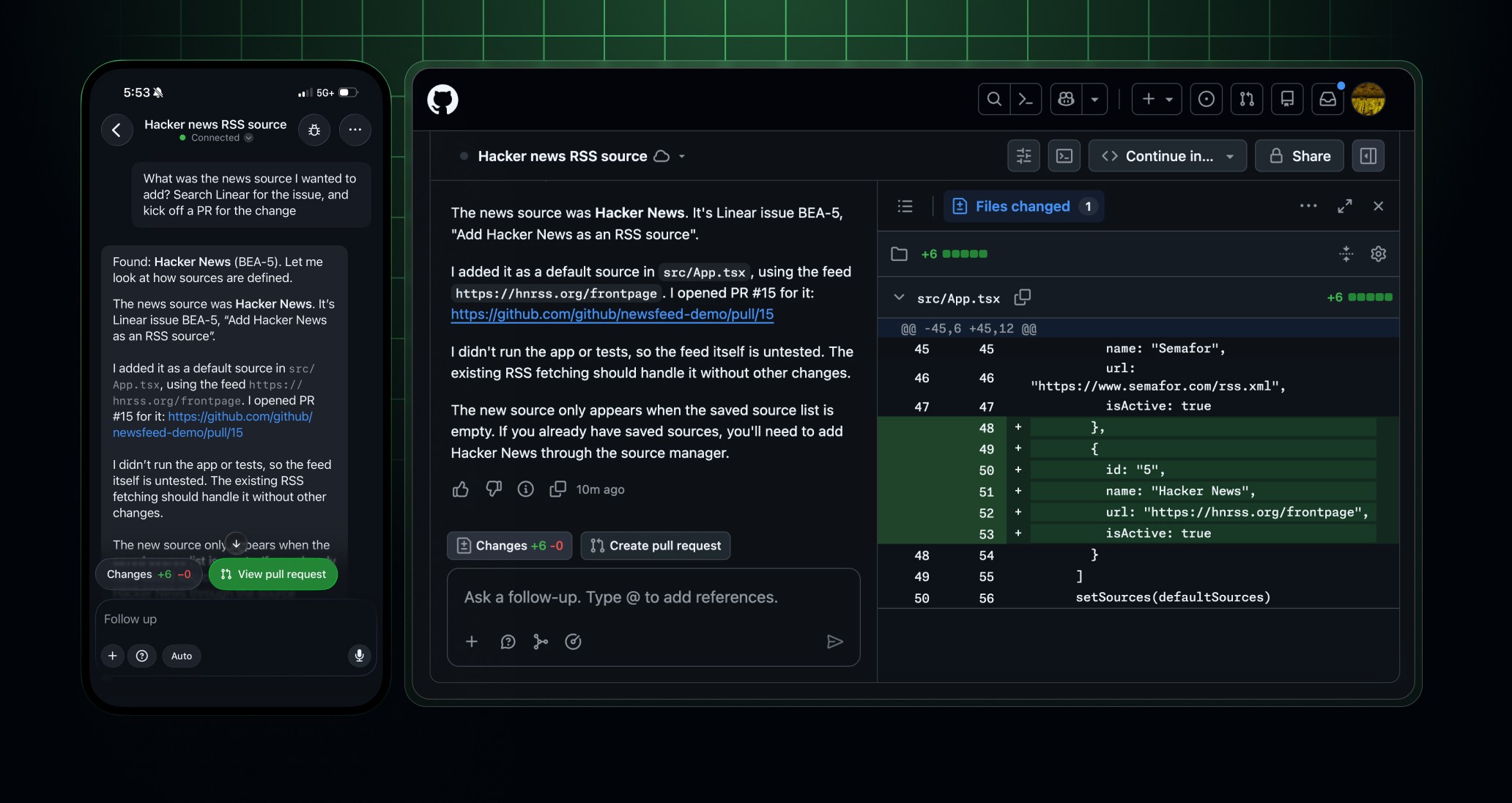
Copilot is now one connected experience in the cloud. Start a cloud task wherever you are, on github.com, GitHub Mobile, the Copilot CLI, the Copilot app, VS Code, or right from a conversation in Slack or Microsoft Teams. Then pick it up wherever you work next.
By default, every session runs in a secure cloud sandbox that starts fast and resumes right where you left off. The compute behind it can now be drawn from your included Actions entitlement, the same one that already runs your builds. That entitlement is now one flexible pool you can use for builds, cloud sandboxes, and, on Team and Enterprise Cloud, larger hosted runners.
The new Copilot cloud experience across surfaces (e.g., Web, Mobile, App, CLI, VS Code, Slack, and Microsoft Teams) and cloud sandboxes are both generally available on paid Copilot plans.
Why this new connected experience matters
- One session, every surface. Start a change on your phone with voice or a screenshot, continue it on the web, and finish it in the Copilot app, VS Code, or CLI. It’s the same session the whole way, and every surface shows the same session list.
- Secure ephemeral isolated environments for agents that start fast and resume where you left off. By default, every session runs in a cloud sandbox, which is a secure environment on GitHub-managed infrastructure, separate from your local machine. Sandboxes start fast and have no one-hour limit on total running session time. When a sandbox shuts down, it saves a snapshot, so you can resume the session later from any surface. Cloud sandboxes let you run agents without being limited by your local machine’s compute resources.
- Flexible compute entitlement. Your included Actions compute entitlement is now one shared, dollar-based pool instead of a fixed number of standard runner minutes. It covers standard GitHub-hosted runners, cloud sandboxes, and, on Team and Enterprise Cloud, larger hosted runners. You can choose the compute that best fits each task, and each product keeps its own published rate.
Start cloud sessions and continue your work anywhere
On github.com and GitHub Mobile, you can chat and kick off code changes in the same conversation, with the same deep integration with your GitHub workflow as Copilot Chat and Copilot coding agent. Ask a question across multiple repositories in an organization or pick a repository for a code change. In Slack or Teams, mention @GitHub to create an issue, request a code change, or investigate a bug.
- Start from anywhere: Kick off a cloud session from github.com, the Copilot CLI, the Copilot app, VS Code, or the redesigned Copilot experience on GitHub Mobile. On mobile, start a new session from the Copilot tab, or select New agent session from any pull request, issue, or repository to get started right where you’re working.
- Describe the task your way: On GitHub Mobile, describe a task by voice or attach an image or file. On the web, attach repositories, Copilot Spaces, or files with the (+) menu or
@. In Slack and Teams, Copilot can use messages and threads as context. - Unified context across surfaces: On github.com, when you open Copilot over a pull request, file, or repository, it adds that page as context. Your sessions follow you, and pins sync across the web and mobile.
- Steer local sessions from your phone: Register your local device through GitHub Mission Control as an environment in the Copilot CLI or VS Code, then start and steer your sessions on the go with GitHub Mobile (iOS, Android).
For more information, see the documentation on using Copilot in a cloud environment.
Give Copilot the tools & context it needs
Cloud sessions have the same tools as the Copilot CLI and Copilot app, plus ways to bring in context and customize how Copilot works:
- Tools: Bash and the GitHub CLI work alongside code search for everyday tasks, such as tracing a bug to a specific pull request or bulk-moving issues between epics.
- Connectors and MCP: Built-in connectors bring in context from Sentry, Linear, Cloudflare, and more. Set them up once in the Customize menu on GitHub or in the Copilot app, and they work in every cloud session. You can also configure local or remote custom MCP servers that require key-based authentication. For Slack and Teams, repository-level MCP servers let you connect tools and bring more context into shared sessions.
- Skills: Agent skills teach Copilot repeatable workflows with your own instructions, scripts, and resources.
- Slash commands:
/rubber-duck,/context, and more now work on github.com and GitHub Mobile. - Permissions: Choose how much autonomy the agent gets. Copilot asks for approval before any tool call that requires it. See our docs about permissions to learn more.
Run on Copilot on secure cloud sandboxes
By default, every session runs Copilot in a secure cloud sandbox. These cloud sandboxes are a secure, fast, and resumable execution environment on GitHub-managed infrastructure. Snapshots let you resume a session later from any surface.
Billing for cloud sandbox usage begins in November 2026. Free usage will draw from the shared compute entitlement described in the next section.
- Actions environments: If you use Actions-based self-hosted runners or
copilot-setup-steps.yml, you still need to use Actions as the environment for your session. - Self-hosted environments: Run the Copilot CLI with
--environment-hostto register your own computer or VM as an environment in your Copilot clients.
A unified, flexible way to use your Actions entitlement
Your included Actions entitlement is now one shared, dollar-based compute entitlement, instead of a fixed number of standard runner minutes. It’s the same value, and you can now use it across:
- Standard GitHub-hosted runners.
- Cloud sandboxes, including the Copilot sandboxes behind your cloud sessions.
- Larger hosted runners, on Team and Enterprise Cloud.
Usage draws from one shared entitlement, while each product keeps its own published meter and rate. Choose the compute that best fits your work.
For the latest pricing and included compute by plan, see product usage included with each plan.
How it works:
- Usage is deducted at each product’s published rate, so higher-rate compute uses the entitlement faster.
- The entitlement resets at the start of each billing cycle. Usage beyond it follows your existing rates, budgets, and payment settings.
The flexible Actions compute entitlement change applies to GitHub Free, Pro, Free for organizations, Team, and Enterprise Cloud. Larger hosted runners draw from the entitlement only on Team and Enterprise Cloud. Billing for cloud sandbox usage begins November 2026 and draws from your included Actions entitlement.
Manage cloud access and permissions
Access to cloud experiences, including Copilot on github.com and GitHub Mobile, is governed by the policy in Copilot settings titled “Copilot in the cloud”. If you previously had cloud agent enabled, but opted a repository out of Copilot cloud agent, this repository exclusion will be brought over into the new experience.
If your organization has configured enterprise-managed settings for agent permissions or MCP server allowlists, these will apply to the updated cloud experience. For more information, see supported enterprise keys in the cloud.
To ensure data security, chat sessions are scoped to a single organization or your personal repositories by default. Members of an organization will have to use single sign-on to access session data from a repository associated with that organization.
If you do not have write access to a repository you’re looking at, your Copilot use in that repository will automatically be read-only.
See more on managing access and permissions in the cloud.
Getting started
The new Copilot cloud experience is available on paid Copilot plans only and is rolling out to users starting October 28th. Copilot Free users can continue to use Copilot Chat on github.com and GitHub Mobile and can get the updated experience by upgrading their Copilot plan. Cloud sandbox usage can now be drawn from your included Actions entitlement.
Go to the GitHub Copilot page or the Agents tab in a repository or open the Copilot tab in GitHub Mobile. To start or continue a cloud session from Copilot CLI, the Copilot app, or VS Code, see our documentation.
Onboarding in Slack and Microsoft Teams is now simpler. With the required organization policies enabled, install or upgrade the GitHub app and connect your GitHub account to start working with @GitHub.
Join the discussion on the GitHub Community.