Ready to make repository hygiene routine? Start with one recurring access or archival task, then use GitHub Apps, actions, issues, and custom properties to automate the problem away.
Staying Evergreen: How we automated secure access and repo hygiene in a shared org
Put native GitHub features to work to review outside collaborator access and archive stale repositories.

|
8 minutes
Working with outside collaborators can add more work for a repository owner. You need to confirm who still needs access, change permissions as projects evolve, and archive repositories once they’ve served their purpose.
To keep up, repository owners need to track collaborators, deadlines, and follow-ups for each repository. As a project grows, that manual housekeeping becomes harder to keep up with and easier to defer.
We faced this problem in a shared organization where GitHub employees (“Hubbers”) collaborate with customers and partners on product trials and professional services engagements. Our answer was Evergreen, a GitHub App built with native GitHub features. The workflows below exhibit a pattern you can adapt for your own organization.
Meet Evergreen
Evergreen is a GitHub App that automates organization hygiene through two workflows:
- Outside collaborator access reviews. Every quarter, each repo’s outside collaborators are reviewed. Keep who you need, and everyone else is removed.
- Stale repository detection and archival. Repos with no human activity past a threshold get flagged, warned, and (if still untouched) archived.
Two design principles shaped everything:
Fail secure. If nobody responds to an access review, we don’t leave access in place and hope for the best. We revoke it. The safe outcome is the default outcome.
Never destroy anything. Evergreen will never delete a repository or its contents. Archived repos are recoverable, and every access change is written into the repo’s tracking issue, so reverting a mistake is as easy as a copy-paste to Copilot.
How it works: One brain, many hands
Under the hood, Evergreen is a small Go webhook server running in a container. But the interesting part is the choreography. Every moving piece is a stock GitHub feature: a GitHub App, scheduled actions, webhooks, issues, custom properties, and plain files in a repo. Nothing exotic to reinvent.
A controller that keeps time
A dedicated controller repo acts as Evergreen’s clock and its memory. Four scheduled GitHub Actions workflows fire repository_dispatch events on a quarterly cadence, and the app wakes up and does the work:
| Day | Workflow | What happens |
|---|---|---|
| 1st | Stale repo review | Flag repos with no recent human activity, open a warning issue |
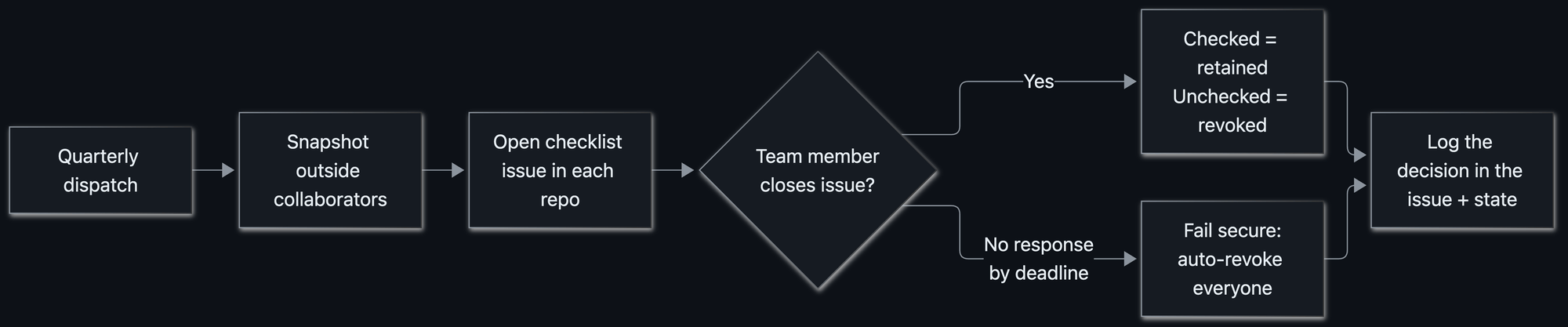
| 8th | Access review | Snapshot outside collaborators, open a checklist issue per repo |
| 16th | Stale repo cleanup | Archive repos still stale after the grace period |
| 23rd | Access cleanup | Auto‑revoke access for any review left unanswered |
Reviews open two weeks before their cleanup runs, and there’s a hard grace period baked in so a stray manual run can never fast‑forward the guillotine. Each workflow also supports workflow_dispatch, so we can trigger any step by hand as needed.
State you can git blame
Evergreen tracks every repo’s status as a JSON file (one per repository) committed to the controller repo under state/repos/<repo_id>.json. The snapshot of who had access, when the review opened, the deadline, who decided, and what happened all lives there. Here’s a completed review where a Hubber kept Alice’s access and let Bob’s lapse:
{
  "repo_id": 123456789,
  "full_name": "the-org/acme-trial",
  "last_seen_at": "2026-04-13T00:05:00Z",
  "access_review": {
    "deadline": "2026-04-27T00:00:00Z",
    "status": "renewed",
    "collaborators_at_open": [
      { "login": "alice", "name": "Alice Example", "permission": "admin" },
      { "login": "bob", "name": "Bob Example", "permission": "write" }
    ],
    "renewed_logins": ["alice"],
    "decided_by": "carol-hubber",
    "decided_at": "2026-04-15T16:42:10Z",
    "tracking_issue": { "repo_id": 123456789, "number": 42 }
  },
  "staleness": {
    "last_activity_at": "2026-04-15T16:42:10Z",
    "warned_at": null,
    "archive_deadline": null,
    "status": "active",
    "tracking_issue": null
  }
}
The best part: because state is just files in git, the commit history is the audit trail. Want to know why someone lost access last spring? git log the state file. There’s no separate database or bespoke audit pipeline to track.
Issue‑ops, everywhere it matters
Evergreen does its talking through issues inside each repository. When an access review kicks off, every repo gets a checklist issue:
![Screenshot of an access review issue titled “[ACTION REQUIRED] Access Review – 2026-04-13.” Outside collaborators Alice Example, with admin access, and Bob Example, with write access, have unchecked boxes. Instructions say to select anyone who should keep access, then close the issue. A warning states that if no action is taken by April 27, all listed access will be automatically revoked.](https://github.blog/wp-content/uploads/2026/10/674986199-ee305d10-3419-4270-a829-41ed3da29fae.png?resize=528%2C221)
The interaction model is delightfully simple: check the boxes for who stays, then close the issue. That’s it. When the issue closes, Evergreen listens for the issues.closed webhook event, reads the checkboxes, retains the checked collaborators, and revokes the rest, then posts a receipt comment listing exactly what it kept and what it removed.
Only the right humans can pull the lever
Closing an access review issue is a privileged action, so Evergreen guards it. If someone who isn’t a Hubber closes an issue, the app quietly reopens it and posts a note explaining why. Decisions only count when they come from the people authorized to make them.
Informing the right people
Here’s a subtle problem: we know the people who need to respond to a review are Hubbers, but we didn’t always know which Hubber(s) owned a given repository.
Evergreen resolves the right people to notify through a fallback chain:
- If a repo sets an
evergreen_repo_ownercustom property (a@useror@org/team), use it. - Otherwise, look at recent issue and commit authors and cc the ones who are on the access review team, i.e., the Hubbers actually working in that repo.
The result: the right owners get pinged automatically, without anyone maintaining a spreadsheet of “who owns what.”
Fail secure, and fail closed
When a review deadline passes with no response, cleanup revokes every collaborator in the snapshot. We were careful about a subtle edge case: what if some removals succeed while others hit a transient API error? Marking the review “done” while a removal is still outstanding would be a quiet inconsistency, and we didn’t want that.
So Evergreen fails closed. If any removal fails, the review stays pending and the issue stays open, and the next run retries the stragglers. It only records “revoked” once every removal actually succeeded. And whatever gets removed is written into the issue, so restoring access is a matter of re‑adding the handles it listed.
The user experience: automation that feels considerate
Automated housekeeping has a reputation for being the office smoke alarm: loud, easy to ignore, and usually going off while you’re cooking something perfectly fine. We worked hard to make Evergreen feel like the opposite:
- It comes to you. The work happens as an issue in your repo.
- It tags the right people. No “who owns this?” archaeology.
- It’s crystal clear about the ask. Every issue states what to do, the exact deadline, and precisely what happens if you ignore it.
- It nudges before it acts. A reminder comment lands before the deadline: no surprise revocations.
- It has an escape hatch. Org owners (Hubbers) can opt out by setting a custom property (
evergreen_exempt_from_access_revieworevergreen_exempt_from_archive).
Rolling it out carefully
Automation that manages access and archives repositories deserves a careful rollout, especially into a large, active org (ours has 1,400+ Hubbers, and many more customers and partners). We wanted the very first run to be a complete non‑event. A few practices got us there:
Dry‑run first. Evergreen ships with a DRY_RUN mode that logs every write it would make without touching a single collaborator or repo. We ran it against the real org and read the logs like tea leaves until we trusted the decisions it wanted to make.
Overcommunicate. Before flipping the switch, we broadcast what was coming, when, and what people needed to do, so the first issue anyone saw wasn’t a surprise. We found that when you’re telling a large group the same thing for the seventh time, it’s often when many are still hearing it for the first time.
Watch everything with Splunk. Evergreen emits structured logfmt logs to a dedicated Splunk index. That observability is how we caught edge cases in the wild (empty collaborator lists, unusual permissions, repos with issues disabled) and tightened the logic before they mattered.
Respect the platform’s speed limits. When you open issues and post comments across every repo in a big org, you slam into GitHub’s secondary rate limits for content creation: 80 requests/minute and 500/hour. While this is a thoughtful preventative control to avoid system abuse, it requires a bit of intention when automating IssueOps at large scale.
So Evergreen paces itself by construction. It processes repos in batches, spaces out each content‑creating call by a couple of seconds, and sleeps between batches to let the rolling window clear, and it only counts the repos that actually create content, so a quiet quarter where nothing’s eligible still runs fast. We opted for proactive avoidance over reactive back‑off.
Lessons we’re taking with us
- Make the safe path the default path. Fail secure, then make responding easy enough that failing secure rarely triggers.
- Use the primitives you already have. Issues, webhooks, custom properties, and git history did the work of a bespoke UI, a job queue, and an audit database.
- Meet people where they work. An issue in your repo beats a dashboard you’ll never open.
- Logs are a revert button. Writing every change into the issue turned “oops” into “paste these three handles into a Copilot session.”
- Respect the limits. At org scale, rate limits aren’t an edge case: they’re the design constraint.
Keep your org evergreen
Routine hygiene is the kind of work that’s easy to defer and perfect to automate. The trick isn’t heroic cleanup sprints: it’s making the boring, safe thing happen on a schedule, with a friendly face and an undo button.
That’s Evergreen. And because it’s built entirely from native GitHub features, you can stand up the same pattern yourself.
Tags:
Written by

Related posts

The bridge to agent-scale Git infrastructure
We moved a copy of 99.99999% of GitHub’s repositories to Azure. Here’s how per-reference quorums will bring over the rest, and how object storage lets reads scale independently.

From 2,500 requests to 24: Rebuilding star history without the stargazers
Our new repo star history API now provides trends without returning individual identities or requiring unbounded database work. These are the engineering tradeoffs we made.

Building Git infrastructure for agent-scale development
We’re rebuilding GitHub’s Git infrastructure while GitHub keeps running, creating a foundation for agent-scale software development.