New Audit Log events and event context
GitHub’s audit log allows admins to quickly review the actions performed by members of their Enterprise. It includes details such as who performed the action, what the action was, and…
GitHub’s audit log allows admins to quickly review the actions performed by members of their Enterprise. It includes details such as who performed the action, what the action was, and…
In May we shipped a setting for including the pull request title in the default commit message presented to users when squash merging a pull request. We just shipped more…
GitHub Packages is being re-platformed, unlocking great capabilities such as fine-grained permissions, org-level publishing and increased performance. Package registries on the new GitHub Packages architecture, including container registry and npm…

GitHub Discussions and Audit Log Streaming, new automation features, and security enhancements are available now in GitHub Enterprise Server 3.6.
Today, we’re releasing capabilities that will enable developers and organizations to efficiently manage and confidently scale with Codespaces. Retention setting for all individuals To enable auto-cleanup of unused codespaces, inactive…
GitHub Advanced Security customers can now see an overview of code scanning alerts at the enterprise level. This page provides a repo-centric view of application security risks, as well as…

We’re releasing exciting functionalities that will enable organizations to confidently manage and scale with Codespaces.
Custom repository roles are now GA for GitHub.com and Enterprise Server 3.5. Organization admins can create custom repository roles available to all repositories in their organization. Roles can be configured…
Today’s Changelog brings you the release of project webhooks, a first exploration into templates and a host of improvements to GitHub Issues. ☁️🪝 Automate more with project webhooks The first…
Users can now add a comment when dismissing a code scanning alert. It is optional to provide a dismissal comment. Dismissal comments are recorded in the alert timeline. They can…

A two-part story about how GitHub’s Product Security Engineering team rolled out Dependabot internally to track vulnerable dependencies, and how GitHub tracks and prioritizes technical debt.
Today’s Changelog brings you the release of issue closed reasons, project deletion, and availability of the new side-panel. 🕵🏽♀️ Issue closed reasons We announced a preview of issue closed reasons…
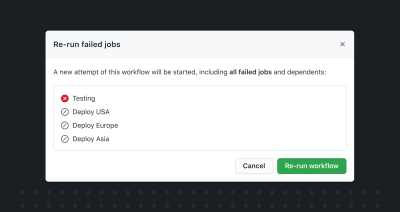
It is now possible to re-run only failed jobs or a single job in GitHub Actions workflows.

GitHub Enterprise Server 3.4 is now generally available for all customers. This release makes software development faster and more secure with new features like reusable workflows, Dependabot security updates, and GitHub Advanced Security enhancements.

A public beta of the new GitHub Issues, a “security manager” role for organizations, a command palette beta, and lots more.
Organizations using GitHub Enterprise Cloud now have more granular control over the repository access permissions they can grant to users, with custom repository roles – now available in Beta. A…

Since last year’s GitHub Universe, we’ve shipped more than 20,000 improvements to GitHub for developers, open source communities, and enterprise teams. Here’s a comprehensive overview of what we’re announcing at Universe this week.

Catch up on 44 ships, including a colorblind-accessible theme, a public README.md for organizations, and customization of code review settings.
What did we ship in August? Codespaces, Discussions, and lots of other updates, from the general availability of the dark high contrast theme to an auto-generated table of contents for wikis.
GitHub Advanced Security customers can now view all their private repo secret scanning alerts in the organization security tab. This view is currently only available to organization owners, but will…
Maintainers can now manage the repository-level “Allow auto-merge” setting. This setting, which is off by default, controls whether auto-merge is available on pull requests in the repository. Previously, only admins…

Build what’s next on GitHub, the place for anyone from anywhere to build anything.

Join us October 28-29 in San Francisco or online for GitHub Universe, our flagship developer event uniting people, agents, and the world’s code.

