GitPad: Write your commits in Notepad
For many developers getting started with Git on Windows, one of the confusing features of Git is that the default editor for commit messages is Vim. While Vim is a…
For many developers getting started with Git on Windows, one of the confusing features of Git is that the default editor for commit messages is Vim. While Vim is a great editor, many folks would prefer something a bit more user-friendly.
For those folks, we’ve created a great getting-started resource, GitPad. This is a portable, single-EXE program that will configure Notepad as your default editor for commit messages and other features such as interactive rebase, which lets you reorder and combine commits before you send them to others.
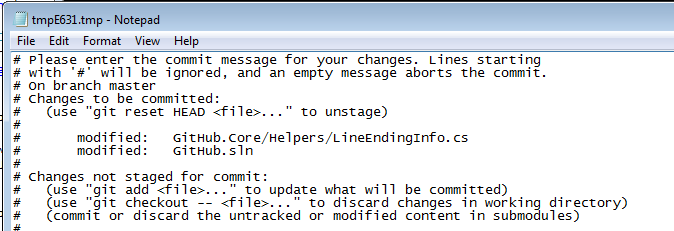
If you’re interested, grab GitPad.exe from the Download page and run it, then restart your CMD / Bash shell window.
Written by

Related posts

The next developer interface is ambient intelligence
AI, agents, voice, and physical controls are shifting software development from operating tools to expressing intent—and helping developers stay focused on building.

GitHub availability report: September 2026
In September, we experienced two incidents that resulted in degraded performance across GitHub services.

10 technical talks I’m excited about at GitHub Universe 2026
From verifying AI-written code to securing npm dependencies, these are the sessions I’m building my Universe agenda around.