Better Notifications in GitHub for Mac
GitHub for Mac has had support for OS X 10.8’s Notification Center for quite some time now. Today, we’re making our Notification Center feature even more useful by tying them…
GitHub for Mac has had support for OS X 10.8’s Notification
Center for quite
some time now. Today, we’re making our Notification Center feature even more
useful by tying them in with GitHub.com’s
Notifications.
Now, notifications will only appear for repositories and threads that you’re
watching, just like on GitHub.com. We’ve removed the noisy notifications
about commits, branches, and tags.
We’re also adding the ability to mute threads straight from the app (when using
the “Alert” style from System Preferences):
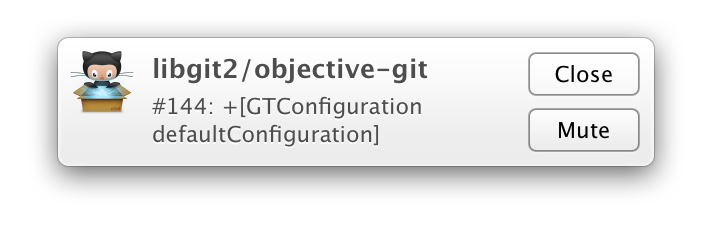
Muting matches exactly what you see on GitHub.com. If you mute a thread from the
app, it will also be muted on the website, and vice-versa.
We’re hoping that you find notifications in GitHub for Mac a lot more useful
after these changes. Enjoy!
Update: We’ve since removed notifications from GitHub for Mac because the feature was kind of half-baked, and we prefer not to use half-measures. We might reintroduce it in a future release after we’ve had some more time to think about how it should work. In the meantime, we recommend that you use the website notifications or email notifications.
Written by

Related posts
10 technical talks I’m excited about at GitHub Universe 2026
From verifying AI-written code to securing npm dependencies, these are the sessions I’m building my Universe agenda around.

Developer policy update: Transparency, state policy, and what’s ahead
Explore GitHub’s latest transparency data and learn more about policy updates affecting developers and open source.

Developers want more efficient software. Here’s what over 1,000 GitHub users told us they need.
New research from GitHub and Yale Program on Climate Change Communication finds strong demand for tools, measurement, and practical guidance that can help developers reduce wasted compute.