Project board automation and template updates
Automate settings in your project boards for more workflow control with issues and pull requests.
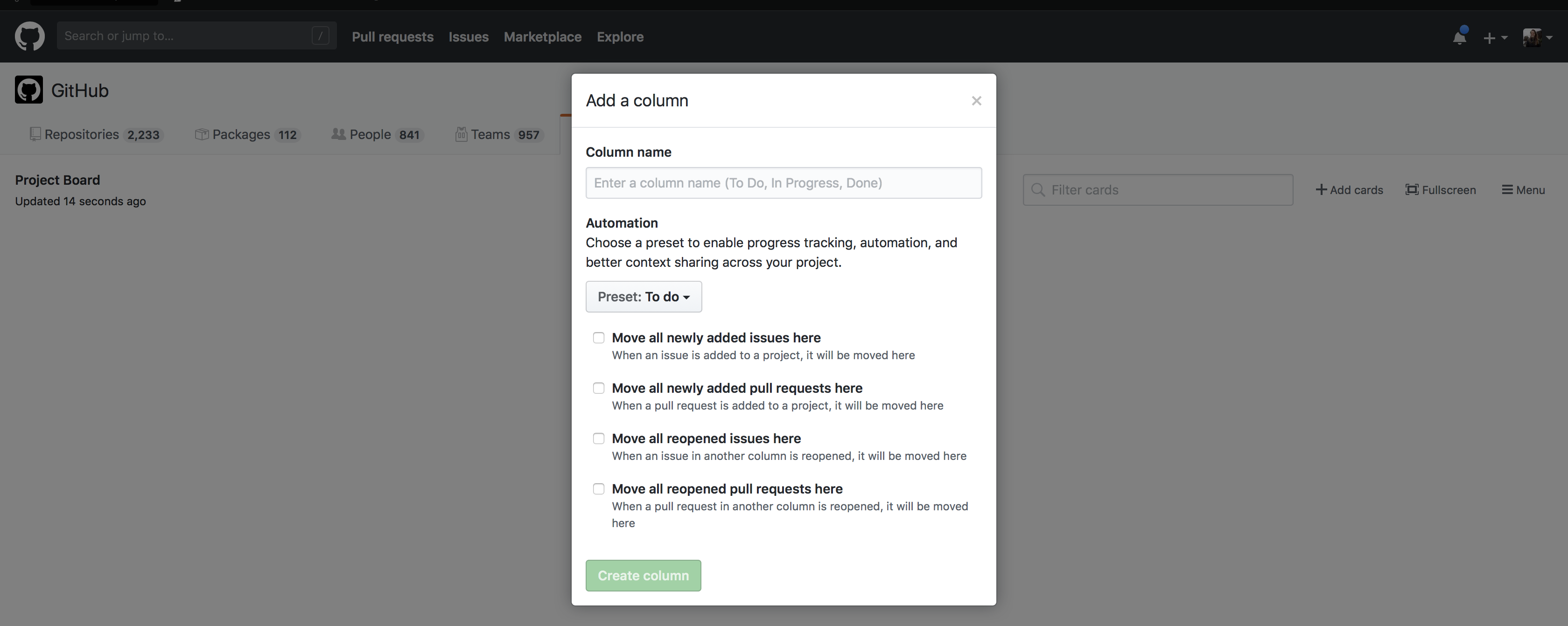
We’ve made some changes to project automation that will provide you with more control when managing issues and pull requests in a project. Previously, issue and pull request cards behaved the same when they were added and moved across the board. Now you can specify different actions for them, like creating separate columns for in progress or reopened issues and pull requests.
Template updates
Simplify the process of managing bugs with the new “Bug triage” project board template. It features “To do”, “High priority”, “Low priority,” and “Closed” columns for better bug tracking.
The “Automated kanban” template has also been updated for automated workflows and now places newly-added pull requests to the “In progress” column. New issues will still appear in the “To do” column.
Changing your settings
Anyone with write access can manually configure new issue and pull request automation options on existing projects.
To configure these settings in existing projects, click Manage Automation on the columns you wish to update. For new projects, access the changes by setting up a project with the “Automated kanban” template, or by clicking Manage Automation on any columns you manually create.
Read the documentation to learn more.
Written by

Related posts

The next developer interface is ambient intelligence
AI, agents, voice, and physical controls are shifting software development from operating tools to expressing intent—and helping developers stay focused on building.

GitHub availability report: September 2026
In September, we experienced two incidents that resulted in degraded performance across GitHub services.

10 technical talks I’m excited about at GitHub Universe 2026
From verifying AI-written code to securing npm dependencies, these are the sessions I’m building my Universe agenda around.