Playing the Blame Game
One of the features I use a lot in git is ‘git blame’, which will show you who was the last person to change each line in any file in…
One of the features I use a lot in git is ‘git blame’, which will
show you who was the last person to change each line in any file
in your project, and which commit it was.
This is most often used by me to avoid embarassment, as I have a
ridiculously short term memory – there have been several dozen
times in the last few years where I think “What moron added this code?
It looks as if a slow monkey on barbituates got arbitrarily angry at the
keyboard!”, only to find through my friend ‘git blame’ that that monkey
was me. That’s helpful information to know before you go yelling at
your co-workers.
So, we thought adding this face-saving functionality to GitHub might
be a good idea. Enter the ‘blame’ link:
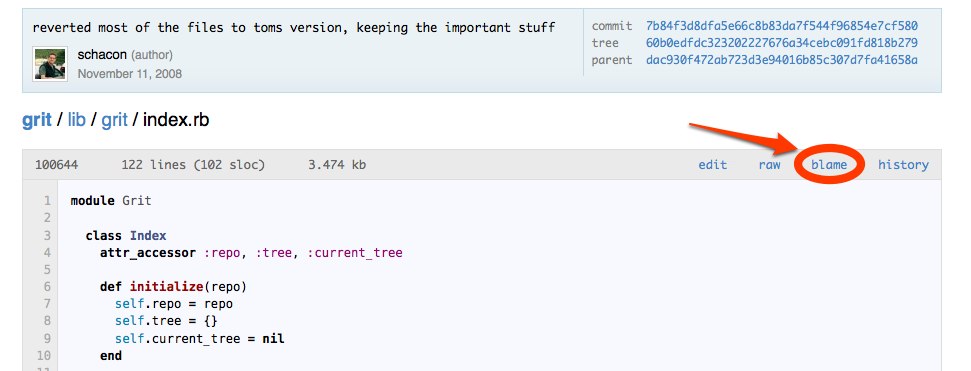
If you click that link from the file view of any of the files in a
project, you’ll get something that looks thusly:
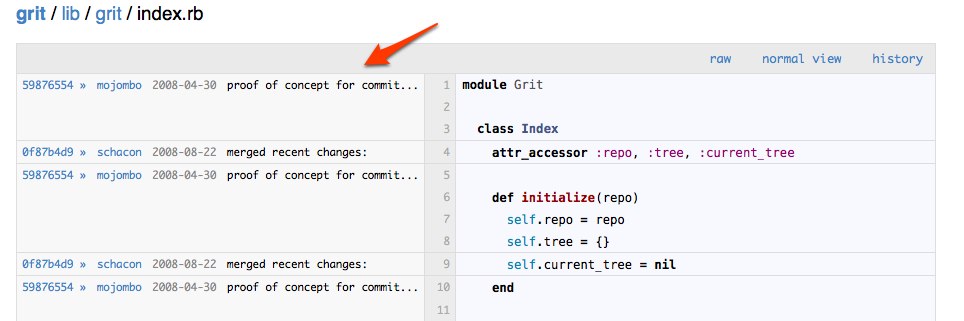
It’s basically the same view, with the code itself a bit truncated
and a bunch of fun new information added. For each block of code that
changed at once, it will show you the sha of the commit that last
changed it, along with the author, date and message of that commit.
Even cooler, it will show a little ” » ” icon next to the sha – if
you click this it will ‘drill down’ to show you the blame for the file
from that commit instead. Meaning, if you wanted to know who changed that
line before that gal, clicking on that icon will show you the
next previous person, and so on. If that doens’t make sense, just give
it a try – you can do this on any file in any of your projects. Go nuts!
(don’t really go nuts…)
Written by

Related posts

GitHub availability report: August 2026
In August, we experienced five incidents that resulted in degraded performance across GitHub services.

The August 17 outage, and the work ahead
An update on the August 17 outage and the steps we’re taking to improve reliability.

Your guide to GitHub Universe 2026 is here: The schedule just launched!
The GitHub Universe session catalog is live. Explore interactive workshops, community talks, demos, and panels. Plus, register before August 19 to save $300.