GitHub’s RubyGem Server
Update regarding require, please read below The next time you visit your repository’s edit screen you’ll see a new checkbox that should be pretty exciting for users hosting their RubyGem…
Update regarding require, please read below
The next time you visit your repository’s edit screen you’ll see a new checkbox that should be pretty exciting for users hosting their RubyGem project on GitHub:
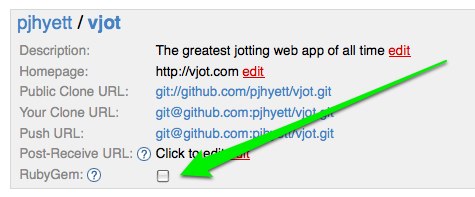
After checking that, managing your gem is as simple as managing a gemspec in your project’s root directory (example). Anytime you push a modified gemspec to GitHub, we’ll build and publish a new gem for you.
Feel free to give your open source friends a hard time when they don’t release a new gem version for a while, because they have no excuse now 🙂
One concept regarding our server that bears repeating is that your gem will always be prefixed with your username. Installing mojombo’s grit gem is done via the following:
$ sudo gem install mojombo-grit
Successfully installed mojombo-grit-0.8.1
Using said gem works a couple of ways. First the regular require:
$ irb -rubygems
>> require 'grit'
=> true
Update: The following also works if you have competing versions of the same gem:
$ irb -rubygems
>> gem 'mojombo-grit'
=> true
>> require 'grit'
=> true
The namespacing may feel awkward as first, but it really lends itself to the distributed nature of the service we provide. Forking a RubyGem project shouldn’t be any more complicated than forking any other type of project.
Visit http://gems.github.com for all of the details. Enjoy!
Written by

Related posts

GitHub Universe 2026: Evolving every layer of the stack
Today, we laid out our vision for GitHub as the most comprehensive, end-to-end software delivery system in the world.

Octoverse: Commits, pushes, reach new highs in 2026 as developers build with agents
See how a record year of growth reached every industry, every field, and every kind of builder in the 2026 Octoverse report.

The next developer interface is ambient intelligence
AI, agents, voice, and physical controls are shifting software development from operating tools to expressing intent—and helping developers stay focused on building.