Forking with the Edit Button
You’ve been able to edit files in repositories you own on GitHub for years. But today, we’ve improved the workflow for this functionality. You can now edit files in repositories…
You’ve been able to edit files in repositories you own on GitHub for years. But today, we’ve improved the workflow for this functionality. You can now edit files in repositories that you don’t have write access to!
If you browse to a file on GitHub in someone else’s repository and want to suggest a change, you can click the new ‘Fork and edit file’ button:
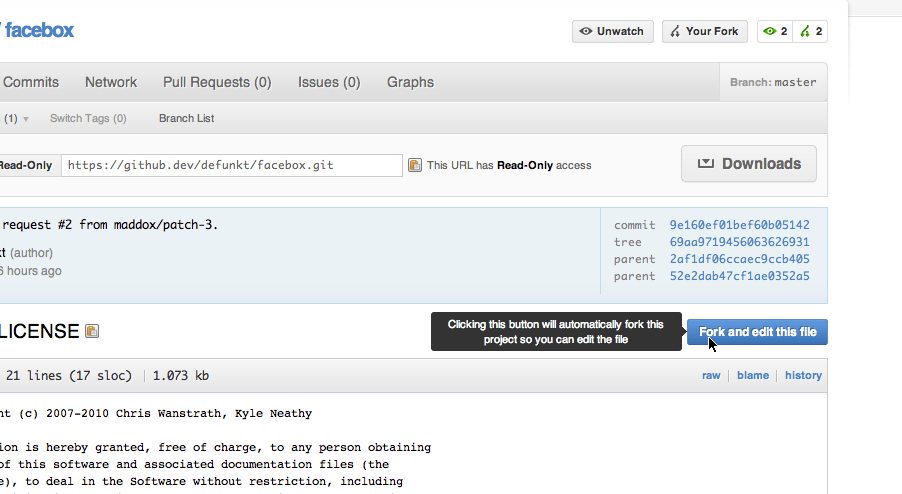
This will let you change the file. If you don’t have a fork of the project already, it will fork it for you in the background. When you are done with your edit, we will write your change into your new fork automatically and send you to the pull request page so you can tell the owner of the repository.
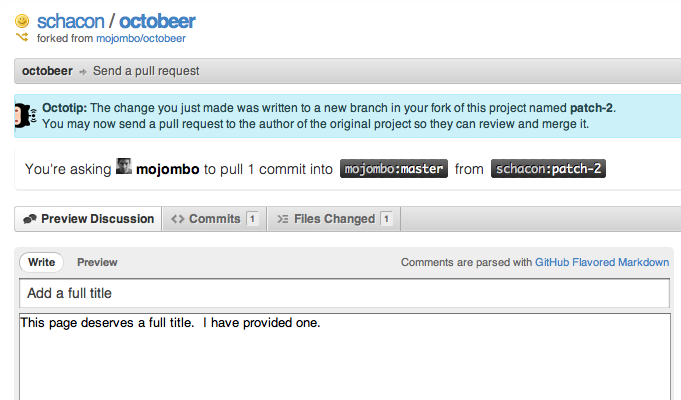
If you would like to try it yourself, go ahead and add something to this file.
This makes it so you can make a change to any visible file and send it to the project owner in mere seconds. Happy collaborating!
Written by

Related posts

The next developer interface is ambient intelligence
AI, agents, voice, and physical controls are shifting software development from operating tools to expressing intent—and helping developers stay focused on building.

GitHub availability report: September 2026
In September, we experienced two incidents that resulted in degraded performance across GitHub services.

10 technical talks I’m excited about at GitHub Universe 2026
From verifying AI-written code to securing npm dependencies, these are the sessions I’m building my Universe agenda around.