Fast Forward Your Fork
Since forking a repository is so easy on GitHub, a number of people tend to do it thinking they want to play with the source, but then never actually push…
Since forking a repository is so easy on GitHub, a number of people tend to do it thinking they want to play with the source, but then never actually push back into their fork. Meanwhile, development continues on the main branch, and it’s a little annoying to have to add them as a remote and merge in order to get back up to date. So, we’ve added a new button to your repository details that will show up if you forked a project, didn’t push to it, and the source repo has moved on:
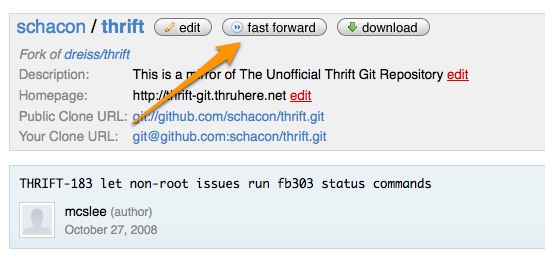
If you click on ‘Fast Forward’, it will move all your branches up to wherever the repository you originally forked from now is. Now all of those of you who forked Rails months ago and never did anything with it and are thinking of trying again, go forth and Fast Forward.
Written by

Related posts

An update on GitHub availability
Here’s what we’ve done—and what we’re still doing—to improve our availability and reliability.

GitHub Copilot is moving to usage-based billing
Starting June 1, your Copilot usage will consume GitHub AI Credits.

Changes to GitHub Copilot Individual plans
We’re making these changes to ensure a reliable and predictable experience for existing customers.