Repo Deletion for Everyone
Here’s our latest feature: Did ya spot it? It’s the delete button! No, we’re not crazy. Prior to today, if you had a project that had been forked, you were…
Here’s our latest feature:
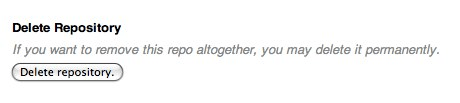
Did ya spot it? It’s the delete button!
No, we’re not crazy. Prior to today, if you had a project that had been forked, you were unable to delete it.
The reason is simple: when you fork a repository, we don’t copy over the data, we just point your repository to the original via an alternates file. It’s one of the great things about git, and the reason you can fork the linux kernel and not use up any of your allotted space (until you make changes).
So, if the owner of the repository wants to delete their repo, it would have broken all of the forks as well. Not exactly optimal in open source situations when the original project maintainer gets bored.
Our solution was to create a “graveyard” for deleted repositories. A place where your repo’s objects are stored, but no longer associated with your account. That way it’s not counted against your account’s limits nor are any of its forks affected.
One thing worth noting is that this does not apply to private repositories with forks. If a private repo is deleted, all of its forks will also be deleted for security reasons. It’s up to you to let your network and collaborators know what’s happening.
Written by

Related posts

The next developer interface is ambient intelligence
AI, agents, voice, and physical controls are shifting software development from operating tools to expressing intent—and helping developers stay focused on building.

GitHub availability report: September 2026
In September, we experienced two incidents that resulted in degraded performance across GitHub services.

10 technical talks I’m excited about at GitHub Universe 2026
From verifying AI-written code to securing npm dependencies, these are the sessions I’m building my Universe agenda around.