Repo Deletion for Everyone
Here’s our latest feature: Did ya spot it? It’s the delete button! No, we’re not crazy. Prior to today, if you had a project that had been forked, you were…
Here’s our latest feature:
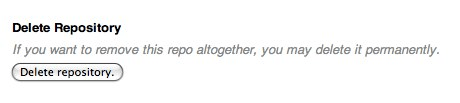
Did ya spot it? It’s the delete button!
No, we’re not crazy. Prior to today, if you had a project that had been forked, you were unable to delete it.
The reason is simple: when you fork a repository, we don’t copy over the data, we just point your repository to the original via an alternates file. It’s one of the great things about git, and the reason you can fork the linux kernel and not use up any of your allotted space (until you make changes).
So, if the owner of the repository wants to delete their repo, it would have broken all of the forks as well. Not exactly optimal in open source situations when the original project maintainer gets bored.
Our solution was to create a “graveyard” for deleted repositories. A place where your repo’s objects are stored, but no longer associated with your account. That way it’s not counted against your account’s limits nor are any of its forks affected.
One thing worth noting is that this does not apply to private repositories with forks. If a private repo is deleted, all of its forks will also be deleted for security reasons. It’s up to you to let your network and collaborators know what’s happening.
Written by

Related posts

What’s coming to our GitHub Actions 2026 security roadmap
A look at GitHub Actions’ 2026 roadmap, outlining how secure defaults, policy controls, and CI/CD observability harden the software supply chain end to end.

Updates to GitHub Copilot interaction data usage policy
From April 24 onward, interaction data—specifically inputs, outputs, code snippets, and associated context—from Copilot Free, Pro, and Pro+ users will be used to train and improve our AI models unless they opt out.

GitHub availability report: February 2026
In February, we experienced six incidents that resulted in degraded performance across GitHub services.