Project board issue and pull request details view
View and edit key information in issues and pull requests from within your project board.

You can now view and edit key information in issues and pull requests from within your project board.
Clicking on the title of an issue or pull request card opens a side panel on the right hand side of the screen. The following actions are supported within this side panel view:
- Adding and editing reactions
- Adding and removing labels
- Editing titles and descriptions
- Editing assignees
- Editing and requesting reviewers
- Editing projects the issue or pull request is in
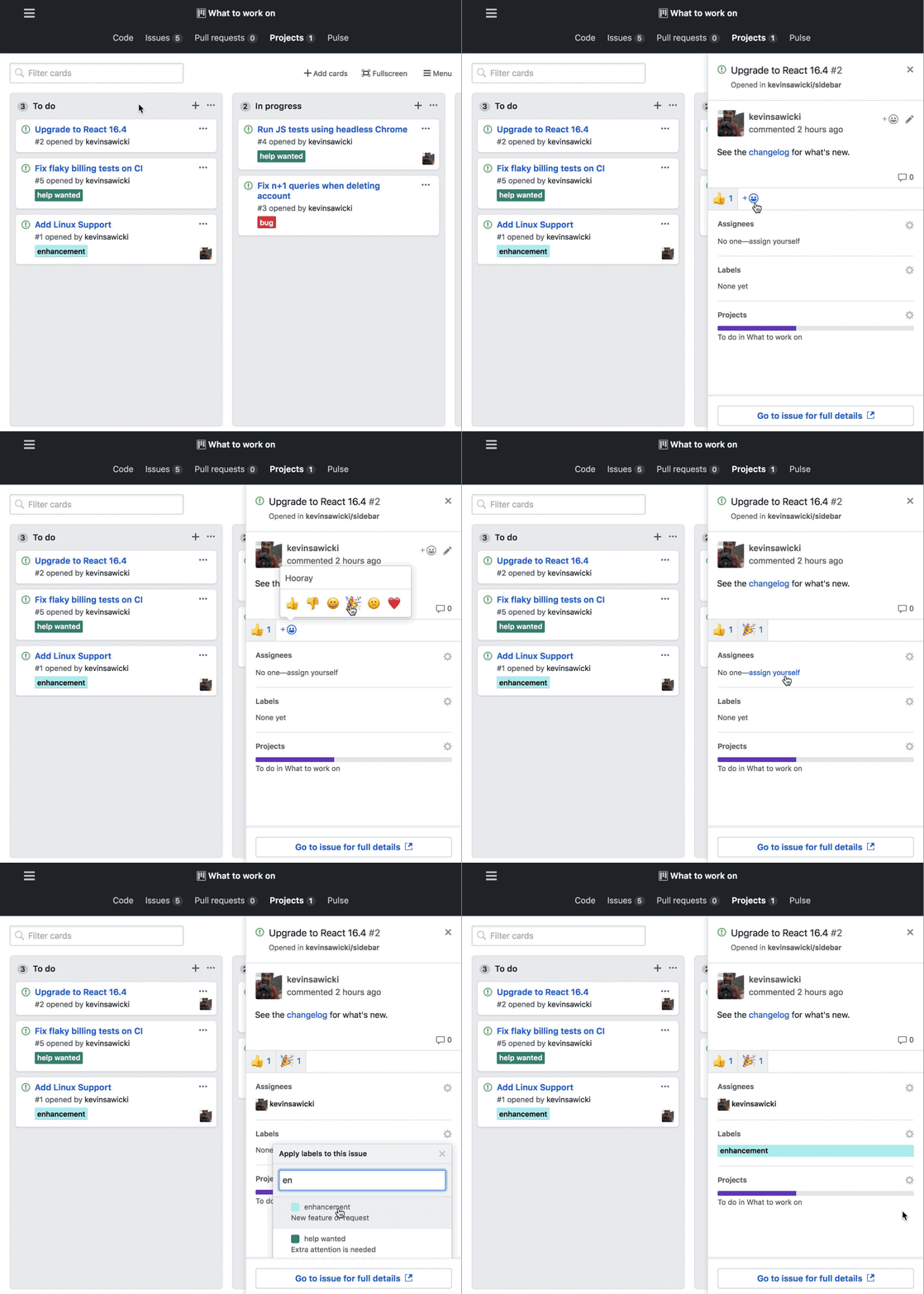
Additionally, clicking the link at the bottom of the side panel view opens your issue or pull request in a new tab while your project board remains open.
Read the documentation for more information.
Written by

Related posts

GitHub availability report: February 2026
In February, we experienced six incidents that resulted in degraded performance across GitHub services.

Addressing GitHub’s recent availability issues
GitHub recently experienced several availability incidents. We understand the impact these outages have on our customers and are sharing details on the stabilization work we’re prioritizing right now.

GitHub availability report: January 2026
In January, we experienced two incidents that resulted in degraded performance across GitHub services.