Track the progress of your projects
Get a more complete overview of how each of your projects is going. Now you’ll see a progress bar that tracks the to do, in progress, and done cards and…

Get a more complete overview of how each of your projects is going. Now you’ll see a progress bar that tracks the to do, in progress, and done cards and visualizes the progress of each of your projects.

With this update, you can also track project boards from other repositories and organizations with more context. Enter the URL of any project on GitHub into the note field to create a project summary card—a detail card like the recently released issue summary cards. Your existing cards will update automatically, so there’s no need to manually upgrade your project boards.
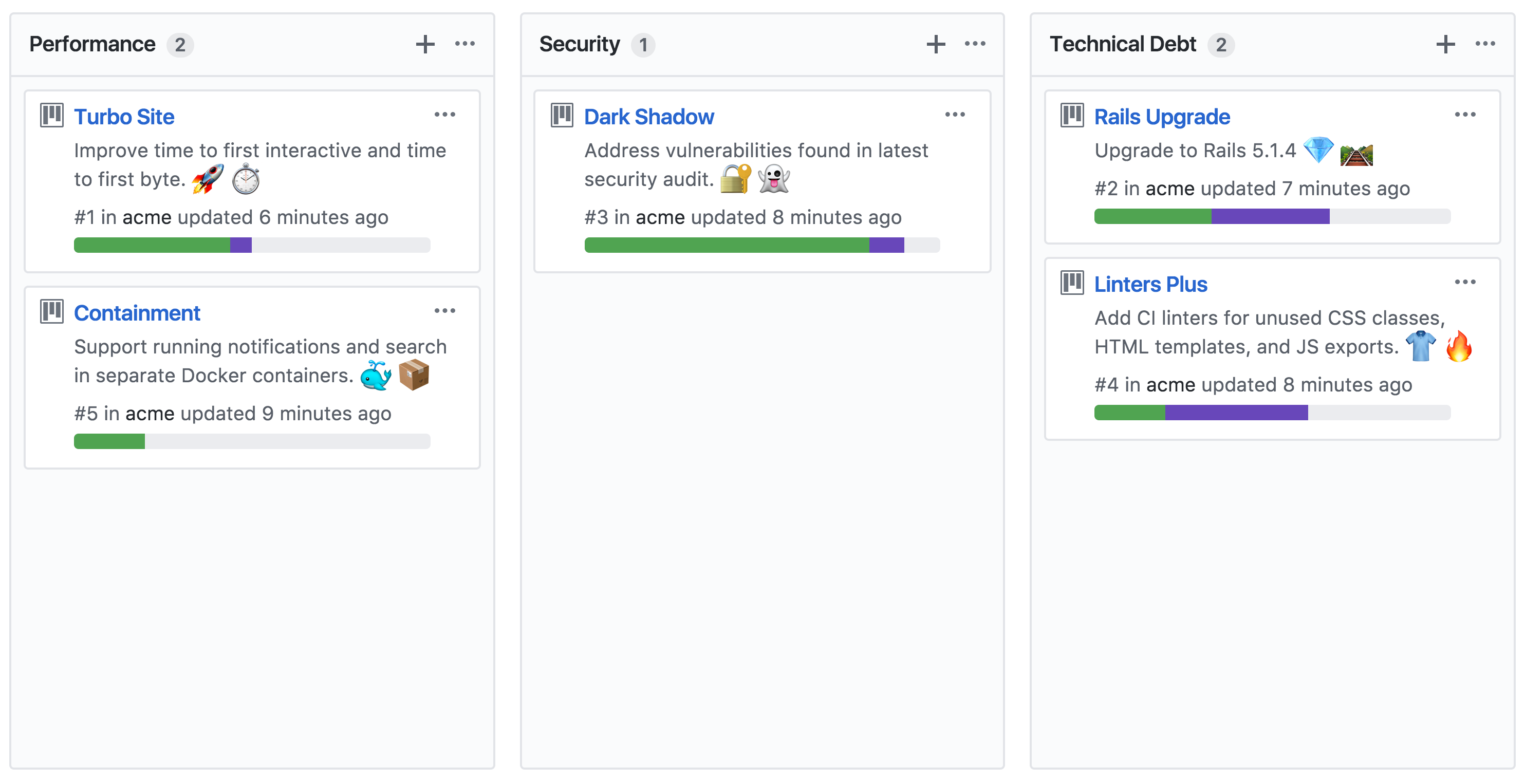
Check out the documentation to learn more about tracking your project’s progress, including how to disable tracking for long-running projects and other boards you’d prefer not to track.
Written by

Related posts

The next developer interface is ambient intelligence
AI, agents, voice, and physical controls are shifting software development from operating tools to expressing intent—and helping developers stay focused on building.

GitHub availability report: September 2026
In September, we experienced two incidents that resulted in degraded performance across GitHub services.
10 technical talks I’m excited about at GitHub Universe 2026
From verifying AI-written code to securing npm dependencies, these are the sessions I’m building my Universe agenda around.