Keep your project boards up to date, automatically
Today we’re releasing the first set of project automation events. Now you can set up your project boards to make updates for you automatically, moving cards between columns when you…

Today we’re releasing the first set of project automation events. Now you can set up your project boards to make updates for you automatically, moving cards between columns when you or a teammate:
- Add a new card to a project, moving it from from triage to a default starting column
- Close an issue
- Merge a pull request
- Close a pull request with unmerged changes
- Reopen an issue or pull request
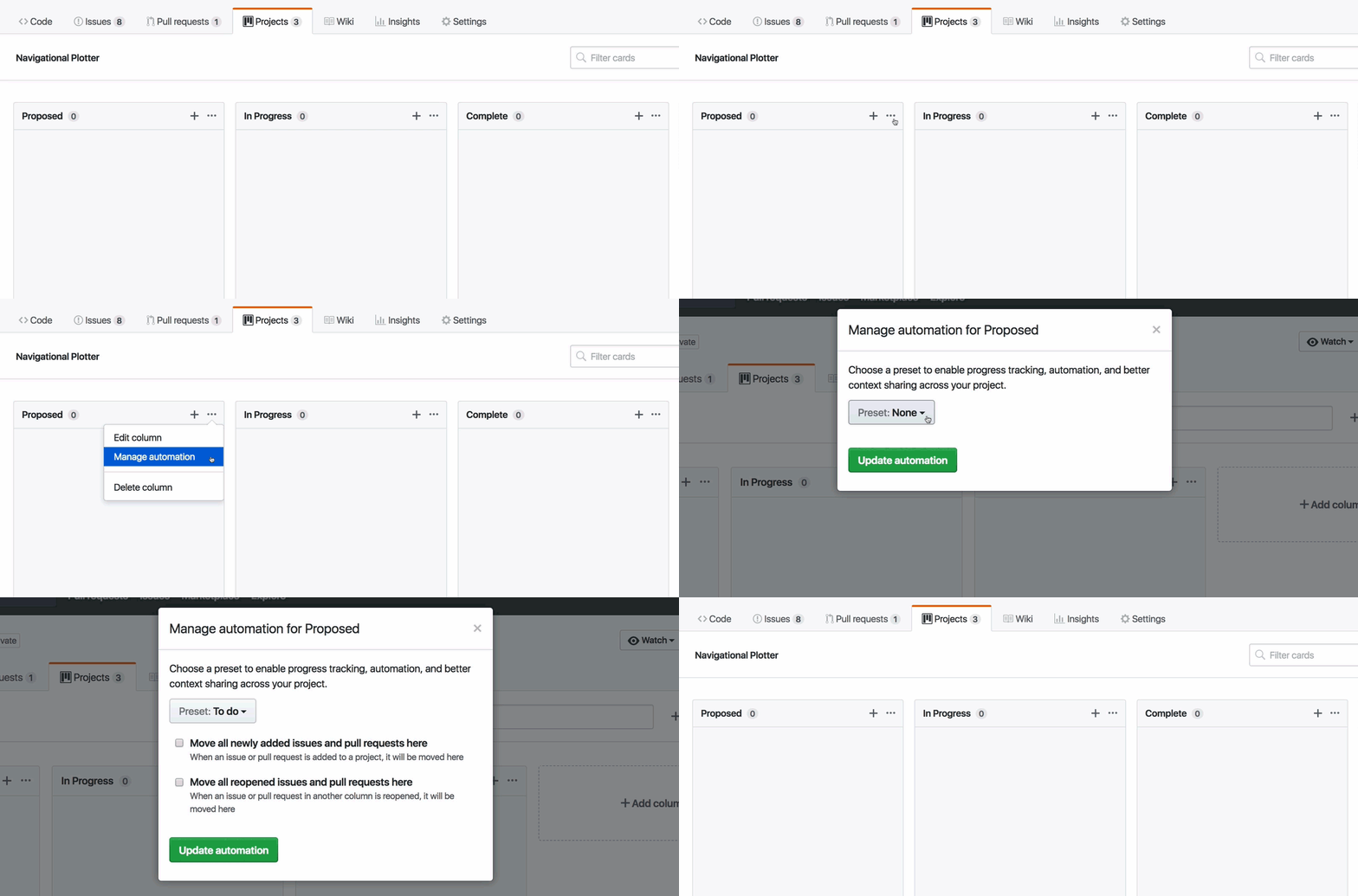
Check out the documentation to learn how to automate your project boards—and stay tuned! We’re working on automation for other common developer workflows, like changes in review or build status on pull requests. We’d love to hear from you about other ways we can help you to do your best work.
Written by

Related posts

The next developer interface is ambient intelligence
AI, agents, voice, and physical controls are shifting software development from operating tools to expressing intent—and helping developers stay focused on building.

GitHub availability report: September 2026
In September, we experienced two incidents that resulted in degraded performance across GitHub services.

10 technical talks I’m excited about at GitHub Universe 2026
From verifying AI-written code to securing npm dependencies, these are the sessions I’m building my Universe agenda around.