GitHub’s RubyGem Server
Update regarding require, please read below The next time you visit your repository’s edit screen you’ll see a new checkbox that should be pretty exciting for users hosting their RubyGem…
Update regarding require, please read below
The next time you visit your repository’s edit screen you’ll see a new checkbox that should be pretty exciting for users hosting their RubyGem project on GitHub:
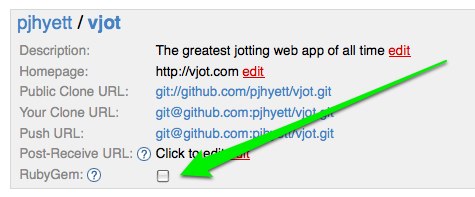
After checking that, managing your gem is as simple as managing a gemspec in your project’s root directory (example). Anytime you push a modified gemspec to GitHub, we’ll build and publish a new gem for you.
Feel free to give your open source friends a hard time when they don’t release a new gem version for a while, because they have no excuse now 🙂
One concept regarding our server that bears repeating is that your gem will always be prefixed with your username. Installing mojombo’s grit gem is done via the following:
$ sudo gem install mojombo-grit
Successfully installed mojombo-grit-0.8.1
Using said gem works a couple of ways. First the regular require:
$ irb -rubygems
>> require 'grit'
=> true
Update: The following also works if you have competing versions of the same gem:
$ irb -rubygems
>> gem 'mojombo-grit'
=> true
>> require 'grit'
=> true
The namespacing may feel awkward as first, but it really lends itself to the distributed nature of the service we provide. Forking a RubyGem project shouldn’t be any more complicated than forking any other type of project.
Visit http://gems.github.com for all of the details. Enjoy!
Written by

Related posts

GitHub availability report: March 2026
In March, we experienced four incidents that resulted in degraded performance across GitHub services.

GitHub Universe is back: We want you to take the stage
Get inspired by five of the most memorable, magical, and quirky Universe sessions to date.

What’s coming to our GitHub Actions 2026 security roadmap
A look at GitHub Actions’ 2026 roadmap, outlining how secure defaults, policy controls, and CI/CD observability harden the software supply chain end to end.