Cross-Repository Compare View
When we launched Compare View earlier this year, we knew there was a killer feature still missing: the ability to compare branches across repositories. Easy forking and the networks that…
When we launched Compare View earlier this year, we knew there was a
killer feature still missing: the ability to compare branches across
repositories. Easy forking and the networks that emerge as a result is what
makes GitHub great. Limiting the Compare View to a single repository felt all
wrong. So today we’re flipping the switch on some non-trivial architectural
changes that make cross-repository comparisons a reality:
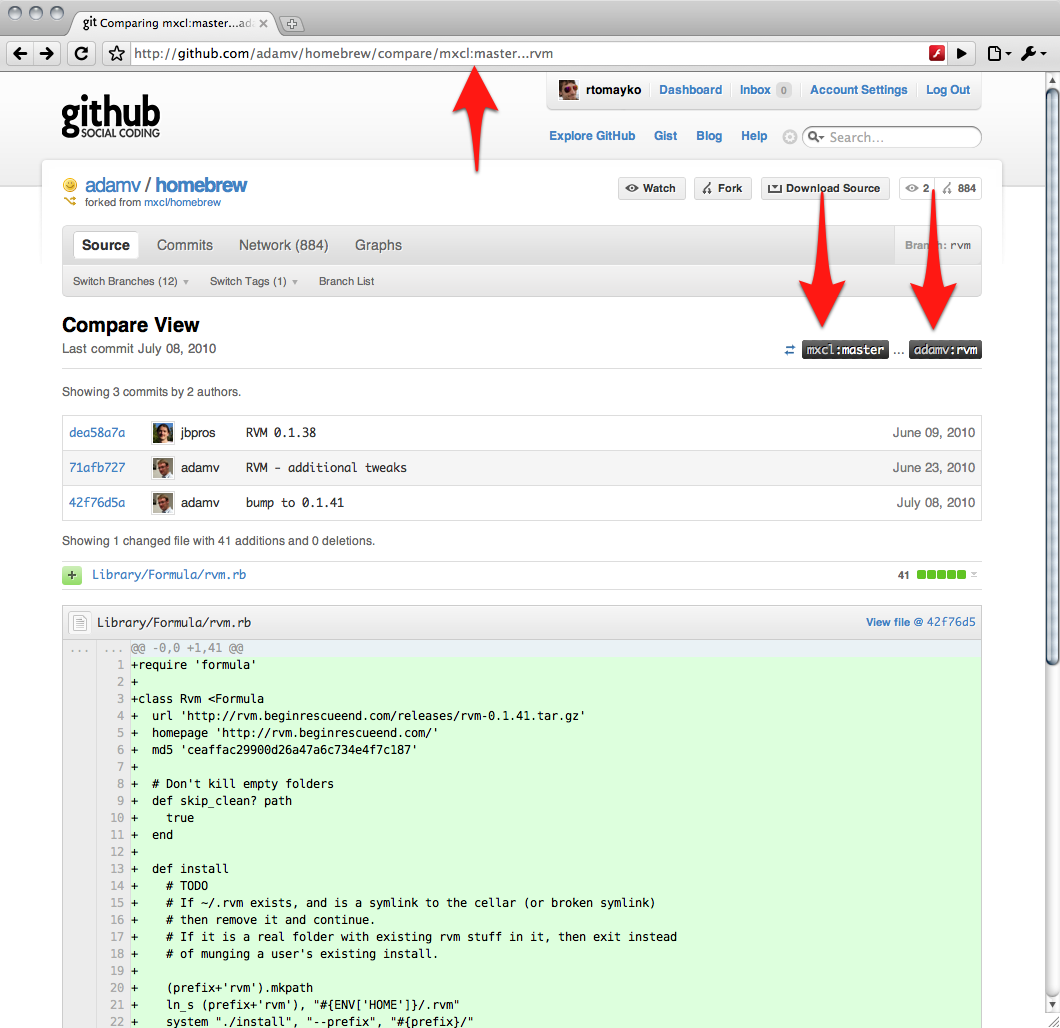
Here’s how it works: it’s now possible to specify a <user>: prefix on the
comparison’s starting or ending point. When given, the <user> part identifies
the owner of a another repository/fork in the same network. In the example
above, we’re comparing branches in the
homebrew network with
mxcl‘s master
branch as the starting point and adamv‘s rvm branch
as the ending point.
To change the starting or ending point, click the ref label buttons and enter
the branch name or commit SHA1 to switch to. For example, we can change the
starting point from mxcl’s master branch to the brew07 branch like this:

Written by

Related posts

The August 17 outage, and the work ahead
An update on the August 17 outage and the steps we’re taking to improve reliability.
Your guide to GitHub Universe 2026 is here: The schedule just launched!
The GitHub Universe session catalog is live. Explore interactive workshops, community talks, demos, and panels. Plus, register before August 19 to save $300.

GitHub availability report: July 2026
In July, we experienced eight incidents that resulted in degraded performance across GitHub services.