Changes to GitHub Copilot Individual plans
We’re making these changes to ensure a reliable and predictable experience for existing customers.

Today we’re making the following changes to GitHub Copilot’s Individual plans to protect the experience for existing customers: pausing new sign-ups, tightening usage limits, and adjusting model availability. We know these changes are disruptive, and we want to be clear about why we’re making them and how they will affect you.
Agentic workflows have fundamentally changed Copilot’s compute demands. Long-running, parallelized sessions now regularly consume far more resources than the original plan structure was built to support. As Copilot’s agentic capabilities have expanded rapidly, agents are doing more work, and more customers are hitting usage limits designed to maintain service reliability. Without further action, service quality degrades for everyone.
We’ve heard your frustrations about usage limits and model availability, and we need to do a better job communicating the guardrails we are adding—here’s what’s changing and why.
- New sign-ups for GitHub Copilot Pro, Pro+, and Student plans are paused. Pausing sign-ups allows us to serve existing customers more effectively.
- We are tightening usage limits for individual plans. Pro+ plans offer more than 5X the limits of Pro. Users on the Pro plan who need higher limits can upgrade to Pro+. Usage limits are now displayed in VS Code and Copilot CLI to make it easier for you to avoid hitting these limits.
- Opus models are no longer available in Pro plans. Opus 4.7 remains available in Pro+ plans. As we announced in our changelog, Opus 4.5 and Opus 4.6 will be removed from Pro+.
These changes are necessary to ensure we can serve existing customers with a predictable experience. If you hit unexpected limits or these changes just don’t work for you, you can cancel your Pro or Pro+ subscription and receive a refund by visiting your Billing settings before May 20.
- Monthly plans will be refunded the entire monthly subscription fee for the current month.
- Annual plans will be refunded for the time remaining on your subscription.
How usage limits work in GitHub Copilot
GitHub Copilot has two usage limits today: session and weekly (7 day) limits. Both limits depend on two distinct factors—token consumption and the model’s multiplier.
The session limits exist primarily to ensure that the service is not overloaded during periods of peak usage. They’re set so most users shouldn’t be impacted. Over time, these limits will be adjusted to balance reliability and demand. If you do encounter a session limit, you must wait until the usage window resets to resume using Copilot.
Weekly limits represent a cap on the total number of tokens a user can consume during the week. We introduced weekly limits recently to control for parallelized, long-trajectory requests that often run for extended periods of time and result in prohibitively high costs.
The weekly limits for each plan are also set so that most users will not be impacted. If you hit a weekly limit and have premium requests remaining, you can continue to use Copilot with Auto model selection. Model choice will be reenabled when the weekly period resets. If you are a Pro user, you can upgrade to Pro+ to increase your weekly limits. Pro+ includes over 5X the limits of Pro.
Usage limits are separate from your premium request entitlements. Premium requests determine which models you can access and how many requests you can make. Usage limits, by contrast, are token-based guardrails that cap how many tokens you can consume within a given time window. You can have premium requests remaining and still hit a usage limit.
Avoiding surprise limits and improving our transparency
Starting today, VS Code and Copilot CLI both display your available usage when you’re approaching a limit. These changes are meant to help you avoid a surprise limit.
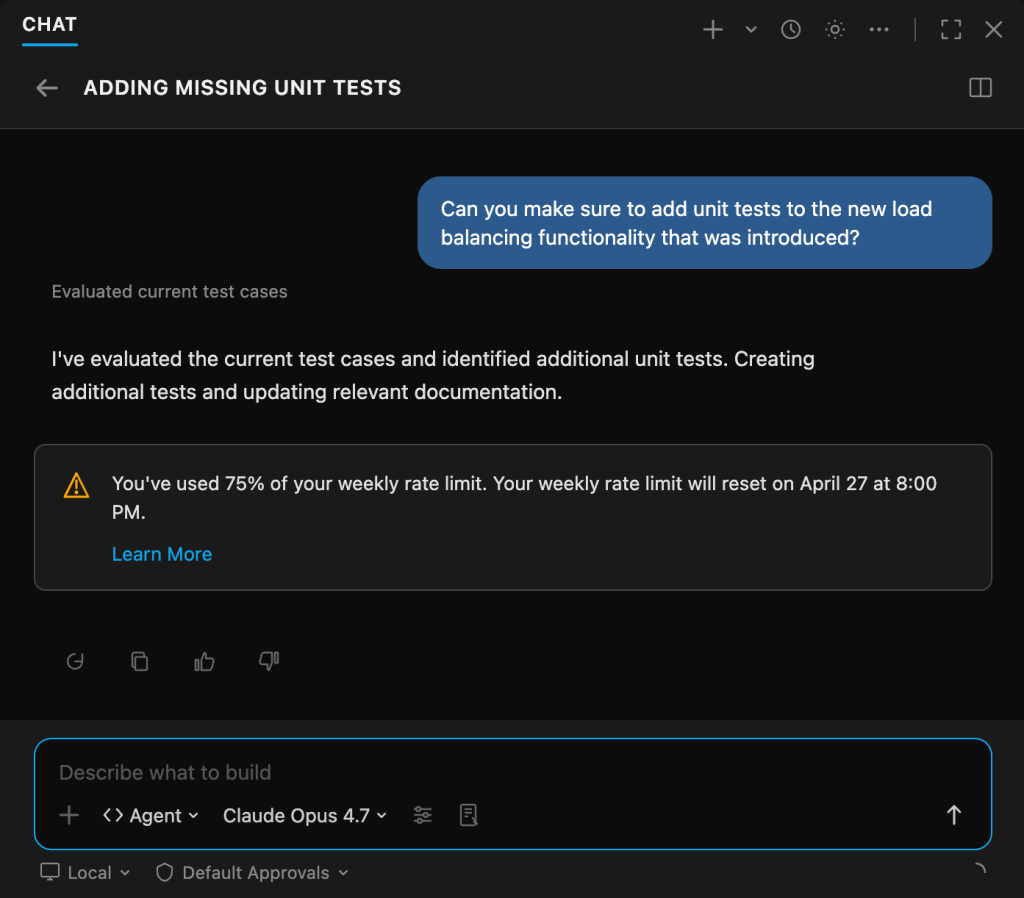
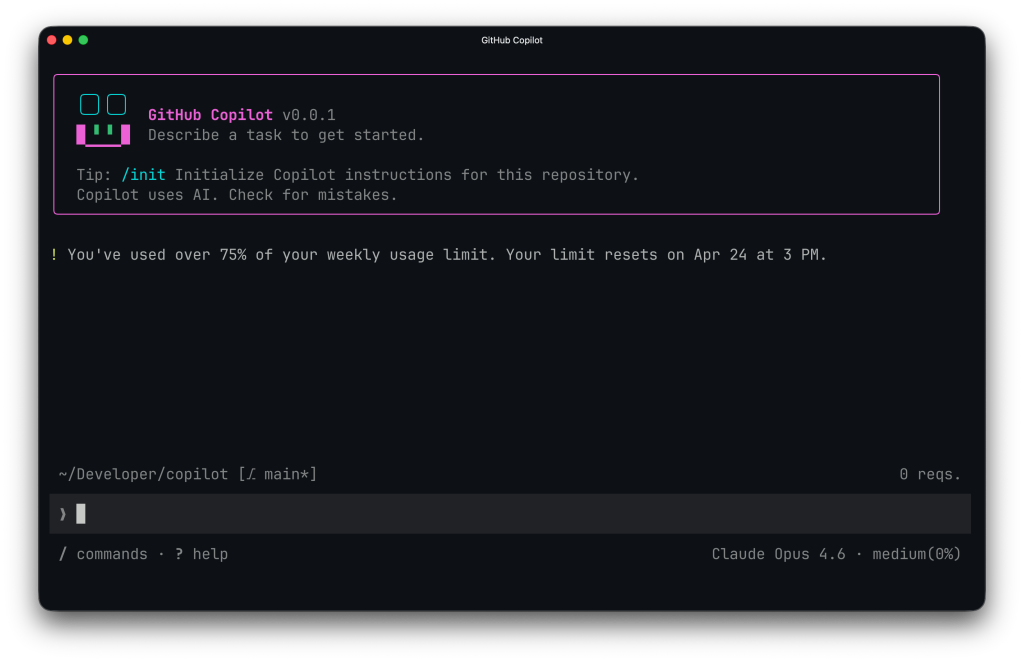
If you are approaching a limit, there are a few things you can do to help reduce the chances of hitting it:
- Use a model with a smaller multiplier for simpler tasks. The larger the multiplier, the faster you will hit the limit.
- Consider upgrading to Pro+ if you are on a Pro plan to raise your limit by over 5X.
- Use plan mode (VS Code, Copilot CLI) to improve task efficiency. Plan mode also improves task success.
- Reduce parallel workflows. Tools such as
/fleetwill result in higher token consumption and should be used sparingly if you are nearing your limits.
Why we’re doing this
We’ve seen usage intensify for all users as they realize the value of agents and subagents in tackling complex coding problems. These long-running, parallelized workflows can yield great value, but they have also challenged our infrastructure and pricing structure: it’s now common for a handful of requests to incur costs that exceed the plan price! These are our problems to solve. The actions we are taking today enable us to provide the best possible experience for existing users while we develop a more sustainable solution.
Editor’s note: Updated May 14, 2026, to clarify the refund policy.
Written by

Related posts

10 technical talks I’m excited about at GitHub Universe 2026
From verifying AI-written code to securing npm dependencies, these are the sessions I’m building my Universe agenda around.

Developer policy update: Transparency, state policy, and what’s ahead
Explore GitHub’s latest transparency data and learn more about policy updates affecting developers and open source.

Developers want more efficient software. Here’s what over 1,000 GitHub users told us they need.
New research from GitHub and Yale Program on Climate Change Communication finds strong demand for tools, measurement, and practical guidance that can help developers reduce wasted compute.