All of your downloads. One big button.
Update: Uploads have been deprecated A couple of weeks ago, downloads on GitHub were everywhere — we had the Download Source buttons, the Downloads tab, and, some clicks away, perhaps…
Update: Uploads have been deprecated
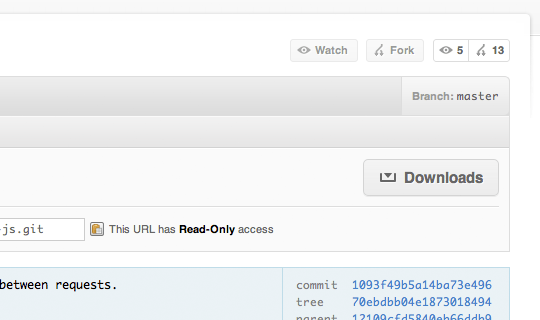
A couple of weeks ago, downloads on GitHub were everywhere — we had the Download Source buttons, the Downloads tab, and, some clicks away, perhaps the download you were looking for. The old UI made downloading especially hard for those needing to grab binaries of GitHub-hosted projects, with many people mistakenly downloading the source instead. To solve this — and to (hopefully) increase downloading on GitHub — we recently consolidated our downloads into one big Downloads button.
So how do I download stuff now?
Every repository now has a big Downloads button in the repository description — check out the image below:
When you click on the new Downloads button, you’ll be presented with a couple of options. You can download the source of the branch or commit you’re on, the latest packaged downloads, or even some tagged downloads. This way, we try to surface the things that people are looking for in the majority of cases:
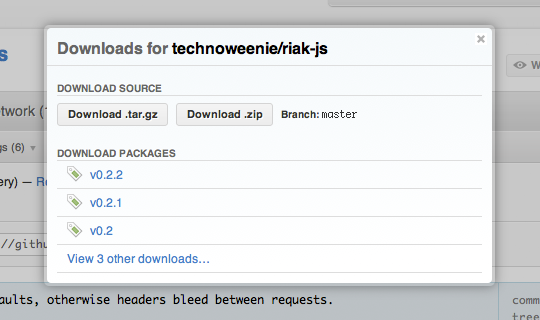
Of course, the old Downloads page still exists. Clicking the last link in the Download Packages list will take you to the full Downloads page. From there, you can download (or upload) as you have in the past.
Written by

Related posts

10 technical talks I’m excited about at GitHub Universe 2026
From verifying AI-written code to securing npm dependencies, these are the sessions I’m building my Universe agenda around.

Developer policy update: Transparency, state policy, and what’s ahead
Explore GitHub’s latest transparency data and learn more about policy updates affecting developers and open source.

Developers want more efficient software. Here’s what over 1,000 GitHub users told us they need.
New research from GitHub and Yale Program on Climate Change Communication finds strong demand for tools, measurement, and practical guidance that can help developers reduce wasted compute.