From pixels to characters: The engineering behind GitHub Copilot CLI’s animated ASCII banner
Learn how GitHub built an accessible, multi-terminal-safe ASCII animation for the Copilot CLI using custom tooling, ANSI color roles, and advanced terminal engineering.
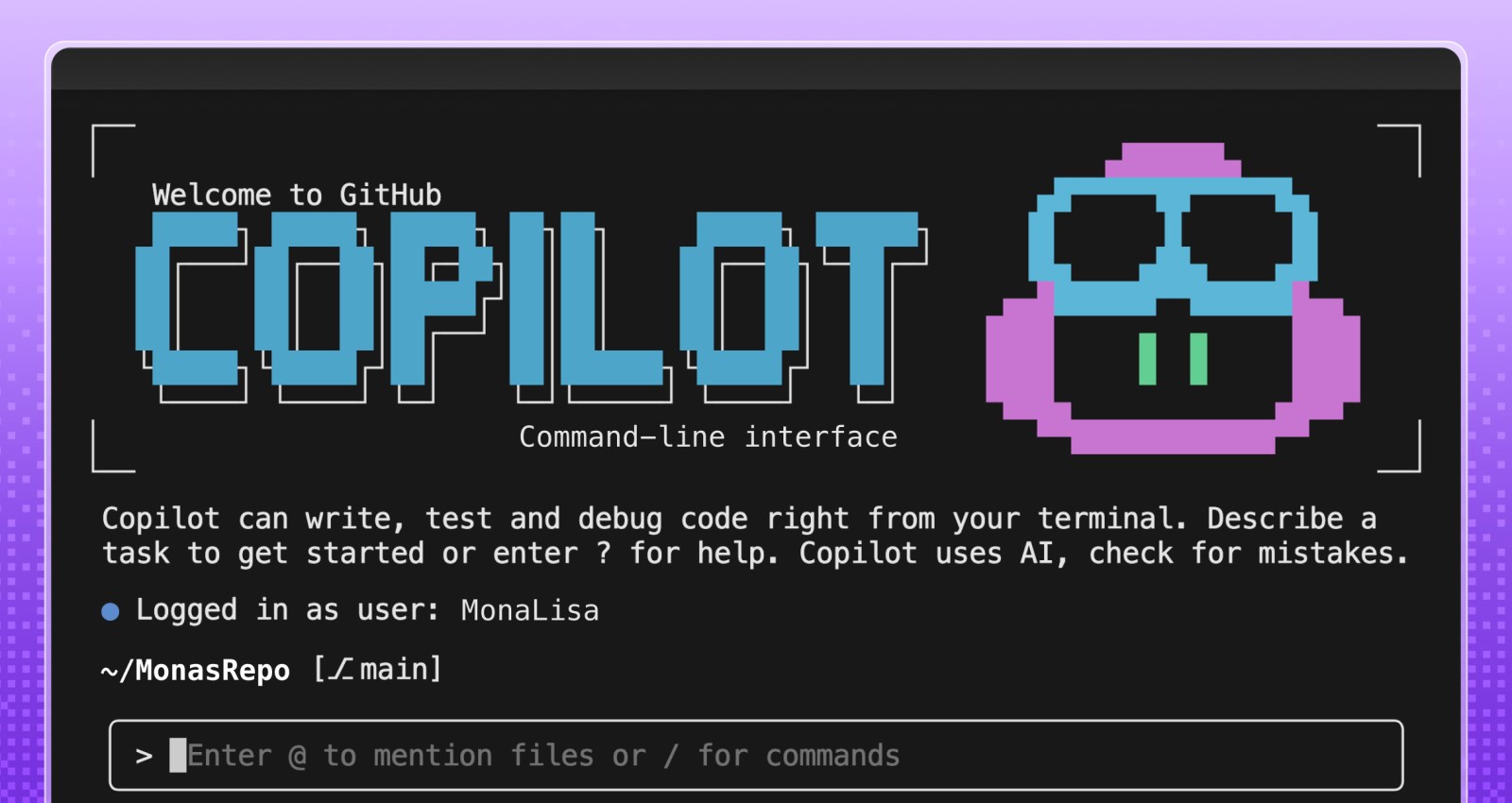
Most people think ASCII art is simple, and a nostalgic remnant of the early internet. But when the GitHub Copilot CLI team asked for a small entrance banner for the new command-line experience, they discovered the opposite: An ASCII animation in a real-world terminal is one of the most constrained UI engineering problems you can take on.
Part of what makes this even more interesting is the moment we’re in. Over the past year, CLIs have seen a surge of investment as AI-assisted and agentic workflows move directly into the terminal. But unlike the web—where design systems, accessibility standards, and rendering models are well-established—the CLI world is still fragmented. Terminals behave differently, have few shared standards, and offer almost no consistent accessibility guidelines. That reality shaped every engineering decision in this project.
Different terminals interpret ANSI color codes differently. Screen readers treat fast-changing characters as noise. Layout engines vary. Buffers flicker. Some users override global colors for accessibility. Others throttle redraw speed. There is no canvas, no compositor, no consistent rendering model, and no standard animation framework.
So when an animated Copilot mascot flying into the terminal appeared, it looked playful. But behind it was serious engineering work, unexpected complexity, a custom design toolchain, and a tight pairing between a designer and a long-time CLI engineer.
That complexity only became fully visible once the system was built. In the end, animating a three-second ASCII banner required over 6,000 lines of TypeScript—most of it dedicated not to visuals, but to handling terminal inconsistencies, accessibility constraints, and maintainable rendering logic.
This is the technical story of how it came together.
Why animated ASCII is a hard engineering problem
Before diving into the build process, it’s worth calling out why this problem space is more advanced than it looks.
Terminals don’t have a canvas
Unlike browsers (DOM), native apps (views), or graphics frameworks (GPU surfaces), terminals treat output as a stream of characters. There’s no native concept of:
- Frames
- Sprites
- Z-index
- Rasterized pixels
- Animation tick rates
Because of this, every “frame” has to be manually repainted using cursor movements and redraw commands. There’s no compositor smoothing anything over behind the scenes. Everything is stdout writes + ANSI control sequences.
ANSI escape codes are inconsistent, and terminal color is its own engineering challenge
ANSI escape codes like \x1b[35m (bright magenta) or \x1b[H (cursor home) behave differently across terminals—not just in how they render, but in whether they’re supported at all. Some environments (like Windows Command Prompt or older versions of PowerShell) have limited or no ANSI support without extra configuration.
But even in terminals that do support ANSI, the hardest part isn’t the cursor movement. It’s the colors.
When you’re building a CLI, you realistically have three approaches:
- Use no color at all. This guarantees broad compatibility, but makes it harder to highlight meaning or guide users’ attention—especially in dense CLI output.
- Use richer color modes (3-bit, 4-bit, 8-bit, or truecolor) that aren’t uniformly supported or customizable. This introduces a maintenance headache: Different terminals, themes, and accessibility profiles render the same color codes differently, and users often disagree about what “good” colors look like.
- Use a minimal, customizable palette (usually 4-bit colors) that most terminals allow users to override in their preferences. This is the safest path, but it limits how accurately you can represent a brand palette—and it forces you to design for environments with widely varying contrast and theme choices.
For the Copilot CLI animation, this meant treating color as a semantic system, not a literal one: Instead of committing specific RGB values, the team mapped high-level “roles” (eyes, goggles, shadow, border) to ANSI colors that degrade gracefully across different terminals and accessibility settings.
Accessibility is a first-class concern
Terminals are used by developers with a wide range of visual abilities—not just blind users with screen readers, but also low-vision users, color-blind users, and anyone working in high-contrast or customized themes.
That means:
- Rapid re-renders can create auditory clutter for screen readers
- Color-based meaning must degrade safely, since bold, dim, or subtle hues may not be perceivable
- Low-vision users may not see contrast differences that designers expect
- Animations must be opt-in, not automatic
- Clearing sequences must avoid confusing assistive technologies
This is also why the Copilot CLI animation ended up behind an opt-in flag early on—accessibility constraints shaped the architecture from the start.
These constraints guided every decision in the Copilot CLI animation. The banner had to work when colors were overridden, when contrast was limited, and even when the animation itself wasn’t visible.
Ink (React for the terminal) helps, but it’s not an animation engine
Ink lets you build terminal interfaces using React components, but:
- It re-renders on every state change
- It doesn’t manage frame deltas
- It doesn’t synchronize with terminal paint cycles
- It doesn’t solve flicker or cursor ghosting
Which meant animation logic had to be handcrafted.
Frame-based ASCII animation has no existing workflow for designers
There are tools for ASCII art, but virtually none for:
- Frame-by-frame editing
- Multi-color ANSI previews
- Exporting color roles
- Generating Ink-ready components
- Testing contrast and accessibility
Even existing ANSI preview tools don’t simulate how different terminals remap colors or handle cursor updates, which makes accurate design iteration almost impossible without custom tooling. So the team had to build one.
Part 1: A request that didn’t fit any workflow
Cameron Foxly (@cameronfoxly), a brand designer at GitHub with a background in animation, was asked to create a banner for the Copilot CLI.
“Normally, I’d build something in After Effects and hand off assets,” Cameron said. “But engineers didn’t have the time to manually translate animation frames into a CLI. And honestly, I wanted something more fun.”
He’d seen the static ASCII intro in Claude Code and knew Copilot deserved more personality.
The 3D Copilot mascot flying in to reveal the CLI logo felt right. But after attempting to create just one frame manually, the idea quickly ran into reality.
“It was a nightmare,” Cameron said. “If this is going to exist, I need to build my own tool.”
Part 2: Building an ASCII animation editor from scratch
Cameron opened an empty repository in VS Code, and began asking GitHub Copilot for help scaffolding an animation MVP that could:
- Read text files as frames
- Render them sequentially
- Control timing
- Clear the screen without flicker
- Add a primitive “UI”
Within an hour, he had a working prototype that was monochrome, but functional.
Simplified early animation loop
Below is a simplified example variation of the frame loop logic Cameron prototyped:
import fs from "fs";
import readline from "readline";

/**
 * Load ASCII frames from a directory.
 */
const frames = fs
  .readdirSync("./frames")
  .filter(f => f.endsWith(".txt"))
  .map(f => fs.readFileSync(`./frames/${f}`, "utf8"));

let current = 0;

function render() {
  // Move cursor to top-left of terminal
  readline.cursorTo(process.stdout, 0, 0);

  // Clear the screen below the cursor
  readline.clearScreenDown(process.stdout);

  // Write the current frame
  process.stdout.write(frames[current]);

  // Advance to next frame
  current = (current + 1) % frames.length;
}

// 75ms = ~13fps. Higher can cause flicker in some terminals.
setInterval(render, 75);
This introduced the first major obstacle: color. The prototype worked in monochrome, but the moment color was added, inconsistencies across terminals—and accessibility constraints—became the dominant engineering problem.
Part 3: ANSI color theory and the real-world limitations
The Copilot brand palette is vibrant and high-contrast, which is great for web but exceptionally challenging for terminals.
ANSI terminals support:
- 16-color mode (standard)
- 256-color mode (extended)
- Sometimes truecolor (“24-bit”) but inconsistently
Even in 256-color mode, terminals remap colors based on:
- User themes
- Accessibility settings
- High-contrast modes
- Light/dark backgrounds
- OS-level overrides
Which means you can’t rely on exact hues. You have to design with variability in mind.
Cameron needed a way to paint characters with ANSI color roles while previewing how they look in different terminals.
He took a screenshot of the Wikipedia ANSI table, handed it to Copilot, and asked it to scaffold a palette UI for his tool.
Adding a color “brush” tool
A simplified version:
function applyColor(char, color) {
  // Minimal example: real implementation needed support for roles,
  // contrast testing, and multiple ANSI modes.
  const codes = {
    magenta: "\x1b[35m",
    cyan: "\x1b[36m",
    white: "\x1b[37m"
  };

  return `${codes[color]}${char}\x1b[0m`; // Reset after each char
}
This enabled Cameron to paint ANSI-colored ASCII like you would in Photoshop, one character at a time.
But now he had to export it into the real Copilot CLI codebase.
Part 4: Exporting to Ink (React for the terminal)
Ink is a React renderer for building CLIs using JSX components. Instead of writing to the DOM, components render to stdout.
Cameron asked Copilot to help generate an Ink component that would:
- Accept frames
- Render them line-by-line
- Animate them with state updates
- Integrate cleanly into the CLI codebase
Simplified Ink frame renderer
import React from "react";
import { Box, Text } from "ink";

/**
 * Render a single ASCII frame.
 */
export const CopilotBanner = ({ frame }) => (
  <Box flexDirection="column">
    {frame.split("\n").map((line, i) => (
      <Text key={i}>{line}</Text>
    ))}
  </Box>
);
And a minimal animation wrapper:
export const AnimatedBanner = () => {
  const [i, setI] = React.useState(0);

  React.useEffect(() => {
    const id = setInterval(() => setI(x => (x + 1) % frames.length), 75);
    return () => clearInterval(id);
  }, []);

  return <CopilotBanner frame={frames[i]} />;
};
This gave Cameron the confidence to open a pull request (his first engineering pull request in nine years at GitHub).
“Copilot filled in syntax I didn’t know,” Cameron said. “But I still made all the architectural decisions.”
Now it was time for the engineering team to turn a prototype into something production-worthy.
Part 5: Terminal animation isn’t solved technology
Andy Feller (@andyfeller), a long-time GitHub engineer behind the GitHub CLI, partnered with Cameron to bring the animation into the Copilot CLI codebase.
Unlike browsers—which share rendering engines, accessibility APIs, and standards like WCAG—terminal environments are a patchwork of behaviors inherited from decades-old hardware like the VT100. There’s no DOM, no semantic structure, and only partial agreement on capabilities across terminals. This makes even “simple” UI design problems in the terminal uniquely challenging, especially as AI-driven workflows push CLIs into daily use for more developers.
“There’s no framework for terminal animations,” Andy explained. “We had to figure out how to do this without flickering, without breaking accessibility, and across wildly different terminals.”
Andy broke the engineering challenges into four broad categories:
Challenge 1: From banner to ready without flickering
Most terminals repaint the entire viewport when new content arrives. At the same time, CLIs come with a strict usability expectation: when developers run a command, they want to get to work immediately. Any animation that flickers, blocks input, or lingers too long actively degrades the experience.
This created a core tension the team had to resolve: how to introduce a brief, animated banner without slowing startup, stealing focus, or destabilizing the terminal render loop.
In practice, this was complicated by the fact that terminals behave differently under load. Some:
- Throttle fast writes
- Reveal cleared frames momentarily
- Buffer output differently
- Repaint the cursor region inconsistently
To avoid flicker while keeping the CLI responsive across popular terminals like iTerm2, Windows Terminal, and VS Code, the team had to carefully coordinate several interdependent concerns:
- Keeping the animation under three seconds so it never delayed user interaction
- Separating static and non-static components to minimize unnecessary redraws
- Initializing MCP servers, custom agents, and user setup without blocking render
- Working within Ink’s asynchronous re-rendering model
The result was an animation treated as a non-blocking, best-effort enhancement—visible when it could be rendered safely, but never at the expense of startup performance or usability.
Challenge 2: Brand color mapping in ANSI
“ANSI color consistency simply doesn’t exist,” Andy said.
Most modern terminals support 8-bit color, allowing CLIs to choose from 256 colors. However, how those colors are actually rendered varies widely based on terminal themes, OS settings, and user accessibility overrides. In practice, CLIs can’t rely on exact hues—or even consistent contrast—across environments.
The Copilot banner introduced an additional complexity: although it’s rendered using text characters, the block-letter Copilot logo functions as a graphical object, not readable body text. Under accessibility guidelines, non-text graphical elements have different contrast requirements than text, and they must remain perceivable without relying on fine detail or precise color matching.
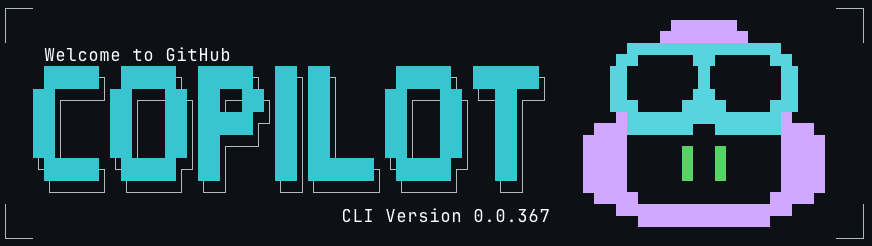
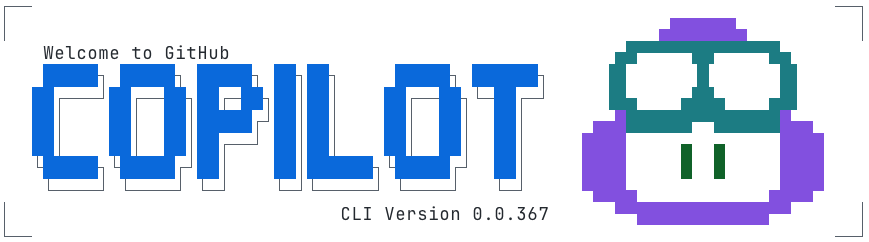
To account for this, the team deliberately chose a minimal 4-bit ANSI palette—one of the few color modes most terminals allow users to customize—to ensure the animation remained legible under high-contrast themes, low-vision settings, and color overrides.
This meant the team had to:
- Treat the Copilot wordmark as non-text graphical content with appropriate contrast requirements
- Select ANSI color codes that approximate the Copilot palette without relying on exact hues
- Satisfy WCAG contrast guidance for both text and non-text elements
- Ensure the animation remained legible in light and dark terminals
- Degrade gracefully when users override terminal colors for accessibility
- Test color combinations across multiple terminal emulators and theme configurations
Rather than encoding brand colors directly, the animation maps semantic roles—such as borders, eyes, highlights, and text—to ANSI color slots that terminals can reinterpret safely. This allows the banner to remain recognizable without assuming control over the user’s color environment.
Challenge 3: Making the animation maintainable
Cameron’s prototype was a great starting point for Andy to incorporate into the Copilot CLI but it wasn’t without its challenges:
- Banner consisted of ~20 animation frames covering an 11×78 area
- There are ~10 animation elements to stylize in any given frame
- Needed a way to separate the text of the frame from the colors involved
- Each frame mapped hard coded colors to row and column coordinates
- Each frame required precise timing to display Cameron’s vision
First, the animation was broken down into distinct animation elements that could be used to create separate light and dark themes:
type AnimationElements =
    | "block_text"
    | "block_shadow"
    | "border"
    | "eyes"
    | "head"
    | "goggles"
    | "shine"
    | "stars"
    | "text";

type AnimationTheme = Record<AnimationElements, ANSIColors>;

const ANIMATION_ANSI_DARK: AnimationTheme = {
    block_text: "cyan",
    block_shadow: "white",
    border: "white",
    eyes: "greenBright",
    head: "magentaBright",
    goggles: "cyanBright",
    shine: "whiteBright",
    stars: "yellowBright",
    text: "whiteBright",
};

const ANIMATION_ANSI_LIGHT: AnimationTheme = {
    block_text: "blue",
    block_shadow: "blackBright",
    border: "blackBright",
    eyes: "green",
    head: "magenta",
    goggles: "cyan",
    shine: "whiteBright",
    stars: "yellow",
    text: "black",
};
Next, the overall animation and subsequent frames would capture content, color, duration needed to animate the banner:
interface AnimationFrame {
    title: string;
    duration: number;
    content: string;
    colors?: Record<string, AnimationElements>; // Map of "row,col" positions to animation elements
}

interface Animation {
    metadata: {
        id: string;
        name: string;
        description: string;
    };
    frames: AnimationFrame[];
}
Then, each animation frame was captured to separate frame content from stylistic and animation details, resulting in over 6,000 lines of TypeScript to safely animate three seconds of the Copilot logo across terminals with wildly different rendering and accessibility behaviors:
    const frames: AnimationFrame[] = [
        {
            title: "Frame 1",
            duration: 80,
            content: `
┌┐
││


││
└┘`,
            colors: {
                "1,0": "border",
                "1,1": "border",
                "2,0": "border",
                "2,1": "border",
                "10,0": "border",
                "10,1": "border",
                "11,0": "border",
                "11,1": "border",
            },
        },
        {
            title: "Frame 2",
            duration: 80,
            content: `
┌──     ──┐
│         │
 █▄▄▄
 ███▀█
 ███ ▐▌
 ███ ▐▌
   ▀▀█▌
   ▐ ▌
    ▐
│█▄▄▌     │
└▀▀▀    ──┘`,
            colors: {
                "1,0": "border",
                "1,1": "border",
                "1,2": "border",
                "1,8": "border",
                "1,9": "border",
                "1,10": "border",
                "2,0": "border",
                "2,10": "border",
                "3,1": "head",
                "3,2": "head",
                "3,3": "head",
                "3,4": "head",
                "4,1": "head",
                "4,2": "head",
                "4,3": "goggles",
                "4,4": "goggles",
                "4,5": "goggles",
                "5,1": "head",
                "5,2": "goggles",
                "5,3": "goggles",
                "5,5": "goggles",
                "5,6": "goggles",
                "6,1": "head",
                "6,2": "goggles",
                "6,3": "goggles",
                "6,5": "goggles",
                "6,6": "goggles",
                "7,3": "goggles",
                "7,4": "goggles",
                "7,5": "goggles",
                "7,6": "goggles",
                "8,3": "eyes",
                "8,5": "head",
                "9,4": "head",
                "10,0": "border",
                "10,1": "head",
                "10,2": "head",
                "10,3": "head",
                "10,4": "head",
                "10,10": "border",
                "11,0": "border",
                "11,1": "head",
                "11,2": "head",
                "11,3": "head",
                "11,8": "border",
                "11,9": "border",
                "11,10": "border",
            },
        },
Finally, each animation frame is rendered building segments of text based on consecutive color usage with the necessary ANSI escape codes:
           {frameContent.map((line, rowIndex) => {
                const truncatedLine = line.length > 80 ? line.substring(0, 80) : line;
                const coloredChars = Array.from(truncatedLine).map((char, colIndex) => {
                    const color = getCharacterColor(rowIndex, colIndex, currentFrame, theme, hasDarkTerminalBackground);
                    return { char, color };
                });

                // Group consecutive characters with the same color
                const segments: Array<{ text: string; color: string }> = [];
                let currentSegment = { text: "", color: coloredChars[0]?.color || theme.COPILOT };

                coloredChars.forEach(({ char, color }) => {
                    if (color === currentSegment.color) {
                        currentSegment.text += char;
                    } else {
                        if (currentSegment.text) segments.push(currentSegment);
                        currentSegment = { text: char, color };
                    }
                });
                if (currentSegment.text) segments.push(currentSegment);

                return (
                    <Text key={rowIndex} wrap="truncate">
                        {segments.map((segment, segIndex) => (
                            <Text key={segIndex} color={segment.color}>
                                {segment.text}
                            </Text>
                        ))}
                    </Text>
                );
            })}
Challenge 4: Accessibility-first design
The engineering team approached the banner with the same philosophy as the GitHub CLI’s accessibility work:
- Respect global color overrides both in terminal and system preferences
- After the first use, avoid animations unless explicitly enabled via the Copilot CLI configuration file
- Minimize ANSI instructions that can confuse assistive tech
“CLI accessibility is under researched,” Andy noted. “We’ve learned a lot from users who are blind as well as users with low vision, and those lessons shaped this project.”
Because of this, the animation is opt-in and gated behind its own flag—so it’s not something developers see by default. And when developers run the CLI in –screen-reader mode, the banner is automatically skipped so no decorative characters or motion are sent to assistive technologies.
Part 6: An architecture built to scale
By the end of the refactor, the team had:
- Frames stored as plain text
- Animation elements
- Themes as simple mappings
- A runtime colorization step
- Ink-driven timing and rendering
- A maintainable foundation for future animations
This pattern—storing frames as plain text, layering semantic roles, and applying themes at runtime—isn’t specific to Copilot. It’s a reusable approach for anyone building terminal UIs or animations.
Part 7: What this project reveals about building for the terminal
A “simple ASCII banner” turned into:
- A frame-based animation tool that didn’t exist
- A custom ANSI color palette strategy
- A new Ink component
- A maintainable rendering architecture
- Accessibility-first CLI design choices
- A designer’s first engineering contribution
- Real-world testing across diverse terminals
- Open source contributions from the community
“The most rewarding part was stepping into open source for the first time,” Cameron said. “With Copilot, I was able to build out my MVP ASCII animation tool into a full open source app at ascii-motion.app,. Someone fixed a typo in my README, and it made my day.”
As Andy pointed out, building accessible experiences for CLIs is still largely unexplored territory and far behind the tooling and standards available for the web.
Today, developers are already contributing to Cameron’s ASCII Motion tool, and the Copilot CLI team can ship new animations without rebuilding the system.
This is what building for the terminal demands: deep understanding of constraints, discipline around accessibility, and the willingness to invent tooling where none exists.
Use GitHub Copilot in your terminal
The GitHub Copilot CLI brings AI-assisted workflows directly into your terminal — including commands for explaining code, generating files, refactoring, testing, and navigating unfamiliar projects.
Tags:
Written by

Related posts
Migrating the GitHub Copilot runtime to Rust, using Copilot
A rewrite this size wasn’t affordable before agents. Here’s what porting the Copilot agent runtime to 800,000 lines of production Rust actually took.
Marketing ops as code: Automating events from planning to follow-up on GitHub
If you can write down how you do your work, you can automate it. Here’s what I did to support GitHub’s APAC marketing team.

GitHub Copilot app for Beginners: Using the diff, terminal, and browser
Checking agent-generated code usually means hopping between tabs. Learn how to view diffs, run terminal commands, and preview web apps side by side in the GitHub Copilot app.