Check out the Quickstart guide for GitHub Issues >
From latency to instant: Modernizing GitHub Issues navigation performance
How the GitHub Issues team used client-side caching, smart prefetching, and service workers to make navigation feel instant.

|
15 minutes
When you’re working through a backlog—opening an issue, jumping to a linked thread, then back to the list—latency isn’t just a metric. It’s a context switch. Even small delays add up, and they hit hardest at the exact moments developers are trying to stay in flow. It’s not that GitHub Issues was “slow” in isolation; it’s that too many navigations still paid the cost of redundant data fetching, breaking flow again and again.
Earlier this year, we set out to fix that—not by chasing marginal backend wins, but by changing how issue pages load end-to-end. Our approach was to shift work to the client and optimize perceived latency: render instantly from locally available data, then revalidate in the background. To make that work, we built a client-side caching layer backed by IndexedDB, added a preheating strategy to improve cache hit rates without spamming requests, and introduced a service worker so cached data remains usable even on hard navigations.
In this post, we’ll walk through how the system works and what changed in practice. We’ll cover the metric we optimized for; the caching and preheating architecture; how the service worker speeds up navigation paths that used to be slow; and the results across real-world usage. We’ll also dig into the tradeoffs—because this approach isn’t free—and what still needs to happen to make “fast” the default across every path into Issues. If you’re building a data-heavy web app, these patterns are directly transferable: you can apply the same model to reduce perceived latency in your own system without waiting for a full rewrite.
The speed of thought: Web performance in 2026
In 2026, “fast enough” is not a competitive bar. For developer tools, latency is product quality. When someone is triaging multiple issues, reviewing a feature request or reporting a bug, every avoidable wait breaks flow.
Modern local-first tools and aggressively optimized clients have moved the standard from “loads in a second” to “feels instant.” In this world, users do not benchmark us against old web apps. They benchmark us against the fastest experience they have ever had every day.
GitHub Issues is not a small surface area. Every week millions of people around the world rely on Issues to keep their codebase running smoothly. As Issues also becomes the planning layer for AI-assisted work, perceived performance becomes even more critical: if the loop between intent and feedback is slow, the entire system feels slow.
We heard the same problems from both internal teams and the community: Issues felt too heavy compared to tools built with speed as a first principle. The bottleneck was not feature depth or correctness. It was architecture and request lifecycle. Too many common paths still paid the full cost of server rendering, network fetches, and client boot, even when data had effectively been seen before.
Our Issues Performance team’s job was to close that gap. The objective was straightforward and technical: redesign data flow and navigation behavior so the product feels instant by default.
Before changing architecture, we needed to align on what “fast” means in user terms and how to measure it. Generic page metrics are useful, but they are not sufficient for a complex product surface like Issues.
We use HPC (Highest Priority Content), an internal metric closely aligned with Web Vitals LCP, to measure when the primary content (the content users care about) on the page is first rendered. Like LCP, this is anchored to a single HTML element selected by the browser, which on issue pages is most often the issue title or the issue body. If that element is rendered quickly, the experience feels responsive even if non-critical page regions are still loading.
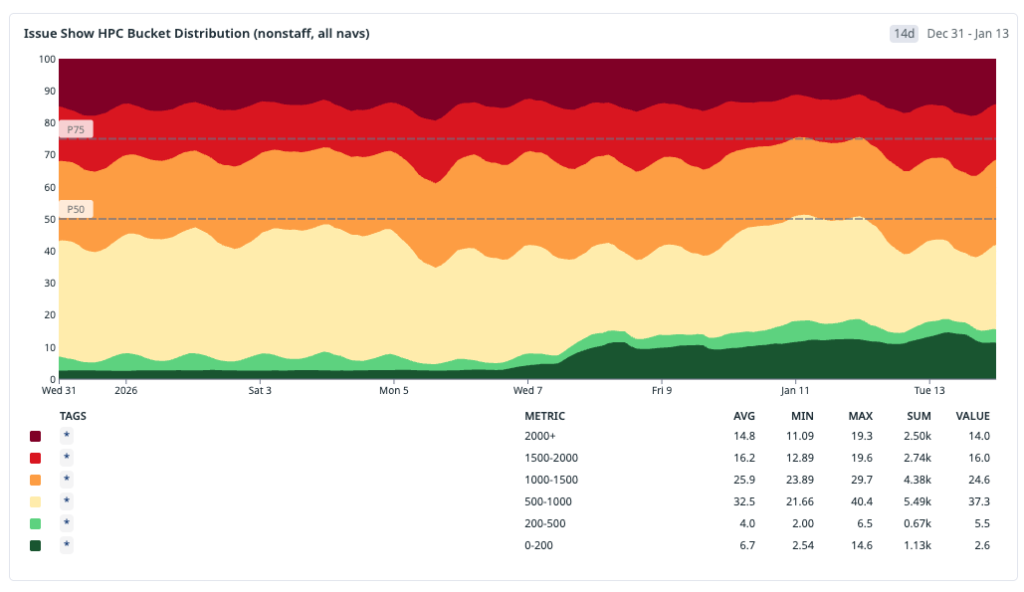
Operationally, we bucket navigations using HPC thresholds:
- Instant: HPC < 200 ms
- Fast: HPC < 1000 ms
- Slow: HPC >= 1000 ms
These thresholds give us a practical model for user-perceived speed, not just raw backend latency. The <200 ms bucket maps to interactions that feel immediate in real workflows, while the <1000 ms bucket captures experiences that are still acceptable but no longer invisible to users.
This is also the point at which our measurement philosophy evolved. Historically, we dedicated significant effort to tracking the p90 and p99 of the HPC and minimizing the worst tail of the distribution. While this work remains important, it does not inherently ensure that the product feels fast for the majority of users. It is possible to enhance the p99 of the HPC while still leaving the median experience feeling sluggish.
For this initiative, we shifted focus toward distribution quality: how many navigations land in our fast and instant buckets across the whole population? The goal is not just fewer terrible outliers. It’s to make speed the default path for the majority of sessions.
The baseline: Navigation mix before we changed anything
Before implementing optimizations, we needed a clear model of how users were actually reaching issues#show (the route for viewing an issue). Treating all navigations as one class of traffic would hide the real bottlenecks.
We identified three primary navigation types:
- Hard navigation: a full browser load (cold start or refresh) where we pay the full cost of network, server rendering, asset loading, JavaScript boot and React hydration.
- Turbo navigation: a Rails Turbo transition that updates targeted page regions without a full reload. It avoids some hard-navigation overhead but still depends heavily on server-rendered responses.
- Soft navigation (React): a client-side transition inside the existing React runtime, where we can often avoid full page bootstrap costs.
Our measured distribution at the start of the workstream was:
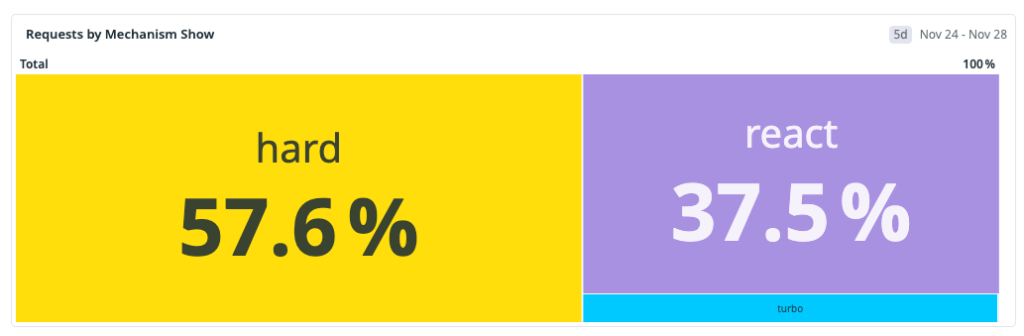
That distribution made one thing obvious: the dominant path was also the slowest. Any strategy focused only on React soft navigations could improve part of the experience, but it could not move overall perceived performance enough on its own.
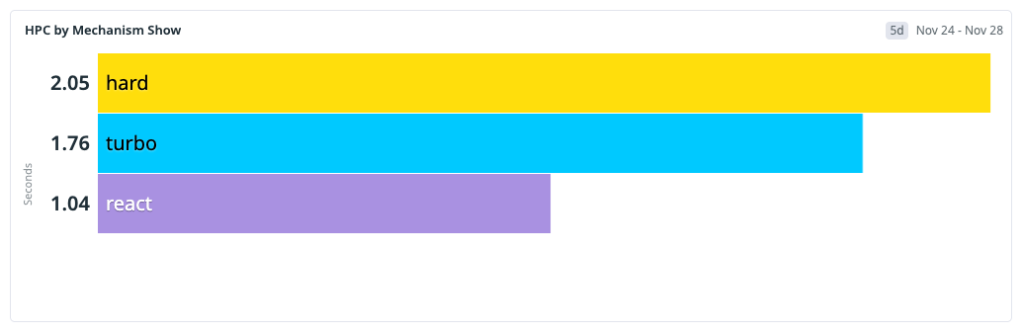
This baseline shaped our next architecture decisions: improve the fast paths and reduce the hard-navigation penalty, because that’s where most users were seeing the most latency.
One thing to note: GitHub is still in the middle of moving from Rails-rendered pages to a React frontend. During that transition, many user journeys cross the Rails/React boundary. When that happens—for example, navigating from a Rails page into Issues—the browser often has to do a full hard navigation and cold boot. That boundary crossing is a big reason hard navigations made up the largest share of our baseline.
We expect that share of hard navigations to decrease over time as more surfaces become React-native. But we could not wait for platform migration alone to solve our problem. We started by optimizing React soft navigations first, where we had immediate architectural leverage and could ship improvements quickly.
Once we aligned on the target, our strategy became clear: build a local-first application model with stale-while-revalidate. That means rendering immediately from locally available data to minimize user-visible latency, then asynchronously revalidating against the server and reconciling the UI if newer data exists.
Step 1: Client-side caching with IndexedDB
We started where we had the most leverage and where we want to move most traffic in the future: React soft navigations. In this path, the runtime is already alive, so the dominant cost is usually data fetch latency, not application boot. If we could remove network from repeated visits, we could move a large slice of traffic into the instant bucket.
Our pre-workstream analysis showed a strong repeated-access pattern: users reopen the same issues frequently during triage and collaboration loops. Based on that behavior, we estimated a potential cache-hit ratio of roughly 30% for issues#show and used that as the initial viability threshold.
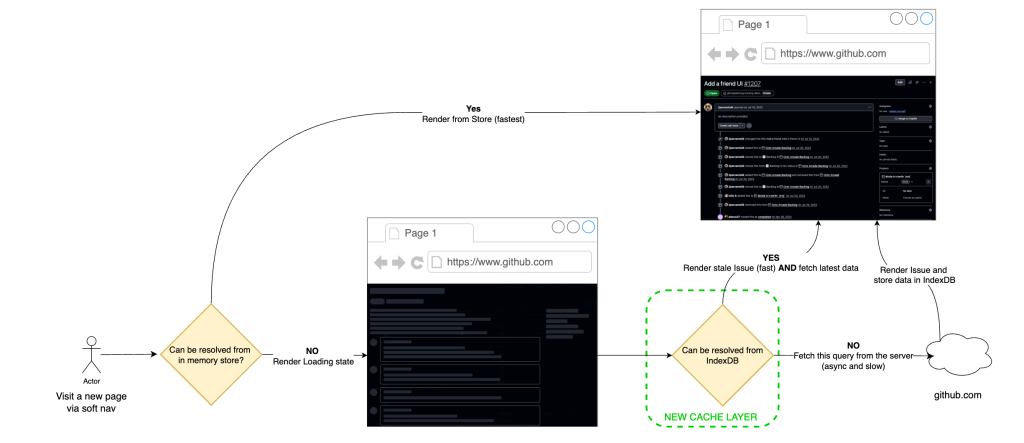
The implementation was to extend our current in-memory store with a persistent client cache in IndexedDB.
Why we chose IndexedDB for this layer:
- Durable browser storage that survives tab closes and browser restarts, unlike memory-only stores.
- Indexed object-store model, which gives efficient key-based lookups for issue query payloads.
- Larger practical quota than localStorage, making it appropriate for real working sets.
On top of that storage layer, we implemented stale-while-revalidate semantics:
- Read path: on soft navigation, attempt to hydrate from local cache first and render immediately.
- Revalidation path: issue a background network request for freshness and reconcile the in-memory store if data changed.
- Failure behavior: when network is degraded, users still get a usable page from cache, with freshness reconciled once connectivity recovers, introducing a new graceful-degradation model.
The architectural point is that this is not “cache or correctness.” It is latency-first rendering with asynchronous consistency checks on the same navigation.
Initial production results validated the model. After broad rollout to all users, approximately 22% of React navigations became instant—up from 4% pre-launch—representing about 15% of total request volume. Observed cache-hit ratio landed around one-third (~33%), which was consistent with the earlier revisit analysis.
The main tradeoff is controlled staleness. We measured server/cache divergence at about 4.7% and treated that as an explicit operating envelope: acceptable for the perceived speed gains on soft navigations, with safeguards to limit user-visible inconsistency.
Moving the needle on cache-hit ratios
Caching is only as good as its cache-hit ratio. The IndexedDB-backed SWR (Stale-While-Revalidate) layer gave us a strong first step, but a one-third hit rate also exposed the next limitation: most navigations still arrived before the data did.
The naive answer was obvious: prefetch every likely next issue as early as possible. We explored that direction and quickly ran into the real constraint, which was not implementation complexity but capacity. On high-fanout surfaces such as issue lists, dashboards, and projects, eager prefetching amplifies request volume, creates N+1-style access patterns and pushes unnecessary compute onto the system for pages a user may never open.
So we changed the objective. Instead of trying to make prefetched data always fresh, we optimized for a cheaper and more scalable condition: make sure some usable data is already local by the time the user clicks.
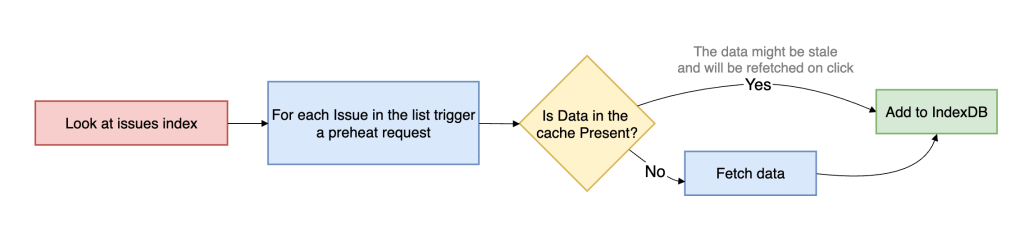
That is preheating. Preheating proactively walks high-intent issue references and prepares cache entries ahead of navigation, but it only hits the network when the issue is not already present in the client cache. If usable data already exists, preheating stops. This makes it fundamentally different from traditional preloading. It is cache-population logic, not freshness-enforcement logic.
This is an explicit tradeoff between freshness and capacity usage. We are willing to serve data that may be slightly stale if that allows the navigation itself to complete near instantaneous, because once the user opens the issue, we can still revalidate in the background and converge to the latest server state.
To support that model efficiently, we introduced an in-memory cache version in front of IndexedDB. IndexedDB gives persistence across tabs and sessions, but it is still asynchronous and therefore not free on the critical path. The in-memory layer sits between the active in-memory store and persistent storage, allowing hot issue payloads to be served synchronously without paying even the IndexedDB read cost. In practice, this removes another async boundary from soft navigation and materially increases the probability of rendering directly from memory.
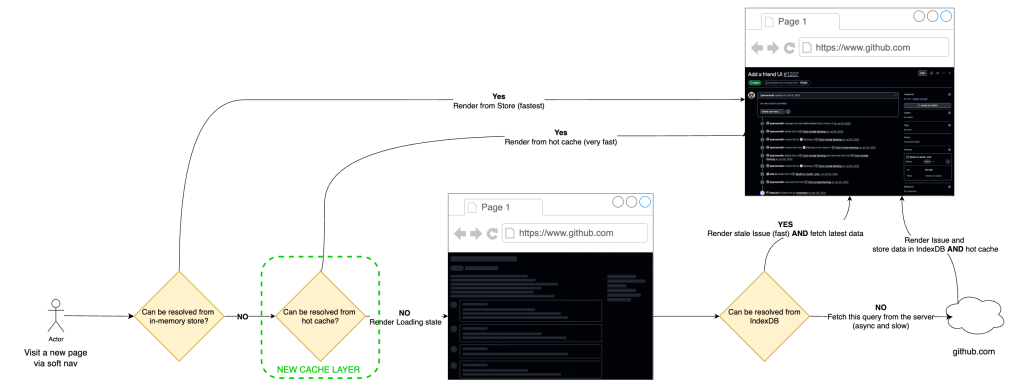
Operationally, preheating is triggered from high-intent surfaces such as issue lists, dashboards, projects, and dependency views. Requests run on low-priority workers, are strictly rate-limited and are guarded by circuit breakers, so the mechanism backs off under pressure. User-initiated work always takes precedence over speculative fetches, allowing us to avoid the noisy-neighbor problem and keep the system stable while still improving cache-hit ratios for real user navigations.
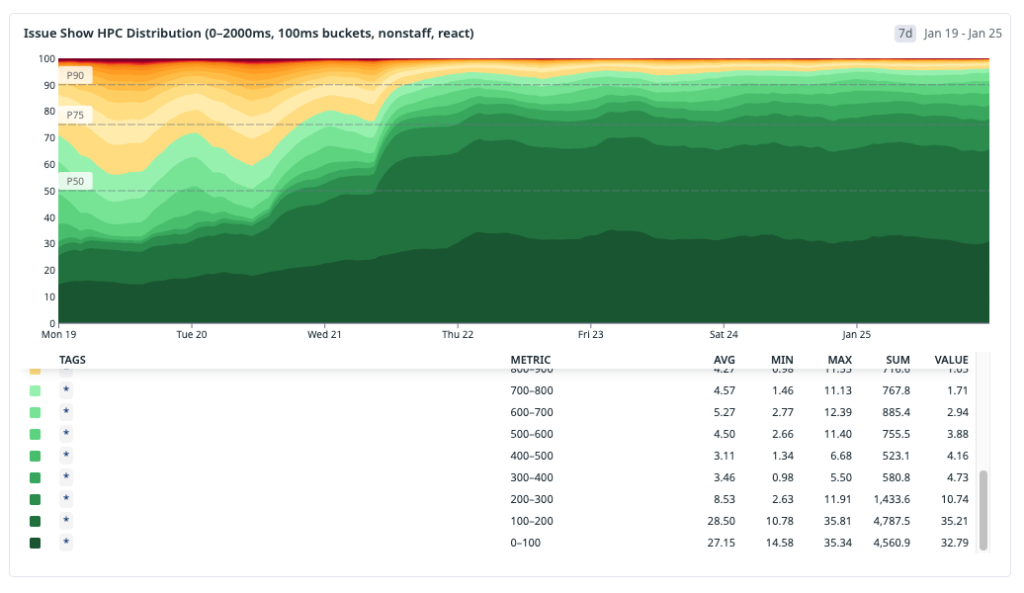
The result was a large shift in distribution. After rolling out preheating broadly, instant navigations for issues#show increased to roughly 30% overall. For React navigations specifically, up to ~70% became instant. Cache-hit ratio rose to roughly 96%.
That tradeoff was acceptable. We spent a small amount of controlled background capacity to move a large percentage of real user navigations out of the network-bound path.
Expanding the fast path: Optimizing turbo and hard navigations
We were happy with the React navigation gains, but soft navigations aren’t the whole story. Even as more of GitHub moves from Rails to React, hard navigations will always exist—refreshes, new tabs, direct URLs, and inbound links. Those cold starts still matter, so we wanted cached data to help there too.
The mechanism we chose was a service worker.
A service worker is a browser-managed script that runs outside the page itself and can intercept network requests before they reach the server. Conceptually, it sits between the browser and the origin as a programmable middleman. That makes it one of the few web platform primitives that can influence hard navigations without requiring the page’s JavaScript runtime to already be active.
For issues#show, our service worker extends the same local-first model we built for React navigations. When the browser starts a navigation request for an issue page, the service worker intercepts it and checks whether the issue data is already available in local cache. If it is, the worker annotates the outgoing request with a specific header that tells the server it can skip a substantial amount of work.

When the service worker detects a cache hit, it signals to the server via a request header. From there, the navigation splits into two paths:
- Cache hit path: return a thin HTML shell (layout + minimal markup + JS), and let React render from the locally cached issue payload.
- Cache miss path: return the normal response (server loads data and SSRs the page).
This is a strict optimization: if the cache is cold, stale, or the service worker isn’t available, behavior falls back to the standard server-rendered path.
This had an especially strong effect on Turbo navigations, because Turbo paths are still heavily constrained by server response time. Once the service worker can signal that issue data is already present, the server spends much less time computing the application fragment, and Turbo benefits almost immediately from that reduction in backend work.
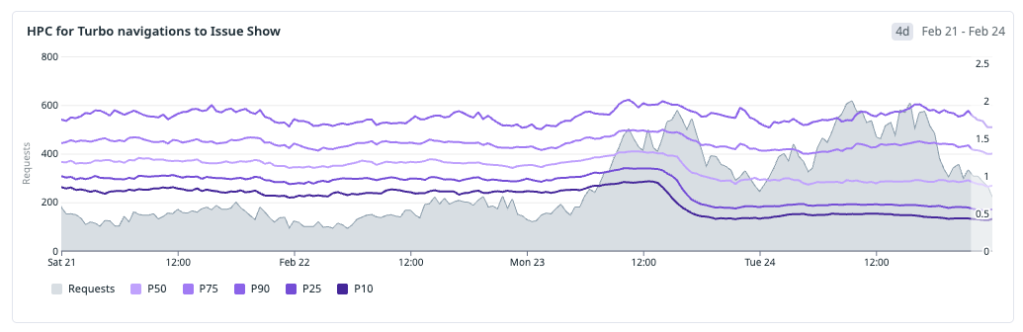
Hard-navigation gains are real, but they are less immediately visible than Turbo gains: on cache-hit hard navigations, so we trade SSR time for client-side rendering. The critical path now becomes JavaScript download and execution.
To reduce that cost, we split code by route using React.lazy and dynamic route preloading, so only the code required for the current route is fetched up front. We apply the same principle at the component level, loading only what’s necessary for the initial view and deferring non-critical modules. For example, we only fetch the issue editor bundle when a user enters edit mode, and use intent-based prefetching (like hover) to hide that latency without bloating the initial bundle.
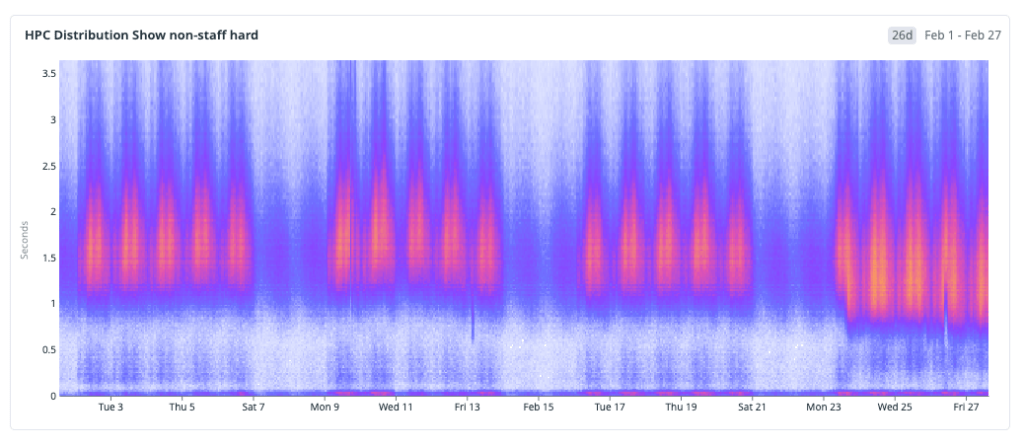
The results
After deploying these changes, we wanted to step back and look at the cumulative impact. We analyzed the HPC metric across the entire rollout period—from the initial IndexedDB cache through preheating, in-memory layering, and the service worker—and the trend is clear and sustained: the distribution is shifting toward fast.
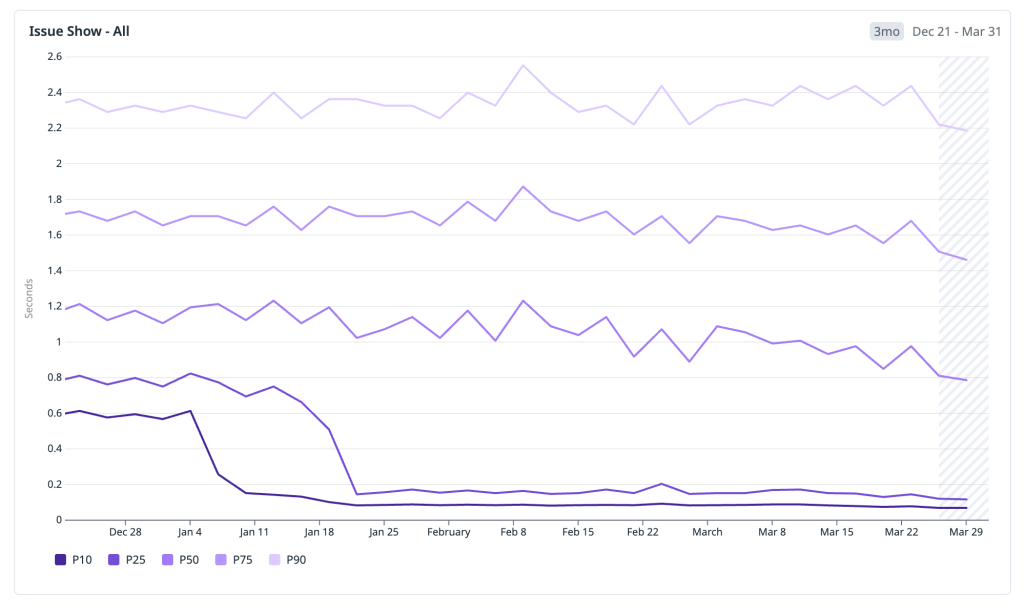
Rather than cherry-pick a single good week, we looked at the full window to share some concrete wins from recent months. Below are the HPC percentiles across all issues#show traffic:
- P10: ~600 ms → 70 ms — the fastest navigations moved firmly into the instant bucket, well below 200 ms.
- P25: ~800 ms → 120 ms — a quarter of all navigations now complete in under 120 ms, down from nearly a full second.
- P50: ~1,200 ms → 700 ms — the median experience crossed below the one-second threshold, moving from the slow bucket into fast.
- P75: 1,800 ms → 1,400 ms — the upper quartile dropped by over 400 ms, shrinking the long tail of perceptible latency.
- P90: 2,400 ms → 2,100 ms — even the slowest navigations improved, though this tail remains the clearest signal of where further work is needed.
The pattern that stands out is the outsized improvement in the lower percentiles. P10 and P25 compressed dramatically because cached and preheated navigations now dominate that part of the distribution. The median improved meaningfully but is still shaped by cold-start traffic. And the upper tail, while better, reflects the hard-navigation paths where JavaScript boot and client rendering are now the bottleneck—exactly the area we are targeting next.
Numbers tell the optimization story, but what ultimately matters is the user impact. The video below shows what these changes feel like in practice—navigating between issues at full speed in a real session:
The work ahead
GitHub Issues is faster today than it has ever been. Across soft navigations, preheated paths, and service-worker-accelerated flows, we have materially changed the distribution of user-perceived latency and moved a much larger share of traffic into the instant bucket.
At the same time, we are not done. Cold starts that rely on SSR are still a real hurdle, especially when client boot and JavaScript execution become the dominant cost after server work is reduced.
The next phase is about moving bigger rocks. We are planning targeted rewrites of parts of our backend stack optimized explicitly for low-latency delivery and are investing in a modern UI delivery layer closer to the edge to reduce round trips and improve response time further.
Performance remains a continuous systems investment, not a one-time project. The architecture is improving, the bottlenecks are changing, and we will keep iterating until fast is the default experience across all navigation paths.
Tags:
Written by

Related posts

The bridge to agent-scale Git infrastructure
We moved a copy of 99.99999% of GitHub’s repositories to Azure. Here’s how per-reference quorums will bring over the rest, and how object storage lets reads scale independently.

Staying Evergreen: How we automated secure access and repo hygiene in a shared org
Put native GitHub features to work to review outside collaborator access and archive stale repositories.

From 2,500 requests to 24: Rebuilding star history without the stargazers
Our new repo star history API now provides trends without returning individual identities or requiring unbounded database work. These are the engineering tradeoffs we made.