Context windows, Plan agent, and TDD: What I learned building a countdown app with GitHub Copilot
Learn how I managed context to keep Copilot focused, used the Plan agent to sharpen vague requirements, and required Test Driven Development practices to catch bugs before users.

In our last Rubber Duck Thursdays stream of 2025, I wanted to build something celebratory. Something that captures what Rubber Duck Thursdays is all about: building together, learning from mistakes, and celebrating everyone who tunes in from across the world.
Along the way, I picked up practical patterns for working with AI that you can apply to your own projects, whether you’re building a countdown app or something entirely different. From managing context windows to avoid cluttered conversations, to using the Plan agent for requirement discovery, to catching edge cases through test-driven development with Copilot. And… why world maps are harder than they look. 👀
See the full stream below. 👇
Starting simple: The basic countdown
Countdown timers are a straightforward concept. Days countdown to hours. Minutes countdown to seconds. But sometimes it’s the simple ideas that allow us to be our most creative. I figured I’d use this as an opportunity to use Copilot in a spec or requirements-driven approach, to build a countdown app that brought anticipation and displayed fireworks as it turned to the new year.
Fortunately, software development is an iterative process and this livestream embraced that fully. While some requirements were well-defined, others evolved in real time, shaped by suggestions from our livestream audience. Custom agents like the Plan agent helped bridge the gap, turning ambiguous ideas into structured plans I could act on. So let’s start at the very beginning, setting up the project.
I generated a new workspace with GitHub Copilot, using a very specific prompt. The prompt explained that we’re building a countdown app and that I wanted to use Vite, TypeScript, and Tailwind CSS v4. It also explained some of the requirements including the dark theme, centred layout, large bold digits with subtle animation, target midnight on January, 2026 by default, with some room for customizations.
#new

1. Create a new workspace for a New Year countdown app using Vite, TypeScript, and Tailwind CSS v4.

**Setup requirements:**
- Use the @tailwindcss/vite plugin (Tailwind v4 style)
- Dark theme by default (zinc-900 background)
- Centered layout with the countdown as the hero element

**Countdown functionality:**
Create a `countdown.ts` module with:
- A `CountdownTarget` type that has `{ name: string, date: Date }` so we can later customize what we're counting down to
- A `getTimeRemaining(target: Date)` function returning `{ days, hours, minutes, seconds, total }`
- A `formatTimeUnit(n: number)` helper that zero-pads to 2 digits
- Default target: midnight on January 1st of NEXT year (calculate dynamically from current date)

**Display:**
- Large, bold countdown digits (use tabular-nums for stable width)
- Labels under each unit (Days, Hours, Minutes, Seconds)
- Subtle animation when digits change (CSS transition)
- Below the countdown, show: "until [target.name]" (e.g., "until 2026")

**Architecture:**
- `src/countdown.ts` - pure logic, no DOM
- `src/main.ts` - sets up the interval and updates the DOM
- Use `requestAnimationFrame` or `setInterval` at 1 second intervals
- Export types so they're reusable

Keep it simple and clean—this is the foundation we'll build themes on top of.
What I love about the “generate new workspace” feature is that Copilot generated custom instruction files for me, automatically capturing my requirements, including the countdown app, Vite, TypeScript, and dark theme. It was all documented before writing a single line of code.
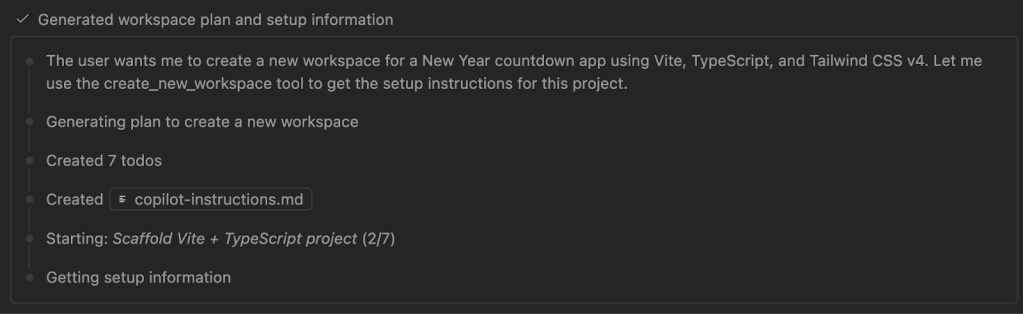
Within minutes, I had a working countdown. Days, hours, minutes, and seconds ticking down to 2026. While it worked, it wasn’t visually exciting. In fairness, I hadn’t specified any design or theme preferences in my initial prompt. So it was time to iterate and make it more interesting.
The community suggestion that steered our course
During the stream, viewers were joining from India, Nigeria, Italy, the United States (the list goes on!); developers from around the world, coming together to learn. One person in the chat made a suggestion that adjusted what we’d do next: What about time zones?
It wasn’t a requirement I’d expected to work on during the stream, so I didn’t have a clear plan of how it would work. Maybe there is a globe that you could spin to select timezones. Maybe there was a world map with a time travel theme. That’s a lot of maybes. My requirements were vague, which was where I turned to the Plan agent.
Plan agent: The questions I hadn’t thought to ask
I’ve been using Plan agent more deliberately lately, especially when I feel that my requirements aren’t fully defined. The Plan agent doesn’t create a plan based on my initial prompt, it asks clarifying questions that can reveal edge cases you may not have considered.
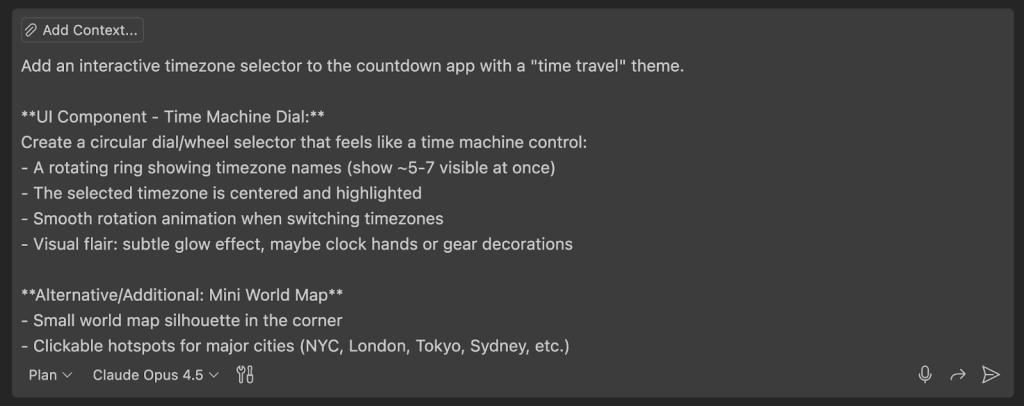
I gave it my rough idea: interactive time zone selector, time travel theme, animate between zones, maybe a world map. The Plan agent came back with questions that made me think:
| Question | Why it mattered |
|---|---|
| Should the circular dial be primary with the world map as secondary, or vice versa? | I hadn’t decided the visual hierarchy |
| What happens on mobile: dropdown fallback or touch-friendly scroll? | I was only thinking of a desktop implementation for this initial version. Mobile could be a future requirement. |
| When a time zone passes midnight, show “already celebrating” with confetti, or a timer showing how long since midnight? | I wanted the celebration, not a reverse countdown. I wasn’t clear on my requirements. |
| Would there be subtle audio feedback when spinning the dial, or visual only? | Bringing audio into the app was scope creep, but it could be a future requirement. |
This is the beauty of working with AI in this way. The Plan agent makes you think, potentially asking a clarifying question and offering options A or B. But as you reflect, you realize the answer is somewhere in between.
For example, in my second iteration of requirements, the plan asked whether fireworks should run continuously, burst once, or loop subtly. I replied that there’s probably a performance consideration, and we should opt for somewhere in the middle. We also asked the livestream viewers to vote on whether we should implement the component as a dial or map. Map won, so we pivoted to a world map as the primary selector with eight featured locations.
Context window management: Just keep what you need
Before implementing, I deliberately started a new chat session.
The context from our previous conversation (workspace creation, basic countdown logic) wasn’t needed anymore. And any context that might have been useful was now included in our custom instructions file. When working with AI tools, that context window is precious. Bringing in irrelevant history clutters the conversation and dilutes focus. So I cleared it, bringing only what mattered: the new requirements, the Plan agent output (which I’d asked Copilot to write to a separate Markdown file), and fresh focus on time zones.
I also reused some custom instruction files, custom agents, and prompt files from another personal project to help steer Copilot in the right direction, and incorporate specialized agents for relevant tasks. This included a UI Performance Specialist agent.
💡 Did you know? GitHub Copilot’s custom agents let you create specialised personas for different development tasks. The UI Performance Specialist agent that I built during the stream is just one example. You can create agents for security reviews, architecture planning, or any role-specific workflow. The awesome-copilot repository has a number of examples.
Implementation: Modular, test-driven, and that map
With the Plan agent’s work complete, I switched to my UI Performance Specialist agent and asked it to review the plan, suggesting deeper implementation details based on its expertise.
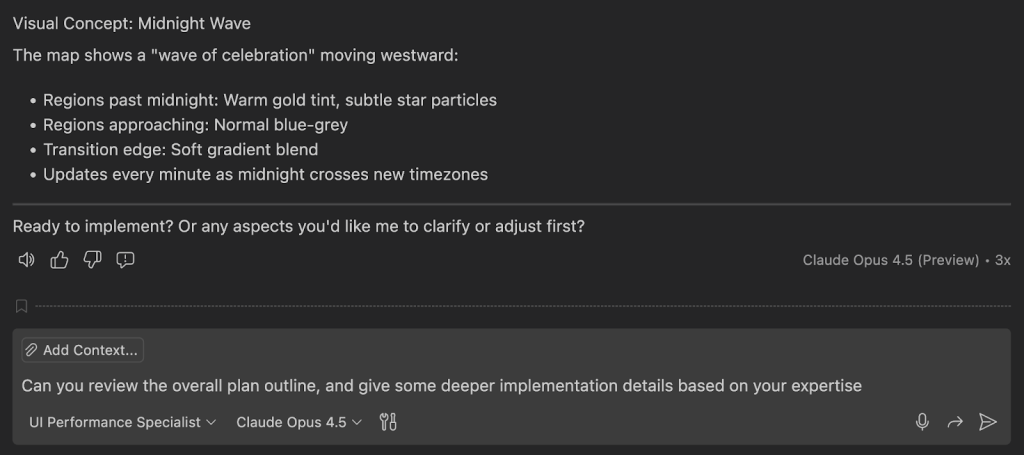
Context is important here, so I didn’t create a new conversation. Instead, I continued the existing one. The agent came back with a detailed set of considerations:
- Frame time budgets for animations
- Map SVG size optimisation strategies
- Celebration particle limits (DOM element concerns) and cleanup considerations
- Animation property recommendations (transform/opacity only)
- Reduced motion support
It looked good, but I added a couple of additional requirements. I asked the custom agent to make the implementation modular, to write the tests first based on expected behaviour, and once it had failing tests, to write the implementation.
That’s right: test-driven development with Copilot.
The TDD Cycle
Copilot created test files for time zone utilities, city state management, and the countdown logic. All failing tests in a red state. Good (one of the few times where we want to see failing tests)!
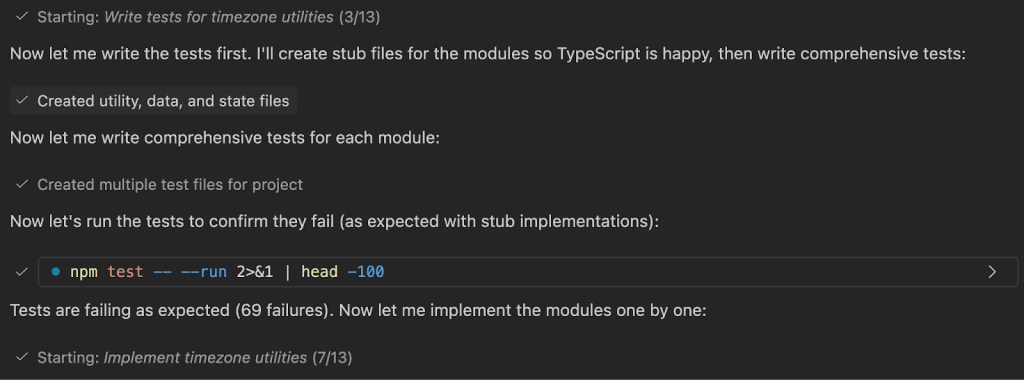
Then it implemented:
- Time zone utilities using the Intl.DateTimeFormat API
- City state with featured locations (New York, London, Tokyo, Sydney, etc.)
- localStorage persistence for selected time zones
- App state management
With access to tools, the custom agent also executed tests in the terminal. Two test cases failed: the logic that determined whether the celebration was being triggered correctly between year rollovers. The tests were expecting that celebrations were handled at midnight, and the duration since the celebrations began.
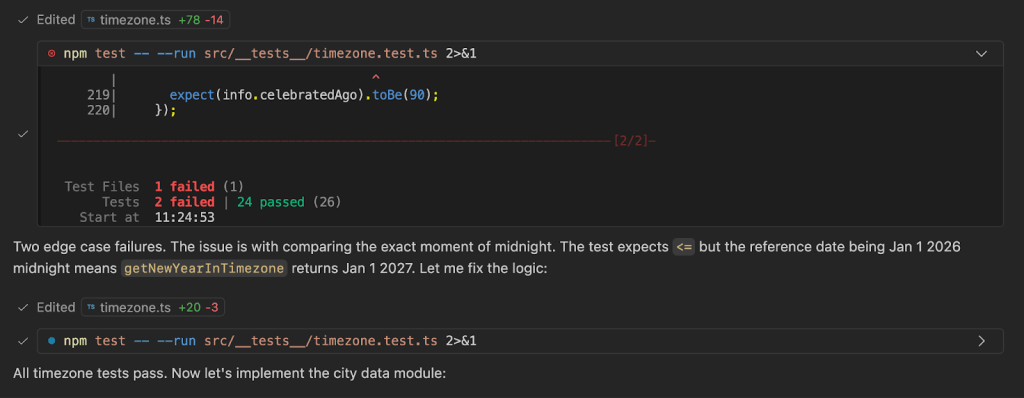
Since Copilot had access to the output, the custom agent caught the test failures, adjusted the timezone implementation, and the tests went green.
💡 Thought: This is exactly why TDD and thinking about code quality matters. Just like us developers, AI-assisted development can get things wrong. Tests help us catch bugs before users do. The year rollover edge case would have been embarrassing to discover on December 31, given that it was the core capability of the app!
But some bugs turn into features. I found one bug too funny to fix immediately. Let’s talk about the world map.
The World map, maybe?
When I opened the app, the countdown worked. The time zone selector worked. The calculations were correct, and switching from New York to Tokyo showed the proper time difference.
But the world map? It didn’t quite render as expected. What appeared on screen was more abstract art than geography. But it really made me laugh on stream.
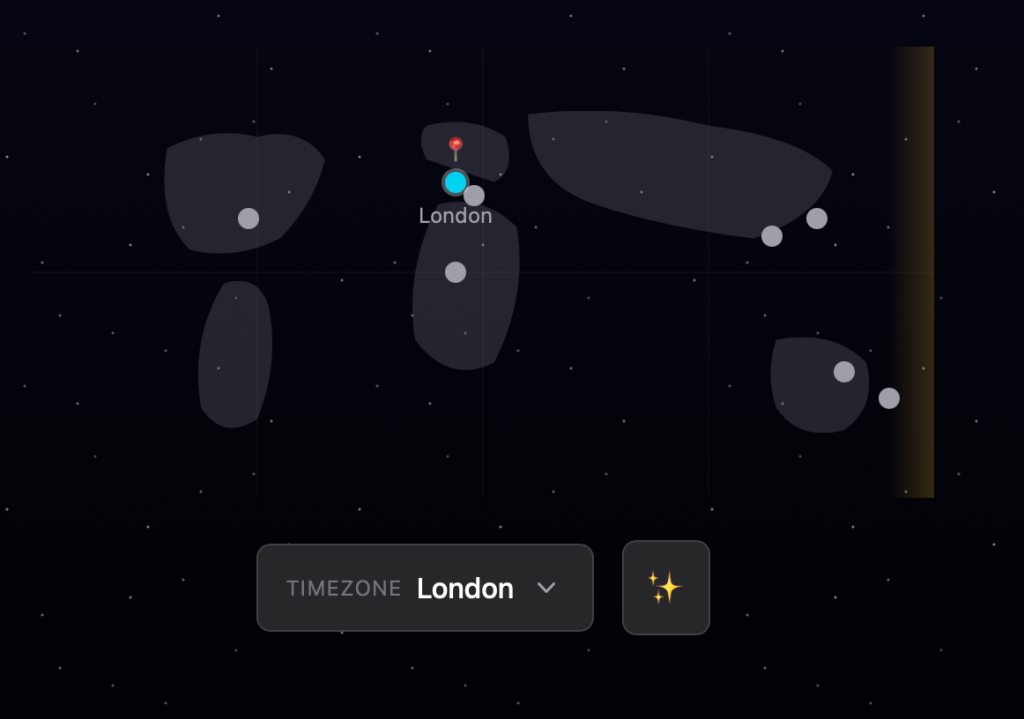
💡 Thought: I was ambitious specifying a world map without providing enough context. No SVG asset, no reference to an existing mapping library. Just “add a mini world map.” A reminder that AI can get things wrong.
Could I have fixed it? Absolutely. But we were over an hour into the stream, and had more features to build. So I left it. The map was a perfect example of iterative development where things don’t always go right the first time. (Can you tell that we build things live yet?)
Fireworks: Building anticipation toward midnight
A countdown on its own is functional, but fireworks add celebration and give some visual flare (See what I did there?).
I switched back to the Plan agent and created a new chat thread (again, context window management, prompting Copilot to build out a plan):
- Use Fireworks.js for the effects
- Set the fireworks behaviour based on time remaining
- If the timer has more than 24 hours left, don’t display fireworks, just show ambient stars
- If the timer has between 24 to 12 hours remaining, set off fireworks every 30 seconds
- Between one hour and 10 minutes remaining, the intensity of the fireworks should build
- And finally, in the last 10 seconds we should have continuous fireworks for maximum celebration
I also asked for a skyline silhouette at the bottom of the screen, a dark night sky gradient, and a theme controller. Plus, one critical testing requirement: “Add a query parameter so I can specify how many minutes away we are from midnight as an override for manual testing.” While I enjoy streaming with our community, I’m not sure that everyone would have enjoyed hanging around until the turn of 2026 to see the results!
The Plan agent asked for further clarification on how to display the stars (either setting them as CSS, or setting them as low-intensity fireworks), as well as some considerations around performance. It also asked about toggle placement, which caught me out. I didn’t remember asking for a toggle button and may have missed that in an iteration of the plan.
After carefully reviewing the plan, the Plan agent that I originally requested an animation toggle for accessibility. This is why I like the Plan agent. It’s rubber ducking with AI that has the context of your conversation, and can check whether those requirements still make sense.
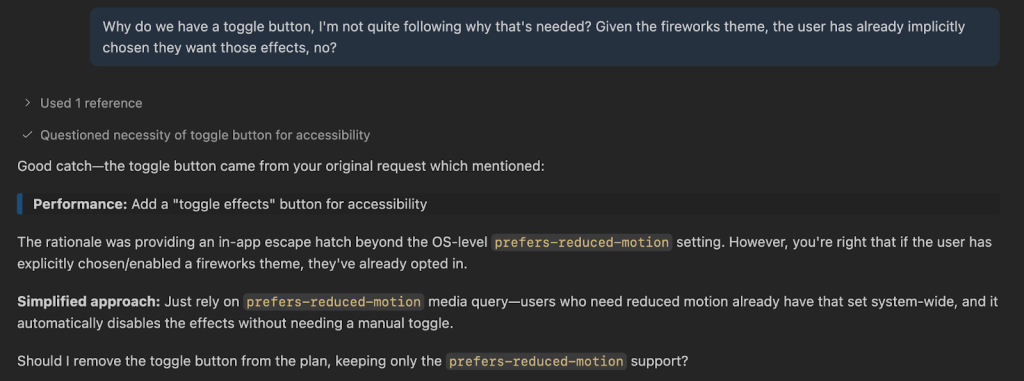
Once Copilot and I renegotiated the requirements, we used that familiar test-driven development approach. One test failed initially as the JSDOM environment setup was missing. Copilot spotted the failure, identified the misconfigured testing configuration, and made the fix. After that, all tests went green.
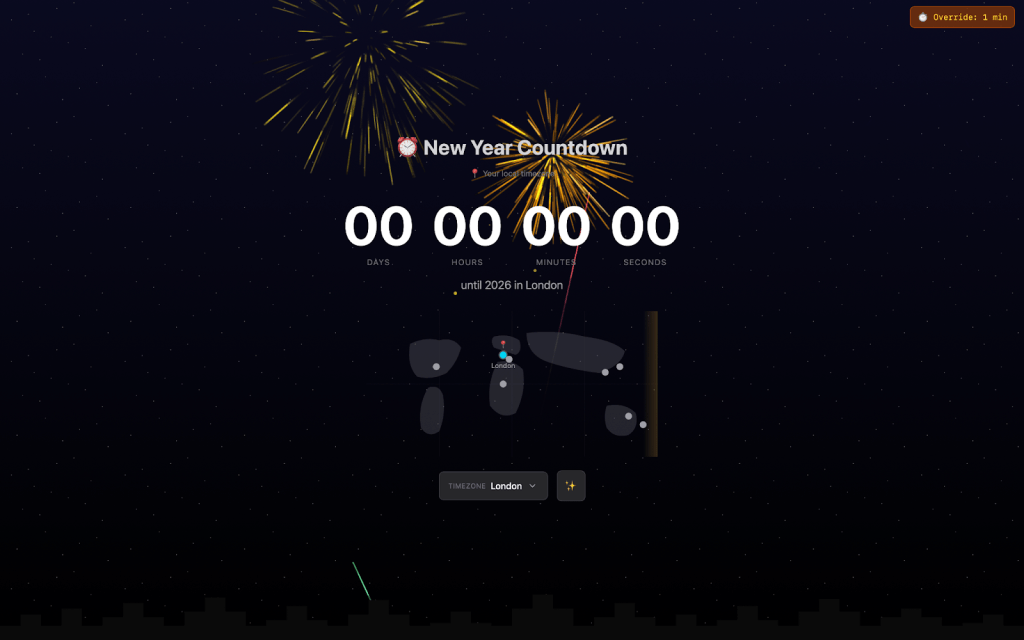
We now had an app with fireworks at different intensity levels, an animated starfield using CSS, a city skyline, reduced motion support, and a query parameter override.
Testing the Intensity Levels
I added ?minutesToMidnight=1 to the URL. Fireworks appeared with medium intensity, building excitement with increasing amounts of colors and particles across the sky. At “midnight,” Happy New Year appeared with even more celebration. The intensity curve felt right, the buildup created anticipation and the finale delivered.
Reveal: What I built that morning
But I didn’t stop there. Throughout the stream, I’d been teasing that I’d made another countdown app earlier that morning, something with a very relevant theme. Our viewers guessed another fireworks countdown, a confetti timer, and even an “elicitation-powered tic-tac-toe” (which, to be fair, we have built before).
But as a GitHub stream, there was only one way that we could finish it off. We had to have a contribution graph themed countdown!
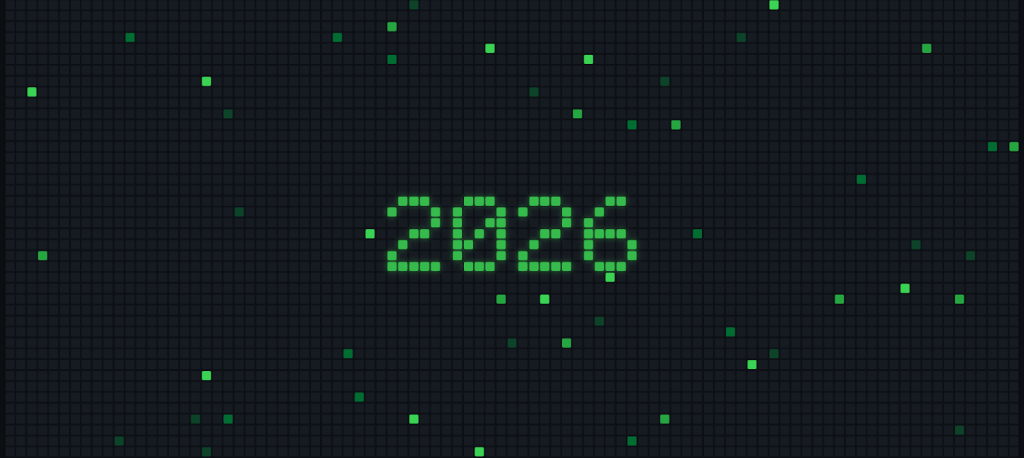
The countdown sat in the centre in front of an animated contribution graph. Each square flickered with green contributions appearing and disappearing across the grid in waves. And just like the fireworks theme, as the countdown ticked closer to zero, more squares lit up and the intensity built.
This stream was a celebration. A way to bring our community together across time zones, all of us building and counting down to the same moment in our own corners of the world.
During the stream, someone asked about the best programming languages for landing jobs. My answer was the same as my approach to this project: find the thing that brings you joy, and then the right tools and languages just fall into place. I built this GitHub countdown theme because it brought me joy. Because I wanted to make something “GitHubby,” and because I enjoy building visual experiences.
Since that stream, I’ve worked on bringing these two projects into a unified open source countdown app, Timestamp. It has a centralized theme orchestrator, allowing developers to plug into a common architecture and extend with new themes. Every countdown is a URL so can be easily shared, and there are several countdown modes to choose from (local time, absolute moments and timers).
You can check out the live app and review the codebase. You’re welcome to take a look at the repository, star it, fork it, and even contribute a new theme.
I hope this inspires you to build that one project that has been on the backlog, and spend some time on the thing that brings you a little bit of joy.
What have we learned?
- Context window management is a skill. Start new chat sessions when old context isn’t needed. Keep conversations focused. It’s context engineering, not just prompt engineering.
- The Plan agent asks questions you may have forgotten. Use it when requirements are vague. Let it reveal edge cases through clarifying questions. Sometimes the answer to A or B is “somewhere in the middle.”
- Custom agents are specialised helpers. My UI Performance Specialist had expertise in frame budgets, animation properties, and accessibility. It gave implementation details while the plan agent helped ask clarifying questions to determine the scope. Specialisation matters.
- TDD with Copilot works. Write tests first. Let them fail. Implement to pass. Just like us developers, AI-assisted tools produce bugs. We need to use those same practices that we’re used to for checking quality (builds, linters, and tests) to catch issues before users do.
- Things won’t always work the first time. That’s okay. The world map didn’t render as expected, and I left it that way until my significant refactor and rebuild of the countdown app. Authentic development means showing the messy middle, not just polished outcomes. We learn from unexpected results as much as from successes.
- Scope ambitiously, implement iteratively. We went from basic countdown, to time zones, to intense fireworks, to a separate contribution graph themed countdown. Rome wasn’t built in a day, and you don’t need everything on day one.
What will you build in 2026? Drop by the next Rubber Duck Thursdays stream at 10:30 a.m. UK time and 2:00 p.m. Eastern time, and let’s build something that brings us joy, which hasn’t quite reached the top of the “some day” list!
Tags:
Written by

Related posts

GitHub Copilot CLI for Beginners: Getting started with GitHub Copilot CLI
GitHub for Beginners: Getting started with the GitHub Copilot CLI, a step-by-step tutorial.

GitHub Copilot CLI combines model families for a second opinion
Discover how Rubber Duck provides a different perspective to GitHub Copilot CLI.
Run multiple agents at once with /fleet in Copilot CLI
/fleet lets Copilot CLI dispatch multiple agents in parallel. Learn how to write prompts that split work across files, declare dependencies, and avoid common pitfalls.