GitHub intelligence puts your code, context, and history to work
Agents should understand more than your codebase—they should understand how your team works. Your preferences, repository conventions, skills, and custom instructions guide how changes should be made, while code in related repositories can show how the pieces fit together. Without that context, agents spend time rediscovering knowledge and can miss your team’s conventions.
GitHub intelligence is the context and learning layer sourced from the graph of GitHub data. It makes this data useful to agents, helping them remember how you work, keep that guidance current, and find the code and development history relevant to the next task. The goal is for agents to build on what you and your team already know, rather than treating every session as a fresh start.
That is the advantage of building where your team’s work already lives. A repository memory can capture why an edge case matters and which test covers it. GitHub intelligence allows agents to use that context, with controls over what they can access.
Three capabilities bring this into your workflow:
- Memory carries knowledge between sessions
- Dreaming keeps the context current
- Code search reaches beyond your checkout.
Availability and settings vary by capability.
Memory: Pick up where you left off
GitHub Copilot Memory is now generally available on paid Copilot plans. Copilot can remember personal preferences and repository conventions across sessions and clients. Memories can be created in the Copilot app, Copilot CLI, VS Code, Copilot cloud agent, Copilot code review, Slack, Teams, and GitHub Mobile.
You can tell Copilot, Remember to start my pull request descriptions with a TL;DR, and it can reuse that preference across Copilot experiences. Repository memories can capture the right test command or how your team expects Copilot to check its work, so you spend less time repeating guidance in each session. Copilot sessions autonomously generate and curate memories, learning from every interaction.
Among the Copilot CLI sessions reviewed during the public preview where the agent used memory, 93% showed better adherence to developer preferences and 42% showed more efficient workflows attributed to the memories included in the session context.
You can interact with memories in the Copilot app, Copilot CLI, and VS Code, or manage personal memories in your Copilot settings, where you can view or delete saved preferences.
Dreaming: Continuous context improvement
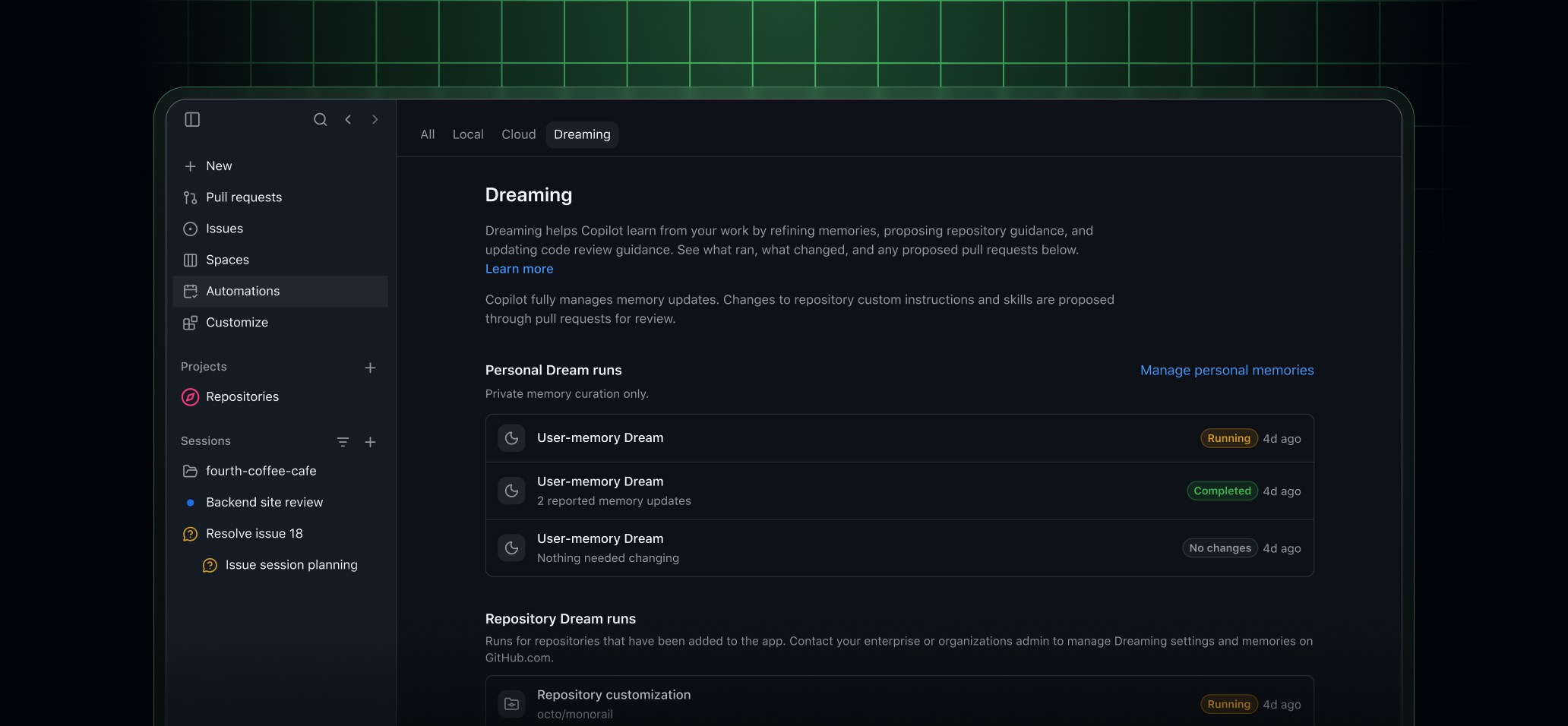
Copilot dreaming, now in public preview, reflects on past work to improve future agentic sessions.
Three dream types are currently available:
- Personal memory curation customizes Copilot to your personal preferences by updating memories based on your agent conversations.
- Repository customization manages repository-scoped memories and proposes updates and improvements to existing skills and custom instruction files.
- Code review customization turns recurring accepted code-review feedback into guidance for Copilot code review.
Dreaming can add, update, and remove personal and repository memories. Changes to checked-in skills and instructions are proposed in pull requests for your team to review.
Dreaming is opt-in.
- Individual subscribers: Enable personal curation in your Copilot settings and repository dreams in each repository’s settings. See personal and repository setup.
- Organizations and enterprises: Administrators enable dreaming through Copilot policies. Enterprise administrators can delegate that choice to organization administrators. Repository dreams cover the repositories allowed by Copilot Memory’s repository access settings. Users must also enable personal dreaming in their own Copilot settings.
Dream runs consume AI credits. See the dreaming documentation for prerequisites, setup, and costs.
Code Search: Reach beyond your checkout
Software projects rarely live in a single repository. GitHub code search helps Copilot find relevant code, configuration, schemas, and documentation across related projects and dependencies without needing a local clone. Copilot can search for exact text and symbols, match patterns with regular expressions, and narrow results by repository, path, or language. Semantic search can also find code by what it does, such as retrying a failed payment, even when you don’t know the file, function name, or repository it lives in.
For example, you’re fixing failed payments, but retry behavior spans a payments service, a shared library, and background workers. Use /research to ask Copilot, How do these components retry failed charges, and where could retries overlap? Copilot can inspect implementations and callers across those repositories to help you understand how the system fits together before changing it.
That unlocks workflows that would otherwise require you to assemble the context yourself:
- Plan a migration: Use
/researchto identify implementations and callers across repositories, plan the changes each service needs, and check which projects still use the old API. - Investigate a bug: Trace related implementations across services and shared libraries, bring specific code references into the investigation, and use that context to propose a coordinated fix.
- Follow organizational standards: Find existing patterns across your organization and use them to guide changes in an unfamiliar codebase.
Whether the task calls for an exact symbol, a regular expression in file contents or paths, or a natural-language description, Copilot can search across repositories in your organization to find relevant context. You spend less time cloning projects, tracking down files, and copying code into the conversation. In addition, Copilot gets the context it needs to make the right changes.
Try it today
Your team shouldn’t have to teach every agent the same lessons. GitHub intelligence helps agents carry those lessons forward, find the context they need, and put more of each session toward the work you actually want done.
Join the discussion within GitHub Community.