Copilot code review: Merge with confidence with Max and approvals
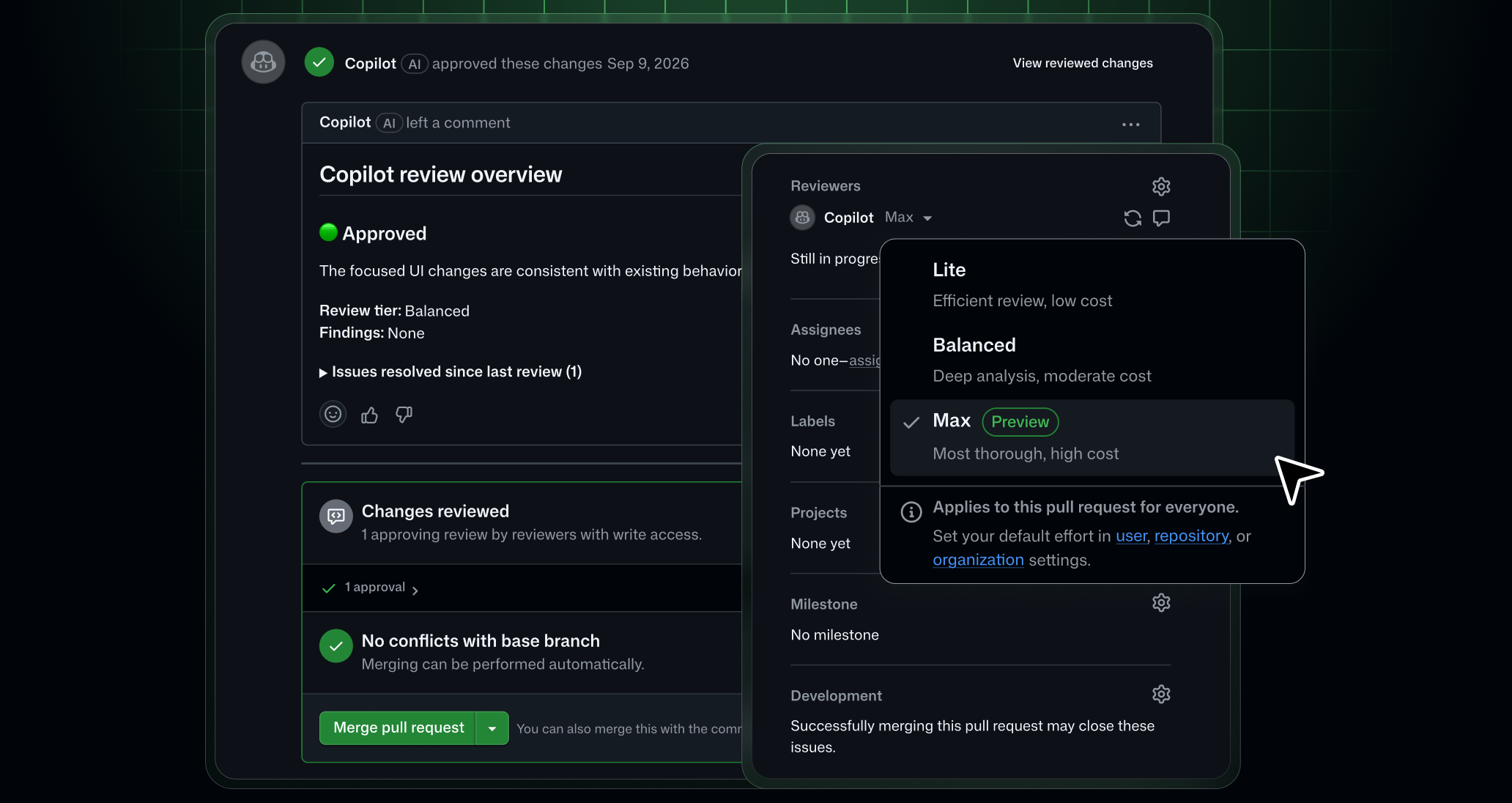
GitHub Copilot code review now offers its most thorough review and can approve your pull request when it’s ready to merge. The new Max review effort level is now in public preview, and Copilot approvals are generally available. Together, they turn a high-quality review into a high-confidence approval, so you can merge with confidence and spend less time waiting on review.
These features are available with Copilot Pro, Pro+, Max, Business, and Enterprise plans.
🚀 Max: The most thorough review from Copilot
Some pull requests carry more risk than others, like a change to authentication logic or to a shared library that several services depend on. Max is built for those types of changes. It joins Lite and Balanced as a third review effort level and runs several independent review agents across models from different providers. Each model has its own strengths and blind spots, so combining them helps catch issues a single model might miss. An aggregation agent then reconciles their findings, resolves disagreements, and double-checks accuracy before combining everything into a single review.
The result is Copilot’s broadest coverage, especially on critical issues, while keeping noise low.
Choose Max when you want the deepest analysis Copilot can provide before you merge. Because Max does more work on each review, it takes longer and uses more AI credits than Lite or Balanced.
✅ Approvals: From review to merge-ready
Copilot approvals, previously available in public preview, are now generally available.
Copilot code review acts as both a reviewer and an approver. Every review includes an approval assessment in the pull request overview comment that tells you whether Copilot considers the pull request ready to merge. When approvals are turned on, Copilot can approve the pull request, and that approval counts toward your repository’s required approvals.
Copilot’s approval behaves like a human reviewer’s approval. If new commits are pushed after Copilot approves, the approval is dismissed, and you can request a new review to get a fresh approval.
🤝 Better reviews, better approvals
Copilot’s approval assessment builds on the findings from its review. Pair Max with approvals on the repositories where a missed issue costs the most, and Copilot’s sign-off reflects the most thorough review it can provide.
⚙️ Configure and control Max
You can select Max for a single pull request from the “Reviewers” bar or set it as the default review effort for a repository, organization, or enterprise. Each level can override the one above it.
Enterprise, organization, and repository admins can optionally set a maximum review effort level to decide where Max is available. Review effort levels above the selected maximum will not be available to use within the enterprise, organization, or repository.
⚙️ Configure approvals
Approvals are off by default. Admins can turn them on at the enterprise, organization, or repository level, and repository admins can choose which file paths Copilot is allowed to approve.
To get started with configuring Max effort level and approvals, see Configuring code review by GitHub Copilot.
Share your feedback in the Copilot code review community discussion.