Explore the GitHub Agentic Workflows repo >
Improving token efficiency in GitHub Agentic Workflows
Agentic workflows that run on every pull request can quietly accumulate large API bills. Here’s how we instrumented our own production workflows, found the inefficiencies, and built agents to fix them.

|
|
12 minutes
GitHub Agentic Workflows is like a team of street sweepers that clean up little messes in your repo. These teams significantly improve repo hygiene and quality, but as with all agentic work, cost is a growing concern for developers. And because CI jobs like agentic workflows are automatically scheduled and triggered, costs can accumulate out of view.
Thankfully, making automations more efficient is easier than doing the same for interactive desktop sessions. Work done during a developer session can be hard to predict, but agentic workflows’ work is fully specified in YAML and repeats every execution.
Because we maintain and use GitHub Agentic Workflows in our own GitHub repositories, we worry about token efficiency as much as our users. That is why in April 2026, we began to systematically optimize the token usage of many of the workflows that we rely on every day. This post describes what we instrumented, the optimizations we applied, and our preliminary results.
Logging token usage
We rely on hundreds of agentic workflows in our repos for maintenance and CI. All workflows run as GitHub Actions against real API rate limits. We are building the plane as we fly it and burning jet fuel as we go.
Before we could optimize our token consumption, we needed to know how tokens were consumed. The first challenge we faced was that each agent framework (Claude CLI, Copilot CLI, Codex CLI) emitted logs in a different format, and usage data could be incomplete for historical runs. Thankfully, the agentic-workflows security architecture uses an API proxy to prevent agents from directly accessing authentication credentials. This proxy gave us a way to capture token usage across all runs in a single normalized format, regardless of agent framework.
Every workflow now outputs a token-usage.jsonl artifact with one record per API call that contains input tokens, output tokens, cache-read tokens, cache-write tokens, model, provider, and timestamps. Combining this data with the rest of the workflow’s logs gave a historical view of how tokens were typically spent and allowed us to optimize for future runs.
Workflows optimizing workflows
With token data in hand, we built two daily optimization workflows.
A Daily Token Usage Auditor reads token usage artifacts from recent workflow runs, aggregates consumption by workflow, and posts a structured report. Its job is to flag any workflow that has significantly increased its recent usage, surface the most expensive workflows, and take note of anomalous runs (e.g., a workflow that normally completes in four LLM turns taking 18).
When an Auditor flags a workflow, a Daily Token Optimizer looks at the workflow’s source and recent logs to create a GitHub Issue describing concrete inefficiencies and proposing specific optimization. The Optimizer has found many inefficiencies that we would have otherwise missed.
Of course, the Auditor and Optimizer are agentic workflows themselves, and their token usages also appear in daily reports to create a small virtuous cycle.
Eliminating unused MCP tools
Based on our initial Auditor and Optimizer results, the most common inefficiency is unused MCP tool registrations.
Because LLM APIs are stateless, agent runtimes typically include the MCP tool function names and JSON schemas with each request. In practice, this means the full set of tools can become part of every call’s context. For a GitHub MCP server with 40 tools, this can add 10–15 KB of schema per turn. If the agent only uses two tools, the remaining 38 are pure overhead added to every request.
Workflow authors naturally start with a full tool-set since it is the path of least resistance, and the agent can figure out which tools it needs. But as time goes on, most workflows rely on a narrow, stable set of tools. The Optimizer identifies this pattern by cross-referencing tool manifests against actual tool calls and recommends pruning unused tools from the configuration.
In our smoke-test workflows, removing unused tools from the MCP configuration reduced per-call context size by 8–12 KB, saving several thousand tokens per run with no change in behavior.
Replacing GitHub MCP with GitHub CLI
Removing unused MCP tools is a relatively simple win. A larger structural opportunity was replacing GitHub MCP calls for data-fetching operations like retrieving pull request diffs, file contents, and review comments with calls to the GitHub CLI.
This change did more than reduce the overhead of unused tools because an MCP tool call is a reasoning step in addition to data retrieval. The agent must decide to call the tool, formulate its arguments, and receive its output as part of the context. That’s a full round-trip LLM API call, consuming tokens for the tool-use JSON schema, the argument block, and the response. Calling gh pr diff, by contrast, is a deterministic HTTP request to GitHub’s REST API with no LLM involvement.
We used two strategies for this migration:
Pre-agentic data downloads. For data that an agent will always need like a pull request diff or the list of changed files, we added setup steps in the workflow that run gh commands before the agent starts and writes the results to workspace files. The agent reads those files instead of making MCP calls. This eliminates tool-call overhead and allows the agent to take advantage of its extensive training in bash scripting to efficiently process the data.
In-agent CLI proxy substitution. Pre-downloading isn’t possible in cases where the agent determines what to fetch at runtime. In these cases we rely on a lightweight transparent HTTP proxy that routes CLI traffic to GitHub’s API servers without exposing an authentication token to the agent. The agent runs gh pr view –json and gets structured data back, just as a user would from a terminal. This reduces token usage without compromising our zero-secrets security requirement for the agent.
Together, these techniques move the majority of GitHub data-fetching out of the LLM reasoning loop.
Measuring efficiency gains is not easy
Once we began to optimize our workflows, we ran into a more nuanced problem: how do you know whether a change made things more efficient, or just made the workflow do less (and perhaps worse) work?
There are three confounding factors.
Not all tokens are created equal. Running the same workflow on Claude Haiku versus Claude Sonnet produces similar token counts but cost very differently. Haiku costs roughly 4× less per token than Sonnet, so a workflow that switches models appears unchanged in raw token count but represents a significant cost reduction. To account for this, we use an Effective Tokens (ET) metric that applies model multipliers to each token type:
ET = m × (1.0 × I + 0.1 × C + 4.0 × O) where m is a model cost multiplier (Haiku = 0.25×, Sonnet = 1.0×, Opus = 5.0×), I is newly-processed input tokens, C is cache-read tokens, and O is output tokens. Output tokens carry 4× weight because they are the most expensive token type across all major providers. Cache-read tokens carry only 0.1× weight because they are served from cache at a fraction of the cost of fresh input. This formula normalizes consumption across model tiers so that a 10% ET reduction means a genuine 10% cost reduction regardless of which model is in use.
The workload is a live repository. As far as we know, there is no agentic-workflow benchmark that we can use to optimize our token usage. When we began looking at token usage by our workflows, we found that in one run a workflow would handle a five-line fix, and in the next run it would handle a 200-line pull request. The first run naturally uses fewer tokens, but the difference is not due to a sudden change in efficiency. Raw token counts can confuse workload variation with fluctuations in efficiency. We try to normalize this by tracking LLM API call counts alongside token counts; constant LLM turns-per-run and falling tokens-per-call indicate genuine efficiency improvement. Both falling together may indicate that less work is being done.
Does quality change? Understanding output quality is the hardest consideration. A lighter model running a more constrained workflow might produce lower-quality output. We looked at the process-level signals like output tokens per LLM call, turn counts per run, and tool-call completion rates to approximate quality. For our optimized Smoke Copilot workflow, all three remained stable across the optimization period even as token consumption fell. The workflow completes in roughly five LLM turns every run, before and after the optimizations. Of course, these are process signals, not outcome signals. We cannot directly observe whether the quality improved, degraded, or was stable, because there is no ground-truth “correctness.” Measuring tokens-per-unit-of-correct-work requires additional instrumentation and thought.
Initial results
After deploying the auditor and optimizer across a dozen production workflows in the gh-aw and gh-aw-firewall repos, we downloaded token-usage artifacts for runs before and after each was optimized and computed ET for each run. Nine of the 12 workflows received optimizer-recommended changes. We include results only for workflows with at least eight runs in both the pre- and post-optimization periods. These are: Auto-Triage Issues, Daily Compiler Quality, Community Attribution, Security Guard, and Smoke Claude.
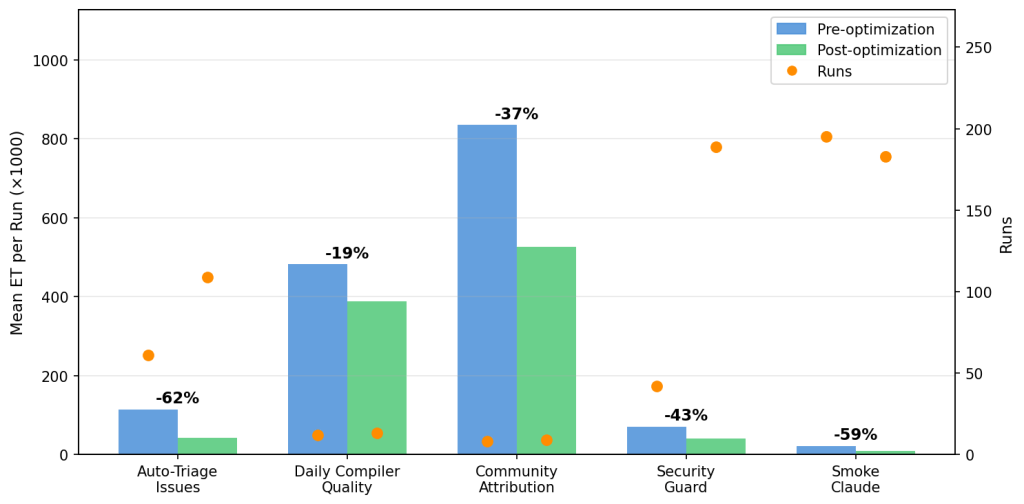
Auto-Triage Issues shows a clear, sustained reduction of 62% across 109 post-fix runs. Daily Compiler Quality shows 19% improvement over 12 post-fix runs, and Daily Community Attribution shows 37% improvement over eight post-fix runs. In the gh-aw-firewall repo, Security Guard, which audits every pull request for security-sensitive changes, and Smoke Claude an integration test that exercises the firewall’s Claude CLI path, had the most post-fix runs and show improvements of 43% and 59%, respectively.
Run frequency matters as much as per-run savings. Auto-Triage Issues fires on every new issue (averaging 6.8 runs per day with a max of 15) while Daily Compiler Quality runs at most once per day. 62% savings and 6.8 runs/day compounds quickly: over the observation period, Auto-Triage’s optimization saved roughly 7.8 M ET in aggregate, assuming the pre-optimization rate. Security Guard and Smoke Claude run even more frequently. When prioritizing which workflows to optimize, run frequency is as important as per-run consumption.
It is important to note that not every optimization that the agent recommends translates into measurable ET savings, especially over short observation windows on a live repository where workload varies day to day. For example, the Contribution Check workflow experienced a 5% increase in ET, and we will discuss it in greater detail below.
Take aways
Based on these results, we highlight three patterns.
Many agent turns are deterministic data-gathering. Auto-Triage Issues shows the strongest sustained improvement in gh-aw (−62% across 109 post-fix runs) because the optimization eliminated structural inefficiency: many agent turns were spent on reads that required no inference, such as fetching issue metadata and scanning labels. Moving those reads into pre-agentic CLI steps before the agent starts removed them from the LLM reasoning loop entirely. The same pattern drove Security Guard’s −43% reduction in gh-aw-firewall: a relevance gate now skips the LLM entirely for pull requests that don’t touch security-sensitive files. The cheapest LLM call is the one you don’t make.
Contribution Check illustrates a confounding factor: 82–83% of input tokens were cache reads (data-gathering), but average ET increased 5%. This is due to a workload shift rather than optimization failure: in the pre-optimization period 41% of runs processed small pull requests (ET < 100K) and 39% processed large pull requests (ET > 300K). The post-optimization period coincided with a burst of development activity, and the workflow processed 9% small pull requests and 65% large pull requests. Output tokens, which carry a 4× weight in the ET formula, rose 14% as the agent reviewed bigger diffs. The optimization likely improved per-turn efficiency, but the shift toward heavier workloads masks that gain in the aggregate numbers.
Unused tools are expensive to carry. Among the excluded gh-aw workflows, the Glossary Maintainer is an instructive case. A single tool—search_repositories—was called 342 times in one run, accounting for 58% of all tool calls, despite being completely unnecessary for a workflow that only scans local file changes. Removing it from the toolset was the optimizer’s recommendation. In gh-aw-firewall, Smoke Claude’s −59% reduction was driven in part by aggressive MCP tool pruning combined with a model-tier switch to Haiku. The Daily Community Attribution workflow illustrates the limits of this approach: it was configured with eight GitHub MCP tools and made zero calls to any of them across an entire run, but removing them did not reduce ET. Tool manifests were a small fraction of this workflow’s overall context.
A single misconfigured rule can cause runaway loops. Also among the excluded workflows, Daily Syntax Error Quality was the highest-ET workflow in the project before optimization. The root cause was a one-line misconfiguration: the workflow copied test files to /tmp/ then called gh aw compile*, but the sandbox’s bash allowlist only permitted relative-path glob patterns. Every compile attempt was blocked. Unable to use the tool it needed, the agent fell into a 64-turn fallback loop in which it manually read source code to reconstruct what the compiler would have told it. One fix to the allowed bash patterns eliminated the loop. We did not have enough baseline runs to precisely quantify the improvement, but the pathology was clear and the fix was unambiguous.
What’s next?
The tools we use to optimize our workflows including API-level observability, automated auditing workflows, MCP tool pruning, and CLI substitution are all available today in the GitHub Agentic Workflows framework. Another upcoming optimization is refactoring monolithic agents into teams of subagents using smaller and cheaper models.
The next step is to move from workflow-level optimization to system-level optimization. A workflow run is not really one flat sequence of API calls. It is a chain of episodes: short phases of work like gathering context, reading artifacts, retrying after a failure, or synthesizing a final answer. Once you can see those episodes clearly, you can ask much better questions. Which episode actually caused a costly run? Which episodes are mostly repeated work, blocked work, or failed work? Which ones should stop being agentic entirely and become deterministic pre-steps?
That same logic applies at the portfolio level. Repositories do not run one workflow in isolation. They run a fleet of agentic automations that often trigger on the same events, inspect the same diffs and logs, and produce adjacent judgments. That means cost is not just a property of a single workflow, but also of overlap across the portfolio. The next analyses we want are portfolio-level ones: where workflows are duplicating reads, where several workflows should be consolidated, and where shared intermediate artifacts should be cached instead of rediscovered by each run.
Those open questions are genuinely hard. Measuring goodput still requires outcome instrumentation that does not yet exist at scale for agentic CI workflows, and understanding episode and portfolio efficiency requires richer lineage data than most systems collect today. But that is the direction that matters. The proxy-level observability and optimizer workflows have already changed how we develop and deploy new agentic automations. We add token monitoring from day one rather than retrofitting it later, and increasingly we think in terms of avoidable work across the whole automation fleet, not just expensive runs in isolation.
If you’re running agentic workflows in CI and wondering whether you’re spending more than you need to, the first step is the same as ours: add the API proxy, turn on logging, and let the data tell you where to look.
If you want to add the workflows mentioned here, you can simply drop them into your repo using the gh-aw CLI:
gh extensions install github/gh-aw
gh aw add githubnext/agentic-ops/copilot-token-audit githubnext/agentic-ops/copilot-token-optimizer
Running them alongside your existing CI will give you immediate visibility into usage and help continuously optimize your workflows over time.
We’d love to hear how others are approaching this problem. Share your thoughts in the community discussion or join the #agentic-workflows channel of the GitHub Next Discord.
Editor’s note: This post was updated on May 13, 2026, to clarify some reduction rates numbers.
Tags:


Related posts

GitHub’s model for secret detection: Finding more secrets with less noise
GitHub’s context-aware secret classifier improves detection quality, raises weighted acceptance by 11.5%, and reduces median scan execution time by 86%.

GitHub Copilot app for Beginners: How to teach Copilot about your codebase
Learn how to add custom instructions and skills to your repository, use custom agents, and connect MCP servers like Playwright.

Secret protection must scale with software
Developers aren’t becoming more careless; they’re being outpaced. The tools that let developers create more software should also take on more of the work of protecting it.