Partial commits in GitHub for Windows
Ever found yourself in a situation where your working directory contains a mix of changes that don’t quite fit together? It would be easy to commit it all at once…
Ever found yourself in a situation where your working directory contains a mix of changes that don’t quite fit together? It would be easy to commit it all at once and move on; however, small, focused commits are great for making it easy to review and discuss a branch of work – especially when working on a complex codebase.
But how can you choose which changes to use in a commit?
The newest release of GitHub for Windows supports selecting lines or blocks of changes when creating a commit. Simply click the desired lines in the gutter, create the commit, and leave the other changes for you to continue working on.
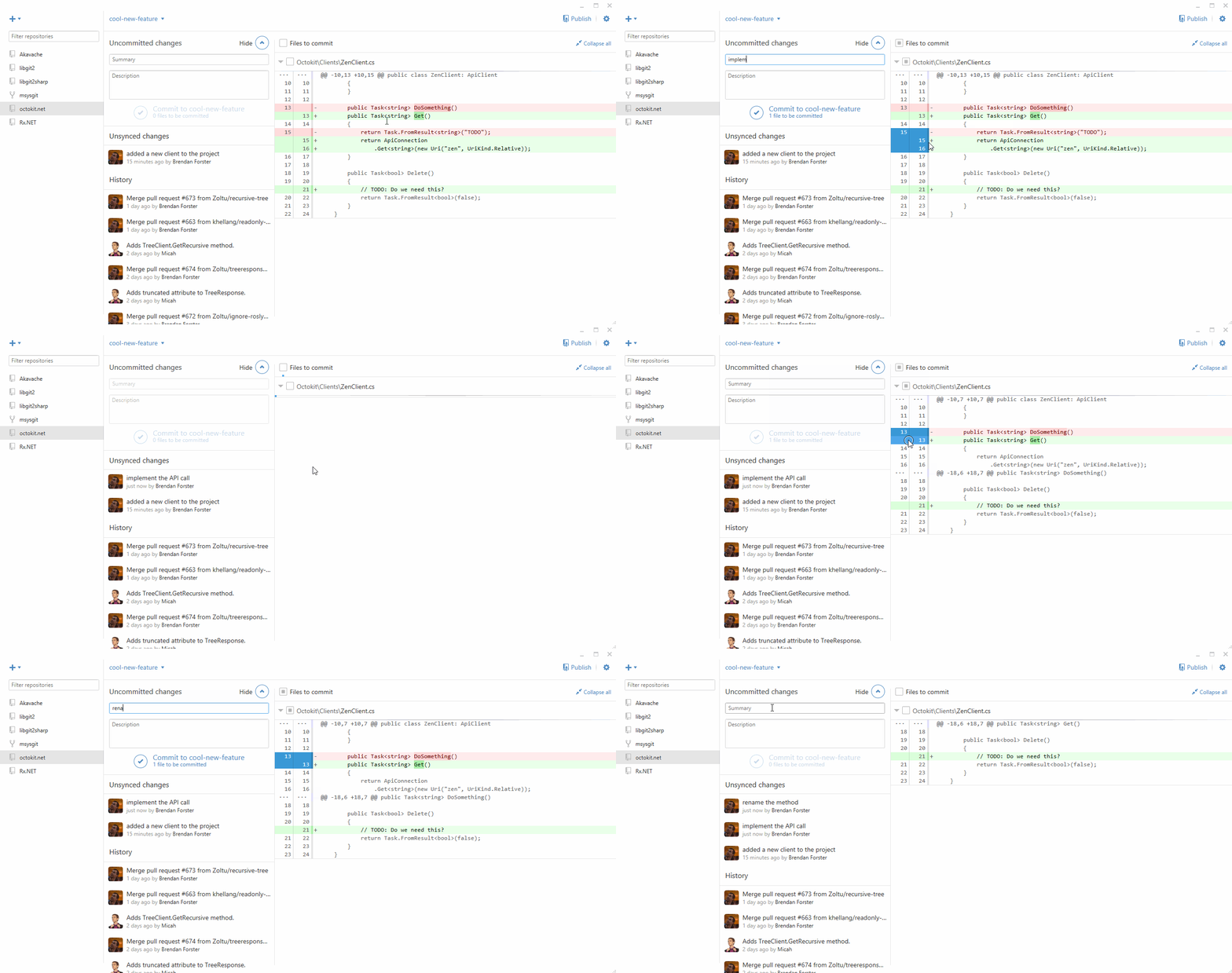
For people familiar with the command line, this change is similar to interactive staging using git add -i or git add -p.
Written by

Related posts

Developer policy update: Transparency, state policy, and what’s ahead
Explore GitHub’s latest transparency data and learn more about policy updates affecting developers and open source.

Developers want more efficient software. Here’s what over 1,000 GitHub users told us they need.
New research from GitHub and Yale Program on Climate Change Communication finds strong demand for tools, measurement, and practical guidance that can help developers reduce wasted compute.

GitHub availability report: August 2026
In August, we experienced five incidents that resulted in degraded performance across GitHub services.