Notification Email Improvements
Reading notifications on github.com is greatly improved thanks to the numerous enhancements shipped out earlier today. We’re excited to also announce a brand new email backend with support for rich…
Reading notifications on github.com is greatly improved thanks to the numerous
enhancements shipped out earlier today. We’re excited to also announce a
brand new email backend with support for rich formatting (HTML), smart mail
headers, and shared read state tracking.
Rich formatting
Issue, Pull Request, and all comment-related email notifications are now
delivered with both HTML and plain text parts. Markdown
formatting such as image embeds, links, lists, code blocks, bold, emphasis, and
blockquotes are supported. GitHub enhancements like
Emoji, @mentions, and
issue references
all work too.
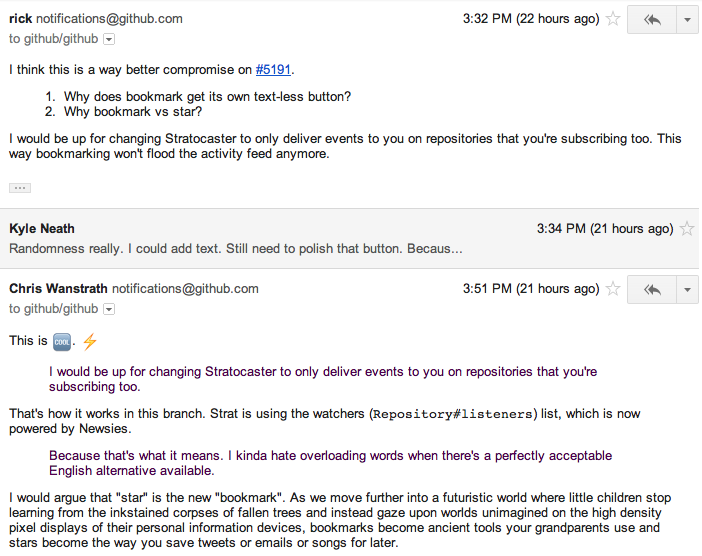
We’ve tested under most popular desktop, web, mobile, and terminal based mail
readers. Here’s a taste of what you might see in Gmail:
See your mail client’s configuration or settings area if you prefer plain text
email. Most clients support disabling HTML content, either globally or for
specific senders.
Mail header refinements
Notification emails now make better use of the To, Cc, and Bcc
headers to signal message importance. Instead of addressing notification email
To you, the Bcc and Cc fields are used. Bcc is used unless
you’re participating in the message, in which case Cc is used instead. This
can be used to enable advanced mail client filters and interface behaviors.
Examples of mail client features that take advantage of these changes:
- Gmail’s mute feature.
Muting a thread means that new messages will not show up in your Inbox unless you are
@mentioned. - Importance indicators such as Gmail’s tiny chevron guys.
- Gmail’s Priority Inbox uses To and Cc to prioritize messages that
are sent directly to you.
All email is now delivered with the From address: notifications@github.com.
Shared notification read state
Notifications that are read as HTML email are automatically marked as read in the
github.com notifications interface. An
invisible image is embedded in each mail message to enable this.
You must allow viewing images in mail from notifications@github.com in order
for this feature to work. Most mail readers allow images by default, but some
require confirmation before images are displayed.
Written by

Related posts
GitHub availability report: June 2026
In June, we experienced six incidents that resulted in degraded performance across GitHub services.
Q1 2026 Innovation Graph update: Open source collaboration is accelerating worldwide
New Innovation Graph data shows global developer communities growing faster than ever, with collaboration reaching new highs across many economies.

GitHub joins coalition advocating for fixes to California AI Transparency Act to protect open source
We’re calling for targeted amendments to resolve conflicts with open source licensing and align with international transparency frameworks while preserving regulatory intent.