Block the Bullies
GitHub has always been about collaboration: we want to make it easy for you to work with other people to build great software. Whether that’s a co-worker sitting next to…
GitHub has always been about collaboration: we want to make it easy for you to work with other people to build great software. Whether that’s a co-worker sitting next to you or a stranger across the globe, it doesn’t matter. Collaboration should be easy and fun.
Unfortunately, there will always be people whose idea of fun is bullying others. That’s why today we are rolling out a feature designed to help you control the people you interact with on GitHub.
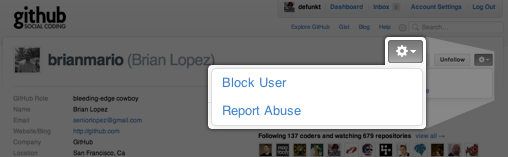
Every profile page on GitHub now has a settings gear which lets you block a user or report them for abuse. This feature is inspired by Twitter and other social networks that let you decide whose content you do and don’t see.
This is just the beginning. Moving forward, we’ll integrate this functionality more tightly with the site and continue adding features to help you better control your GitHub experience.
Finally, we’re sorry if abusive users caused you to have a bad GitHub experience. When you log in to github.com you should see things that make you happy: new Pull Requests, comments on your Issues, messages from people who love your software, intense debates about the quality of code. To that end, GitHub should have had “block user” a long time ago.
Let us know if you have ideas on how we can continue to improve GitHub, and please report anyone causing trouble to support@github.com — we’re here to help.
Written by

Related posts

Still a developer. Just outside. Our latest GitHub Shop collection is here.
The ESC collection lets you escape the confines of your desk and get out into the sun where good ideas are bound to happen.

Take your local GitHub sessions anywhere
Kick off work in VS Code or the CLI, finish it from your phone. Remote control for GitHub Copilot sessions is now generally available on github.com and GitHub Mobile.

GitHub availability report: April 2026
In April, we experienced 10 incidents that resulted in degraded performance across GitHub services.