Cross-Repository Compare View
When we launched Compare View earlier this year, we knew there was a killer feature still missing: the ability to compare branches across repositories. Easy forking and the networks that…
When we launched Compare View earlier this year, we knew there was a
killer feature still missing: the ability to compare branches across
repositories. Easy forking and the networks that emerge as a result is what
makes GitHub great. Limiting the Compare View to a single repository felt all
wrong. So today we’re flipping the switch on some non-trivial architectural
changes that make cross-repository comparisons a reality:
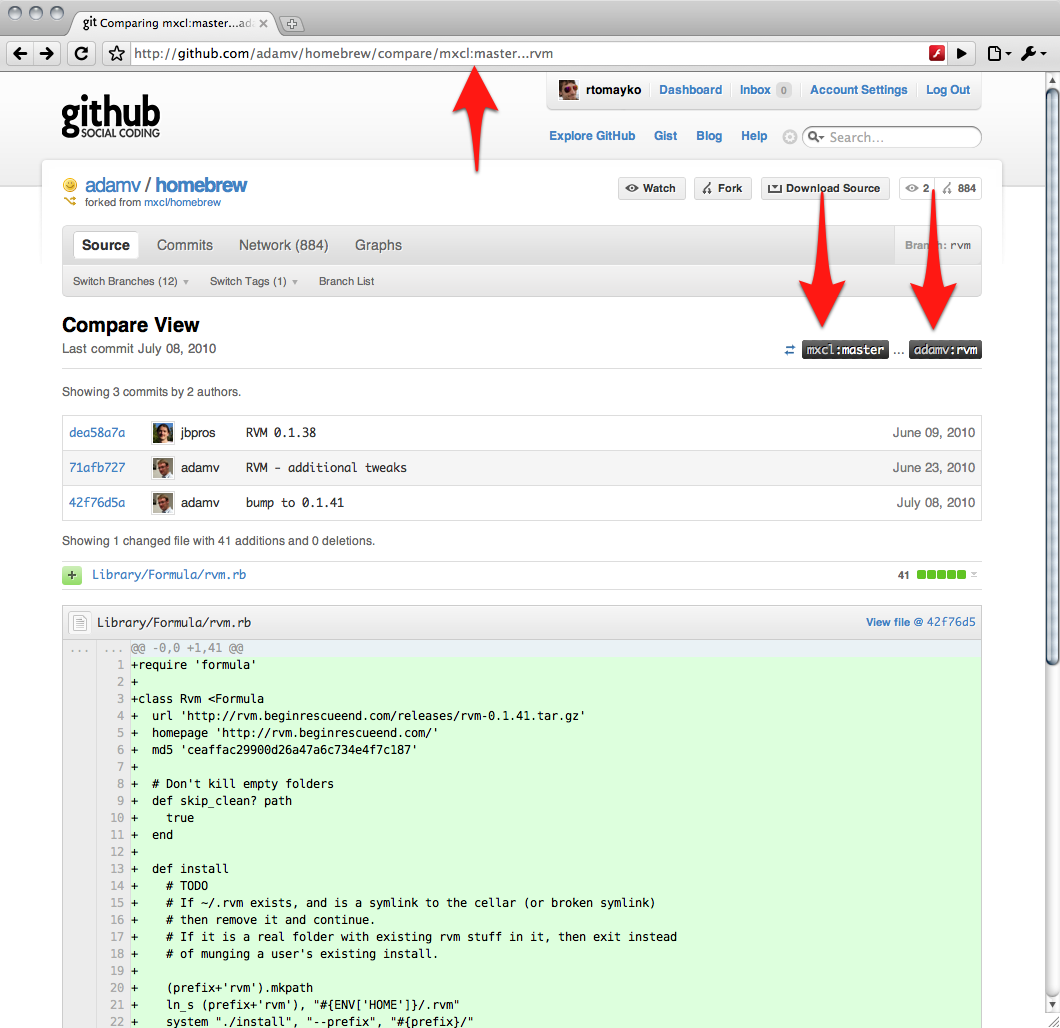
Here’s how it works: it’s now possible to specify a <user>: prefix on the
comparison’s starting or ending point. When given, the <user> part identifies
the owner of a another repository/fork in the same network. In the example
above, we’re comparing branches in the
homebrew network with
mxcl‘s master
branch as the starting point and adamv‘s rvm branch
as the ending point.
To change the starting or ending point, click the ref label buttons and enter
the branch name or commit SHA1 to switch to. For example, we can change the
starting point from mxcl’s master branch to the brew07 branch like this:

Written by

Related posts

10 technical talks I’m excited about at GitHub Universe 2026
From verifying AI-written code to securing npm dependencies, these are the sessions I’m building my Universe agenda around.

Developer policy update: Transparency, state policy, and what’s ahead
Explore GitHub’s latest transparency data and learn more about policy updates affecting developers and open source.

Developers want more efficient software. Here’s what over 1,000 GitHub users told us they need.
New research from GitHub and Yale Program on Climate Change Communication finds strong demand for tools, measurement, and practical guidance that can help developers reduce wasted compute.