Fast Forward Your Fork
Since forking a repository is so easy on GitHub, a number of people tend to do it thinking they want to play with the source, but then never actually push…
Since forking a repository is so easy on GitHub, a number of people tend to do it thinking they want to play with the source, but then never actually push back into their fork. Meanwhile, development continues on the main branch, and it’s a little annoying to have to add them as a remote and merge in order to get back up to date. So, we’ve added a new button to your repository details that will show up if you forked a project, didn’t push to it, and the source repo has moved on:
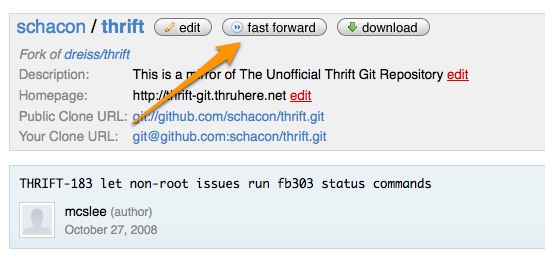
If you click on ‘Fast Forward’, it will move all your branches up to wherever the repository you originally forked from now is. Now all of those of you who forked Rails months ago and never did anything with it and are thinking of trying again, go forth and Fast Forward.
Written by

Related posts

GitHub Universe is back: All together now, in the agentic era
GitHub Universe is back: returning to the historic Fort Mason Center in San Francisco on October 28–29, 2026.

GitHub Copilot app: The agent-native desktop experience
At Microsoft Build 2026, GitHub introduced new tools, updates, and surfaces so agents can work the way you already work.

Still a developer. Just outside. Our latest GitHub Shop collection is here.
The ESC collection lets you escape the confines of your desk and get out into the sun where good ideas are bound to happen.